Check out our White Paper Series!
A complete library of helpful advice and survival guides for every aspect of system monitoring and control.
1-800-693-0351
Have a specific question? Ask our team of expert engineers and get a specific answer!
Sign up for the next DPS Factory Training!
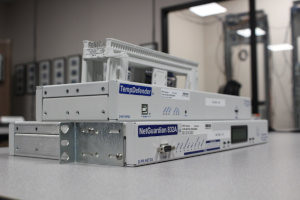
Whether you're new to our equipment or you've used it for years, DPS factory training is the best way to get more from your monitoring.
Reserve Your Seat Today
A utility fleet almost never runs on one kind of site. You're monitoring major transmission substations, distribution huts at the edge of the territory, and pad-mounted taps a technician reaches twice a year, and each of those needs a remote terminal unit (RTU) sized to what's actually installed there rather than to a catalog average. Line up a handful of spec sheets to compare and the units blur together, even though the sites you're buying for never do.
No single model covers a whole utility fleet. The right RTU for a utility is the one matched to the site it lands in, the protocols that site has to speak, and the compliance rules that apply to it, which is why most utilities standardize on two or three models from one product family instead of forcing one unit everywhere. The eight NetGuardian models we build into utility fleets most often each map to a specific kind of site, from the densest transmission substation down to the smallest pad-mounted tap.
We design and build the NetGuardian family in Fresno, California. At peak, 15 of the top 21 U.S. power utilities ran DPS equipment, and decades of those deployments shaped both the eight picks and the criteria behind them.
| RTU | Best for | What you get | Why it fits utilities |
|---|---|---|---|
| NetGuardian G6 832A | Large transmission substations, communications hubs, microwave aggregation nodes | 32 discrete alarms, 32 ping alarms, 8 analog inputs, 8 control relays, 8 serial ports, 1 rack unit | Most capability in one box, Network Equipment-Building System (NEBS) tested, expandable as the site grows |
| NetGuardian 864A G5 | The densest sites, where 32 discrete points won't cover it | 64 discrete alarm points | Same platform and training as the 832A, twice the discrete capacity |
| NetGuardian 480 G4 | High-density contact-closure sites with few analog needs | 80 discrete alarms, 4 control relays, dual power feeds standard | Lowest cost per point in the line, and it doubles as an expansion unit for an 832A |
| NetGuardian 216 G4 | Distribution substations and regional communications huts | 16 discrete alarms, 2 analog inputs, 2 control relays, reach-through serial port | Right capacity for a mid-size site without paying for unused points |
| NetGuardian M16 G2 | Sites where battery plant and power readings matter most | 16 discrete alarms, 6 analog inputs (2 dedicated to battery monitoring), 32 ping targets, 2 or 18 relays | Analog depth for battery voltage, rectifier output, and generator readings |
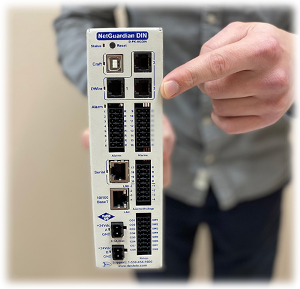
| NetGuardian DIN | Pad-mounted cabinets, roadside enclosures, DIN-rail panels | Up to 8 analog inputs, 6 or 8 discrete alarms, 2 control relays, expandable | Mounts inside the enclosure you already have, with full NetGuardian firmware |
| NetGuardian LT G2 | Small taps and unstaffed huts with a handful of points | Up to 4 discrete alarms, 1 optional control relay, integrated temperature sensor | Cheap enough to justify monitoring sites you'd otherwise leave dark |
| NetGuardian Building Access System | Unstaffed sites where physical access has to be logged | Electronic locks, keypad entry, per-entry audit trail | Supports the physical access controls North American Electric Reliability Corporation Critical Infrastructure Protection (NERC CIP) expects |
DPS is a strong fit when your fleet spans very different site sizes, when you need older or proprietary field gear mediated up to a standard protocol instead of replaced, and when you want the units built to your point counts by the same U.S. factory that will still support them in year twenty. If that describes your situation, we're worth putting on the shortlist.
We picked these eight on the criteria that decide utility deployments in practice, which are capacity fit per site, protocol coverage, transport range, hardening, and long-term support.
The 832A is the unit we put at a utility's biggest sites. In one rack unit, it handles 32 discrete alarms, 32 ping alarms, 8 analog inputs, 8 control relays, and 8 serial ports, which covers the alarm density of a major transmission substation or a microwave aggregation node without stacking multiple boxes in the rack.
Three things make it the default choice at dense sites. It monitors in both directions, taking contact closures and analog readings locally while also polling Simple Network Management Protocol (SNMP) and Modbus devices already at the site. It reports to a standard Supervisory Control and Data Acquisition (SCADA) platform, to an SNMP manager such as SolarWinds, or to our T/Mon master station. And when a site grows past the base point count, expansion units add discrete capacity rather than forcing a replacement.
Central Lincoln PUD, a public utility district covering 700 square miles of the Oregon coast, used it during a transport change. The utility was moving from serial communications to Internet Protocol (IP) transport, and its existing serial-based alarm monitoring couldn't follow. Deploying the NetGuardian 832A bridged serial data onto the IP transport layer while keeping the equipment that didn't need replacing in service, which let dispatchers diagnose faults remotely and send the right crew with the right tools.
Some substations and central offices run past 32 discrete points on day one. The 864A doubles the discrete capacity to 64 points on the same NetGuardian platform, so your technicians configure it the same way, your spares strategy doesn't fork, and the web interface they already know doesn't change.
Plenty of utility sites are dense in contact closures and light on analog readings. The NetGuardian 480 is built for exactly that shape, with 80 discrete inputs and 4 control relays in a single rack unit, which gives it the most economical cost per point in the line. Dual power feeds are standard, and an optional D-Wire port lets you chain analog sensors off the unit when a few readings do turn out to matter.
It also has a second job. Flip a pair of dipswitches and the 480 becomes an expansion unit for an 832A, adding 80 points to that site. That's one model doing two jobs, and one spare on the shelf instead of two.
Mid-size sites are where over-buying happens most often. The 216 gives you 16 discrete alarms, 2 analog inputs, 2 control relays, and a reach-through serial port, which is the honest point count for a distribution substation or a regional communications hut. There's a fiber variant, the NetGuardian 216F, with small form-factor pluggable (SFP) fiber interfaces, a gigabit Ethernet switch, and SNMP version 3 (SNMPv3) support for sites already on fiber.
At sites where the battery plant is the thing most likely to strand a crew, analog depth matters more than discrete count. The NetGuardian M16 G2 carries 16 discrete alarms and 6 analog inputs, two of which are dedicated to battery monitoring, plus 32 ping targets and either 2 or 18 control relays depending on the build. That gives you battery voltage, rectifier output, and generator readings as trends you can watch, instead of a single "battery low" contact that fires once the problem is already expensive. Battery voltage is one of the readings we recommend at nearly every site, and our guide to battery monitoring best practices covers what to watch and where thresholds belong.
Not every utility site has a rack. The NetGuardian DIN mounts on a DIN rail inside the cabinet you already have, with up to 8 analog inputs, 6 or 8 discrete alarms, and 2 control relays, and it runs the same firmware as the larger models. Expansion units add 8 alarms, 4 analogs, and 4 controls each, and you can chain up to three of them, so a cabinet that grows doesn't need a new platform.
At the far end of the fleet, you usually care about three or four conditions. Is commercial power present? What's the battery voltage? Has the door been opened? The NetGuardian LT G2 answers those with up to 4 discrete alarms, an optional control relay, and an integrated temperature sensor, at a price that makes it defensible to monitor sites you'd otherwise leave dark.
NV Energy, which serves 2.4 million residents across 44,400 square miles of Nevada, runs this mix deliberately. "At some of the smaller sites, we can use the smaller NetGuardians," says Tom Parkes of NV Energy.
At an unstaffed site, who can open the door is part of your security requirements. The Building Access System puts remote locks under electronic control, logs every entry, and alarms on unauthorized ones, using the same RTU platform reporting into the same master station as your alarms.
Wheatland Electric Cooperative put this to work across a 4,000-mile distribution network in Kansas serving more than 33,000 meters. Its tower sites were often shared with multiple tenants and secured with physical keys, which is hard to manage and easy to lose track of. By deploying the NetGuardian Building Access System, the cooperative put remote locks under electronic control, ended physical key proliferation, and created a digital record of who entered each site and when.
T/Mon isn't an RTU, but it's the other half of most utility deployments. It supports more than 30 protocols and can poll older or proprietary field units that a modern master won't touch. If you already run a SCADA platform or an SNMP manager you're happy with, our RTUs report to it directly and you can skip T/Mon entirely. You can browse the full lineup on our RTU product page.
A utility RTU lives in an environment that destroys ordinary electronics. Inside a substation or an unconditioned outdoor cabinet, it has to ride through high-voltage switching, nearby lightning strikes, electrostatic discharge (ESD) from a technician's touch, and temperatures that swing from arctic mornings to baking afternoons. A commercial-grade box that runs fine in a climate-controlled server closet will likely throw errors or fail outright in that setting.
That's why utility equipment is held to standards a generic RTU never has to meet:
The reliability bar is higher too, because a false change-of-state on a utility network can trigger a needless dispatch or mask a real fault. If you're evaluating units specifically for substations, the trade-offs there run deep, and we go into them in our guide to choosing an RTU for utility substation monitoring.
You already know your fleet better than any spec sheet does. Before you compare units, put that knowledge on paper and build a site inventory.

A simple rule of thumb helps you decide what belongs on the RTU at each site. For every asset that could fail, ask two questions. How does it fail, and what would that failure cost you? A condition whose failure would cost far more than the sensor and input needed to watch it belongs on the RTU. We've found this framing keeps you from both under-monitoring the things that matter and over-instrumenting the things that don't.

The Orlando Utilities Commission, a municipal electric and water utility, is a clean example of why the cost-of-failure question matters. Its unstaffed substations couldn't report environmental problems, so a cooling failure could damage expensive switchgear before anyone knew. After deploying a T/Mon master station with NetGuardian RTUs and environmental sensors, the system caught an isolated cooling fan failure early enough for technicians to respond in minutes, and it later flagged a substation door left open with no one on site.
One more decision belongs in the inventory. An alarm tells you a remote condition changed. An RTU with control relay outputs lets you act on it from the control center, like cycling power to a hung device, instead of only watching it fail. Decide per site which ones need controls.
Right-sizing is the payoff from that inventory. A high-capacity RTU at a six-point site wastes money on capacity you'll never wire up. Under-sizing a dense substation costs you more later, when you pay for a second truck roll to add the unit you should have specified the first time.
Protocols are where most utility RTU decisions are won or lost, because a utility network rarely speaks just one language. Your SCADA system, your information technology (IT) tools, and your field equipment can each expect something different. Three protocols matter most, and a strong utility RTU handles all three.
| Protocol | What it is for | Where it fits in a utility | Built-in security |
|---|---|---|---|
| DNP3 (Distributed Network Protocol 3) | SCADA control and telemetry for power systems | The de facto standard between RTUs, intelligent electronic devices (IEDs), and master stations in North America; supports time-stamped events for after-the-fact fault analysis | Secure Authentication (DNP3-SA) available |
| Modbus | A simple, widely supported industrial protocol | Common on sensors, controllers, and smart-site equipment, including distributed energy resources (DERs) and inverters | None built in; best polled locally and mediated up to a secure protocol |
| SNMP | Health and status of IP network gear | Routers, microwave radios, optical transport, and power systems on the IT and Network Operations Center (NOC) side | SNMPv3 adds authentication and encryption |
DNP3 is the workhorse for power control and telemetry in North America, and the DNP Users Group maintains it as an open standard. Modbus is everywhere on smart-site equipment, but it carries no security of its own, so the safe pattern is to poll Modbus devices locally and translate that data up into a secure protocol for the long haul. SNMP, especially SNMPv3, is the language your IT and NOC tools already speak.
The harder question is what to do with the equipment that speaks none of these. Most utilities run perfectly good gear that uses older or proprietary protocols, and ripping it out just to modernize the monitoring layer is expensive and risky. The better path is mediation, where an RTU or master station polls those units in their own protocol and presents the data upstream in a standard one, so the gear stays in service. The same approach handles Modbus-only equipment such as generators, inverters, and DERs. Our Modbus to SNMP converter polls up to 128 Modbus registers and reports them as SNMP traps, which brings that equipment into the manager you already run without replacing it.

NV Energy's network shows what that buys you. Alongside modern optical equipment, it still runs proprietary polling units like Badger and Larse. Its NetGuardians poll the modern gear while its master station polls the proprietary units, so the utility can modernize site by site instead of forcing an immediate, network-wide monitoring swap-out.
A utility fleet spans modern substations on fiber and isolated sites where the only practical link is a cellular modem or a satellite gateway. The RTU you standardize on shouldn't lock you into one transport, because your sites won't cooperate. Look for a single product line that covers Ethernet and fiber for modern high-bandwidth sites, plus serial and T1 for established transport you're not ready to retire. At the far end of the fleet, that means cellular for remote sites with no wired backhaul, satellite through an external gateway for the truly isolated ones, and dialup for the handful of sites where it's still the most reliable option.

When one RTU family supports all of these, you can match the transport to each site without changing platforms, retraining your techs, or running a different spares strategy across the fleet.
The best utility RTU works in both directions. It reports to whatever master station or SCADA system you already run, and it pulls in the equipment already sitting below it in the field. A unit that forces you to replace your master station, or that ignores your existing field gear, creates more work than it saves. Pulling data in from below is how you protect the power utility telemetry you already depend on, rather than starting over.
Nova Scotia Power shows what that buys you at the reporting layer. The utility had been leaning on an SNMP manager kept running by a single employee who has since retired, a real risk for a network serving close to 483,000 clients. Rather than replace everything, it added a T/Mon master station on top of roughly 80 NetGuardian RTUs already in the field. The new master gave its technicians historical alarm trending, so a flaky link that kept reappearing over days or months became something they could catch before it failed, and it opened the door to remote generator testing, a capability the utility now sees as a way to cut down on the truck rolls that routine generator maintenance still requires.
Pepco, which serves businesses and communities across the mid-Atlantic region including Washington, D.C. and Maryland, pushed that idea further. As its NetGuardian deployment grew, the utility added a second T/Mon NOC master station kept in sync with the primary, so a backup master is ready within seconds if the primary fails. For a utility scaling its monitored footprint, failover at the reporting layer matters as much as failover in the field.
As utility monitoring moves from isolated serial links to connected IP networks, every RTU becomes part of your attack surface. That's the backdrop for the NERC CIP standards, the mandatory framework that governs how the bulk electric system is secured. Recent revisions extend stricter controls to many sites that used to be treated as low risk, so edge RTUs increasingly need secure configuration management, encrypted access, and audit trails rather than being deploy-and-forget boxes.
A utility RTU should support that posture directly, including encrypted management through SNMPv3 and a clean way to log and control who reaches it. Physical security counts too, which is why the Building Access System above sits on the same platform as the alarm units.
Who built the hardware, and how tightly the manufacturing was controlled, has also become part of the risk picture for critical-infrastructure buyers. Because we design, build, and test every unit at our own facilities in the United States, we control the supply chain end to end, which is a real advantage for utilities working through supply-chain requirements. We walk through one utility's first steps in our article on NERC CIP compliance and G6 RTU upgrades.
An RTU is infrastructure. The right unit should stay in the field for decades, and the company behind it should still answer the phone in year fifteen. Long field life lowers total cost of ownership, and avoiding planned obsolescence means you replace equipment when your needs change, not when a vendor decides to stop supporting it.

Our own equipment routinely operates for more than 20 years in the field, and we still support products we built decades ago. When you call for help, you reach the engineers who designed your unit, not a script. A senior communications engineer at a state department of transportation has run DPS RTUs for two decades.
"We've always been very pleased with DPS Telecom's RTUs. They've lasted for 20 years."
A cheaper box that loses support in five years is rarely the better buy across a fleet you expect to run for twenty.
Every pick above comes from one product family, which is the point. A few specifics on how that plays out:
For one lead telecom technician at an electric utility, that fit-to-site approach was the deciding factor.
"The thing I liked was that DPS was going to make it fit our needs. They were going to make their stuff fit ours."
If you run a rural or cooperative fleet, the same approach scales down to small budgets and far-flung sites. We cover it on our electric cooperative remote monitoring page.
If you're writing or responding to a Request for Proposal (RFP), the same factors that decide the fit translate directly into bid language. The items that separate a real fit from a unit that only looks comparable on paper are:
It also helps to check your draft specs against what a configurable RTU and master station can actually deliver, so you don't accidentally write a spec that locks out a better-fitting option. We walk through that process in our SCADA bid specification review.
Most utilities land on two or three models from one product family. A NetGuardian G6 832A covers large transmission substations, a NetGuardian 216 covers distribution sites, and a NetGuardian DIN or LT covers small taps and cabinets.
Large substations need the point density and control relays of a NetGuardian G6 832A, or a NetGuardian 864A G5 when the discrete count runs past 32. Distribution substations rarely need that much, and a NetGuardian 216 covers most of them.
DNP3 and Modbus cover the SCADA side, and SNMP, ideally SNMPv3, covers the IT and NOC side. The ability to mediate older or proprietary protocols up to those standards keeps existing field gear in service.
Not the same single unit, but the same product family can. You put a high-capacity unit at the dense site and a small unit at the remote site, which keeps spares and training consistent across the fleet.
Yes. NetGuardian RTUs report to standard SCADA platforms and SNMP managers, so they integrate with the master station you already run rather than forcing a replacement.
NERC CIP is the mandatory set of cybersecurity standards for the North American bulk electric system. For RTUs, it means choosing units that support encrypted access, secure configuration management, and physical access logging, and weighing the vendor's supply chain.
Build the site inventory first, then match each site to the unit that fits it. The right capacity at each site, the protocols your gear really speaks, the transport each site actually has, and a unit hardened and supported for the long haul will shorten the shortlist fast.
If you want a second set of eyes on your site mix or your bid specs, give us a call. We've been building this equipment for utilities since 1986, and you'll get an engineer on the phone.
Talk to an Engineer | 800-693-0351

Andrew Erickson
Andrew Erickson is an Application Engineer at DPS Telecom, a manufacturer of semi-custom remote alarm monitoring systems based in Fresno, California. Andrew brings more than 19 years of experience building site monitoring solutions, developing intuitive user interfaces and documentation, and opt...