
Check out our White Paper Series!
A complete library of helpful advice and survival guides for every aspect of system monitoring and control.
1-800-693-0351
Have a specific question? Ask our team of expert engineers and get a specific answer!
Sign up for the next DPS Factory Training!

Whether you're new to our equipment or you've used it for years, DPS factory training is the best way to get more from your monitoring.
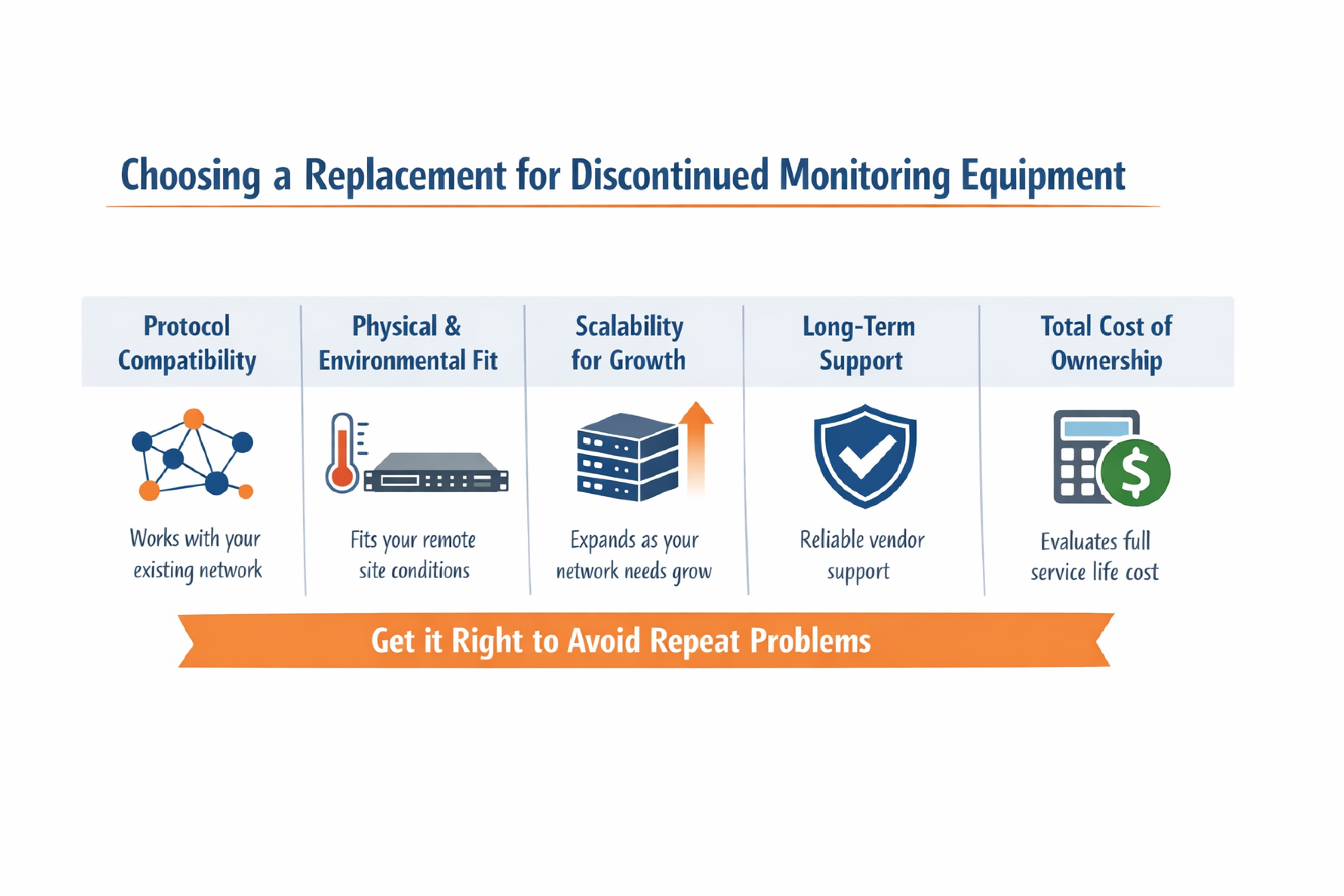
Reserve Your Seat TodayChoosing a replacement for discontinued monitoring equipment comes down to five factors: protocol compatibility with your existing network, physical and environmental fit at your remote sites, scalability for future growth, long-term vendor support, and total cost of ownership over the equipment's full service life. Getting these right means you avoid repeating the same problem in a few years.
At DPS Telecom, we have nearly 40 years in the monitoring industry and more than 172,000 devices deployed worldwide. A significant share of that work involves helping organizations replace equipment that another manufacturer has stopped supporting. This guide walks through each of those evaluation criteria, the migration strategies that reduce risk, and the mistakes that tend to make replacement projects more expensive than they need to be.
Equipment discontinuation happens for several reasons, and understanding the cause can help you avoid the same problem with your replacement.
Manufacturers may stop producing a device because the electronic components it relies on are no longer available. The original chipsets, connectors, or circuit board layouts may have been superseded by newer standards, making continued manufacturing impractical.
In other cases, the manufacturer shifts its business focus. A company that once served telecom or utility monitoring may pivot to a different market segment, leaving existing users without a product roadmap.
Regulatory changes can also push equipment into obsolescence. Cybersecurity mandates (such as NERC CIP for utilities) may exceed what older hardware was designed to support. If the manufacturer can't or won't update the firmware, the device becomes a compliance liability.
Whatever the cause, the result is the same: you lose access to spare parts, software updates, and eventually technical support. And according to the Kyndryl Readiness Report (2024), 44% of mission-critical infrastructure is already nearing or has reached end of life.
The temptation to keep running discontinued equipment is understandable. If it still works, replacement can feel like an unnecessary expense. But the risks compound over time.
Unplanned outages are expensive. ITIC's 2024 survey found that over 90% of mid-size and large enterprises report hourly downtime exceeding $300,000. EMA Research found that unplanned downtime averaged $14,056 per minute across all organization sizes in 2024.
These figures represent averages and exclude legal fees, regulatory fines, and remediation costs. In sectors like healthcare and finance, the numbers can climb much higher.
Monitoring equipment that was secure when it was installed may no longer hold up. Cybersecurity threats evolve, and without firmware updates, older devices can become easy targets. Encryption standards that were acceptable a decade ago may now be inadequate, especially for organizations subject to compliance requirements like NERC CIP or CJIS.
Once a manufacturer stops supporting a product, finding replacement parts often means scouring the secondary market. That introduces unpredictable lead times, uncertain quality, and no warranty. The cost of maintaining unsupported equipment tends to increase every year, even when the equipment itself still powers on.
The evaluation process for replacement equipment should go deeper than checking whether the new device has the same number of inputs and outputs. Here are the criteria that matter most.
This is often the single biggest factor. Monitoring networks in telecom, utilities, and government environments may include equipment from multiple manufacturers, each communicating via different protocols.
| Protocol | Typical Use Case |
|---|---|
| SNMP (v1, v2c, v3) | Network equipment management; v3 adds encryption |
| DNP3 | SCADA environments, utility substations |
| Modbus | Generators, industrial controls, smart site equipment |
| TL1 | Telecom infrastructure (backward compatibility) |
| IEC 61850 | Utility substation automation |
| ASCII | Devices outputting text-based status messages |
If your replacement device only supports one or two of these, you may end up adding protocol converters or running parallel systems. That adds cost and complexity.
In the book 100% Uptime, DPS Telecom CEO Bob Berry notes that many manufacturers develop proprietary protocols to encourage exclusive vendor relationships, and the result of fragmented systems is increased confusion and cost.
A replacement device that supports multiple protocols natively, or that can be paired with a master station capable of mediating between them, gives you more flexibility both now and in future deployments.
Replacement equipment needs to work within the physical constraints already present at your remote sites. That includes rack dimensions, connector types, wiring standards, and power supply requirements.
For sites running on -48 VDC or -24 VDC, the replacement must accept the same input voltage range. If your sites use specific connector standards (such as DB-25 or RJ-45 for serial connections), confirm that the new device matches or provides adapters.
Environmental tolerance matters as well. Remote sites in telecom, utility, and transit environments can experience temperature swings, power surges, and humidity levels that would damage consumer-grade equipment. Look for hardware with wide operating temperature ranges, built-in surge protection, and a track record in similar environments.
Monitoring needs tend to increase over time. A replacement device that fits your current I/O requirements but can't expand may put you back in the same position in a few years.
Look for modular designs that allow you to add discrete inputs, analog inputs, or control relay outputs without replacing the entire unit. RTU platforms with expansion card slots or daisy-chain sensor options can grow with your deployment.
This may be the most important question, especially for organizations that have already experienced discontinuation once.
Consider these factors when evaluating a vendor:
At DPS Telecom, we still support equipment manufactured decades ago, and many of our original clients from the 1990s continue to operate our devices in the field. That continuity is possible because we design, build, and test everything at our facilities in Fresno, California.
The purchase price is only one part of the cost. ARC Advisory Group recommends selecting SCADA hardware carefully, emphasizing that total cost of ownership is more important than initial or installed costs.
A fair comparison should account for:
| Cost Factor | What to Evaluate |
|---|---|
| Acquisition | Purchase price of hardware and any required software licenses |
| Installation | Technician time for mounting, wiring, and commissioning |
| Configuration | Setup time for alarm points, thresholds, protocols, and notification rules |
| Training | Staff training on the new equipment |
| Support fees | Annual maintenance contracts, per-incident fees, or included support |
| Truck rolls avoided | Value of reduced site visits due to better remote visibility |
| Downtime prevented | Value of outages avoided (see cost data above) |
| Lifespan | How many years the equipment can reasonably serve before the next replacement cycle |
A device that costs more upfront but includes free lifetime support, lasts 20+ years, and reduces truck rolls can easily deliver a lower total cost than a cheaper alternative that needs replacement in 5 years and charges annual licensing fees.
The biggest concern with any equipment replacement is keeping operations running during the transition. Several strategies can help.
Before selecting any replacement, document what you have in the field. For each site, record:
Network World reported that an updated asset inventory significantly eased the planning process when the University of Southern California faced multiple end-of-life scenarios across its network. Knowing exactly what you have and where it is makes every subsequent decision faster.
A phased migration spreads cost across multiple budget cycles and gives your team time to learn the new equipment on a smaller scale before scaling up. Start with a handful of sites, work through any integration issues, and build institutional knowledge before deploying across the full network.
This approach also lets you cascade older (but still functional) equipment to less critical sites, extending its useful life while prioritizing replacements where the risk is highest.
During the transition, running replacement equipment alongside existing gear at a test site lets you validate performance, confirm protocol compatibility, and verify alarm behavior before decommissioning the original. Sendero Consulting notes that for large-scale infrastructure updates, defining how systems operate in parallel is essential to managing change.
If possible, deploy your first replacement units at sites where a brief gap in monitoring coverage would be least disruptive. Use these early installs to develop playbooks for your field technicians, identify wiring or configuration issues, and refine your deployment process.
Some vendors offer loaner or evaluation programs that let you test equipment in your actual environment before committing to a purchase. At DPS Telecom, our 30-day loaner program ships equipment directly to you for hands-on testing. You only pay shipping.
A few recurring mistakes can make these projects more expensive or time-consuming than necessary.
Replacing like-for-like without modernizing. If you're already sending technicians to sites for manual adjustments, the replacement is an opportunity to add remote configuration and web-based management. Matching the old spec sheet exactly may mean carrying forward limitations you've been working around for years.
Choosing the lowest upfront price. The cheapest device is rarely the most cost-effective over a 10 to 20 year service life. Factor in support costs, expected lifespan, and the operational savings from better remote monitoring before comparing sticker prices.
Ignoring cybersecurity. If the discontinued equipment predates modern security standards, the replacement should close that gap. Look for support for SNMPv3 (which adds encryption), role-based access controls, and secure firmware update mechanisms.
Underestimating the timeline. Replacing monitoring equipment across dozens or hundreds of distributed sites takes time. The IEEE Power & Energy Society notes that the number of power assets reaching end of life has increased in recent years due to infrastructure built 40 to 50 years ago. If your organization is in that situation, plan for a multi-year rollout rather than expecting a single budget cycle to cover everything.
Losing institutional knowledge. When experienced technicians retire, they take specialized knowledge about your existing systems with them. Document wiring configurations, alarm point mappings, and protocol settings at each site before the people who understand them best are no longer available.
It depends on site count and complexity. A handful of sites can be completed in weeks, while deployments spanning hundreds of locations may take a year or more with a phased approach.
In many cases, yes. RTUs that support SNMP can report to most third-party network management systems. If your master station uses a proprietary protocol, look for replacement RTUs or a master platform that can mediate between proprietary and standard protocols.
Select a device with slightly more capacity than you need right now. Unused inputs give you room to add sensors or alarm points in the future, and many RTU platforms offer expansion modules for incremental growth.
Not necessarily. If your current master station can communicate with the new RTUs via a supported protocol, you can replace them independently. A coordinated replacement makes more sense if the master station is also discontinued or lacks the needed protocol support.
Telecom providers, electric utilities, government agencies, and transit systems tend to run monitoring infrastructure with 15 to 25+ year service lives. DPS Telecom works across all of these sectors, including telecom SCADA and government infrastructure.
If you're facing an end-of-life situation with your current monitoring equipment and need a clear path forward, DPS Telecom can help you evaluate your options. We work through requirements with clients to identify the right combination of RTUs, sensors, and master station capabilities for their specific deployment, including custom engineering at no additional charge when your requirements go beyond off-the-shelf configurations.
Call 800-693-0351 or visit our contact page to start the conversation.

Andrew Erickson
Andrew Erickson is an Application Engineer at DPS Telecom, a manufacturer of semi-custom remote alarm monitoring systems based in Fresno, California. Andrew brings more than 19 years of experience building site monitoring solutions, developing intuitive user interfaces and documentation, and opt...


