
Check out our White Paper Series!
A complete library of helpful advice and survival guides for every aspect of system monitoring and control.
1-800-693-0351
Have a specific question? Ask our team of expert engineers and get a specific answer!
Sign up for the next DPS Factory Training!

Whether you're new to our equipment or you've used it for years, DPS factory training is the best way to get more from your monitoring.
Reserve Your Seat TodayIf you're in charge of remote site monitoring - whether that's for telecom, power utilities, transportation, or government networks - there's something you need to know:
More and more of your gear is talking via SNMP traps. But are you listening?
SNMP traps are the industry-standard way for modern devices to say "hey, there's a problem over here!" When your network infrastructure sends out these SNMP traps, you need to make sure someone - or something - is actually listening and taking action.
If you don't do this, you're missing critical alarms. And the next time something goes offline, you'll only find out when customers start calling.
Let's walk through:
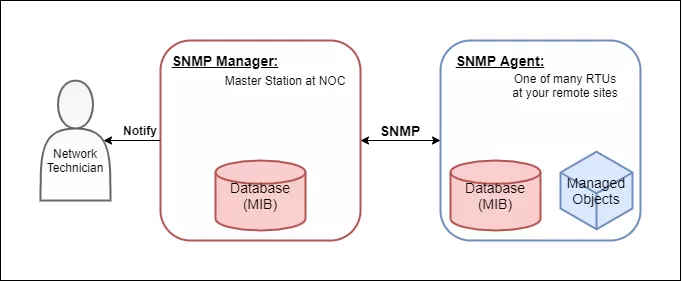
During the early days of remote monitoring, everything used simple dry contacts. If a door opened, a relay closed. If a power supply failed, another contact changed state. Your RTU saw it all happen and sent alarms back to your NOC.
Those setups still work - and they're still in use today. However, more and more of your critical devices (rectifiers, routers, switches, microwave radios, etc.) are now sending out SNMP traps instead.
These traps are digital messages that announce events like:
These messages have a lot of useful info. But if no device is listening for SNMP traps at the remote site, that data never reaches you.
It's like having a fire alarm that only rings inside a locked utility closet. You won't know there's a problem until it's way too late.
If you're used to dry contacts, SNMP traps might seem overly complex. But when handled correctly, they offer some big benefits over traditional monitoring:
A single trap can include status codes, temperatures, voltages, and event types. That's way more data than just "alarm on/off."
You don't need extra relays or converters. Your devices send SNMP directly - creating no fuss.
Traps are tiny packets. Even over a satellite or rural cellular link, they're efficient to transmit. There was a time when "bit protocols" (send raw bits) were an important savings compared to verbose SNMP, but both are very tiny messages by today's bandwidth standards.
Traps are event-driven, meaning they're only sent when something important happens. That makes them fast and efficient (at the cost of your reaction time if your SNMP RTU fails in the field, but there are ways to address that).
If you can collect these traps and make sense of them, you'll have a much clearer picture of what's happening at your remote sites.
You're right that a centralized SNMP manager is the most common way to receive traps. In many cases, that's what you'll use.
For other scenarios, though, it pays to have local visibility of SNMP so your RTU can react on-site. This helps with compartmentalization, which pays off when communication is lost during a major incident (like a hurricane or flood).
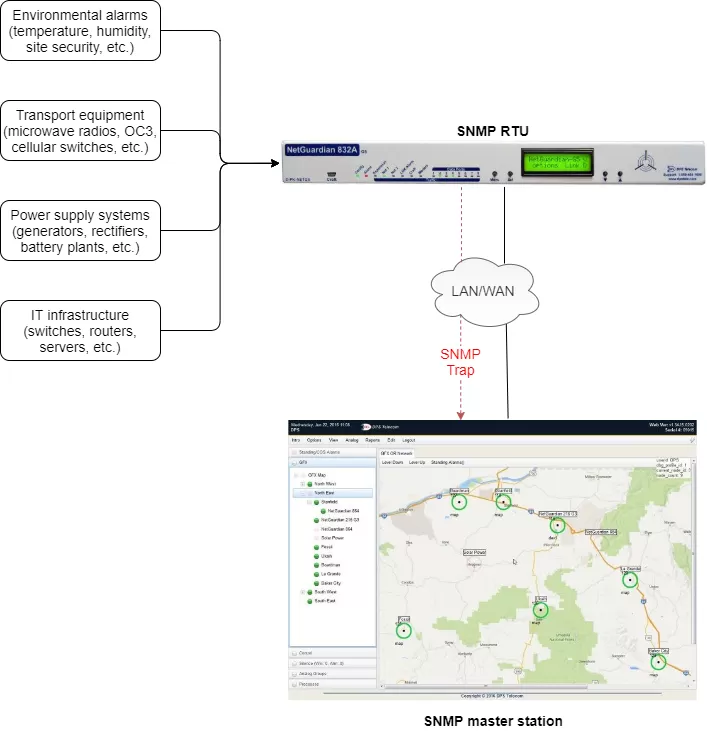
So if SNMP traps are so useful, why aren't more people receiving them with their RTUs?
It usually boils down to one of two things:
Most legacy RTUs are "trap blind." They can send SNMP traps, but they can't receive them. They only handle contact closures and analog voltages.
Even if you do have a trap receiver, it may not be configured properly. It's also possible that your SNMP devices aren't sending traps to the correct IP address.
There's a better way to manage your network using SNMP Traps:
A single NetGuardian RTU that collects both physical alarms AND SNMP traps - consolidating them all into one stream for your NOC.
Think about how much simpler this makes your alarm handling:
Instead, you have a single, unified view of what's going on at each site.
Let's talk specifics. DPS Telecom's NetGuardian RTUs - particularly models like the NetGuardian 832A G6 and the NetGuardian LT G2 - can do something most RTUs can't:
They can receive SNMP traps from any SNMP-capable device on the LAN.
You can even filter, log, or convert traps into alarms. This creates a human-friendly summary of what just happened.
The NetGuardian doesn't just receive SNMP traps. It can mediate them into other formats. This is incredibly useful when you have:
The NetGuardian becomes a translator at the edge of your network. It makes sure that all data, regardless of source, is seen and acted upon.
Suppose you have a small rural site with:
You install a NetGuardian LT G2 at the site that:
Now you have a complete picture - all without adding extra trap receivers or juggling multiple interfaces.
Selecting a DPS NetGuardian offers more value since SNMP Trap reception isn't just an afterthought feature. DPS has been building intelligent remote monitoring equipment for over 30 years.
Using a NetGuardian RTU is a smart choice since they provide:
There's no need for external servers, trap forwarders, or expensive software licenses.
Receive SNMPv1/v2c, and send SNMPv3 with encryption to meet modern IT security standards.
Create detailed logic: filter by trap OID, severity, text match, or source IP.
NetGuardians are designed for harsh environments - such as heat, cold, power surges, and EMI. They're built for remote sites.
Instead of buying a trap receiver, protocol converter, and RTU separately, you get it all in one device - with one IP address to manage.
Not every RTU has this capability. But many in the DPS lineup do. Here are some of the top models you should consider:
If you have a unique need, custom firmware and hardware mods are possible. That's what makes working with DPS so different.
Still wondering if this applies to your operations? Here are a few use cases where receiving SNMP traps at the RTU makes a huge impact:
Any time your equipment speaks SNMP, your RTU needs to understand it.
If you're deploying SNMP-capable gear, you can't afford to ignore the trap side of the equation.
Without a proper trap receiver at your remote sites:
Installing a NetGuardian RTU solves this problem and gives you a future-ready monitoring setup.
At DPS, we're not just a hardware vendor. We're a team of engineers, techs, and support staff who build these systems from scratch - and help you deploy them successfully.
If you want to see exactly how SNMP trap reception works with NetGuardians - or want a personalized recommendation based on your current gear - we're ready to help.
Call us now: 559-454-1600
Or email: sales@dpstele.com
Let's build you a system that captures all your alarms - physical, digital, and SNMP - so you're never caught off guard again.

Andrew Erickson
Andrew Erickson is an Application Engineer at DPS Telecom, a manufacturer of semi-custom remote alarm monitoring systems based in Fresno, California. Andrew brings more than 19 years of experience building site monitoring solutions, developing intuitive user interfaces and documentation, and opt...


