Real-Time Battery Cell Monitoring: A Complete Guide to Per-Battery Visibility
By Andrew Erickson
December 5, 2025
 Live analog values and threshold alarms can be accessed via SNMP. It can also be accessed from a T/Mon master station, the NetGuardian's built-in web interface, or via SMS/email alerts.
Backup batteries don't usually fail with drama. They weaken quietly, drift out of spec, and then reveal the problem during the one moment you actually need them - when utility power drops and your site has to ride through on battery.
For telecom sites, utility substations, data centers, transportation hubs, and industrial facilities, that's not a minor inconvenience. It's an outage risk.
This guide explains how to get real-time visibility into every battery (not just the overall string) using a clean, scalable architecture built around DPS Telecom NetGuardian RTUs and DPS BVM (Battery Voltage Monitor) sensors.
What is battery cell monitoring?
Battery cell (per-battery) monitoring is a system that continuously measures key health indicators on each battery in a string. This is typically voltage, current behavior, and temperature. The system then reports that data to a central monitoring platform.
Instead of periodic spot checks whenever you visit your site, you get always-on visibility and actionable alarms when a single battery starts becoming the weak link.
How real-time battery monitoring works
A practical per-battery monitoring system usually includes:
- Battery sensors: One sensor per battery to measure voltage/current/temperature.
- Digital sensor bus (Cat6): Standard cabling for a clean, repeatable install.
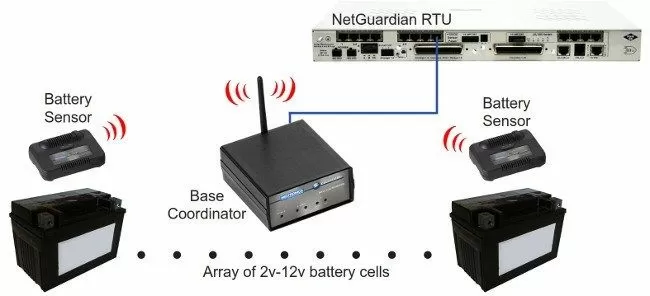
- Remote Telemetry Unit (RTU): A device like a DPS NetGuardian that aggregates readings and forwards alarms/telemetry.
- Monitoring outputs: Web viewing, SNMP alarms, MODBUS integration, and optional alarm-master support.
The simple topology
Think of it like this:
- Batteries → BVM sensors → Cat6 daisy-chain (D-Wire) → NetGuardian RTU → SNMP/Web/MODBUS → (optional) T/Mon
What each piece does
- BVM sensor (one per battery): Measures per-battery voltage, current behavior, and surface temperature.
- Cat6 + D-Wire daisy-chain: Carries power + data over a single line for clean installation and easy expansion.
- NetGuardian RTU: Centralizes sensor data and turns it into usable outputs (web/SNMP/MODBUS).
- NOC tools / alarm master: Receives alarms and telemetry for trending, escalation, and reporting (including optional DPS T/Mon).
Why traditional battery monitoring falls short
1) No visibility between manual visits
Clipboard checks and handheld testers tell you what was true at the moment of the visit only. Battery problems often develop between visits.
2) String-level monitoring misses the weak link
Even if you monitor the string as a whole, a single battery can degrade early and quietly. Per-string data can look "fine" right up until the string has to carry the full load.
3) Vendor lock-in and integration friction
Some monitoring solutions are tied to specific cabinets, rectifiers, or proprietary ecosystems - making it harder to integrate into your existing SNMP-based monitoring stack.
4) DIY builds don't age well
Custom PLC/Raspberry Pi projects can become difficult to support, fragile in harsh environments, and inconsistent across sites - especially as deployments grow.
Best practices for per-battery monitoring
Device selection
- Use one sensor per battery for true weak-link detection.
- Choose industrial-grade monitoring hardware built for unmanned sites and harsh conditions.
Wiring and installation
- Standardize on Cat6 so installs are repeatable and scalable.
- Use a daisy-chain topology to avoid needless home-runs and clutter.
Integration and visibility
- Centralize data in a NetGuardian RTU so battery monitoring becomes part of site alarm visibility.
- Use SNMP for alarming into your NMS.
- Use MODBUS where required to gather data from battery controllers (just make sure you get an RTU like a modern NetGuardian that supports MODBUS)
- If you run a centralized alarm master, DPS T/Mon can aggregate and manage alarms across many sites.
Alerting that actually helps
- Set thresholds for voltage drift, temperature excursions, and abnormal behavior.
- Trend over time to identify "slow failures" before they become outage events.
Where per-battery monitoring pays off
- Telecom: Battery strings supporting critical network equipment during grid instability.
- Utilities/Substations: DC systems for protection, controls, and communications.
- Data Centers: Backup power readiness and early anomaly detection.
- Transportation: Remote hubs that must stay online during primary power interruptions.
- Industrial/Remote Facilities: Sites where truck rolls are expensive and slow.
The benefits you can expect
- Fewer surprise failures by catching early drift and abnormal patterns
- Reduced truck rolls by replacing "checkups" with remote visibility
- Better replacement timing through trending, not guesswork
- Clear accountability with recorded history per battery
- Higher confidence that backup power will perform during a real event
Why DPS Telecom's NetGuardian + BVM approach works
DPS Telecom's approach is built for the reality of remote infrastructure: it's designed to be deployable at scale, easy to wire, and easy to integrate.
- Telecom/industrial-grade reliability: NetGuardian RTUs are purpose-built for telecom and power environments.
- Clean installation: BVM sensors with Cat6 daisy-chaining (D-Wire) reduce wiring and simplify expansion.
- Integration-friendly: Use SNMP, web access, and MODBUS to fit your existing workflows.
- Scales across many sites: Add sensors, extend runs, and standardize deployments without redesigning the system.
Step-by-step: how to deploy per-battery monitoring
- Assess the battery layout: Count batteries per string, document constraints, and define what "healthy" looks like.
- Select the RTU: Choose the right NetGuardian model for your sensor count and integration requirements.
- Install BVM sensors: Mount one sensor per battery for true per-battery visibility.
- Run Cat6 and daisy-chain: Use a clean cable plan and label everything for long-term maintainability.
- Assign sensor IDs: Ensure each battery is uniquely identified so alarms and trends map to the exact unit.
- Configure thresholds and alarms: Set actionable limits for voltage, temperature, and abnormal behavior.
- Integrate with monitoring: Send alarms via SNMP (and MODBUS where required). Optionally, aggregate at T/Mon.
- Trend and improve: Use historical data to refine thresholds and replacement schedules.
FAQ: Real-time battery cell monitoring
What is per-battery monitoring?
Per-battery monitoring measures health data on each individual battery (not just the string), so you can identify the exact battery drifting out of spec.
Why monitor temperature as well as voltage?
Temperature anomalies can appear early and often point to developing failure modes that voltage alone may not reveal in time.
Do I have to use proprietary wiring?
No. A clean approach uses standard Cat6 with a daisy-chain topology, keeping installs straightforward and scalable.
What devices are needed for real-time battery monitoring with DPS Telecom?
Typically: BVM sensors (one per battery) + a NetGuardian RTU + Cat6 daisy-chain wiring (D-Wire), plus SNMP/MODBUS integration to your monitoring tools (and optional T/Mon where used).
Ready to stop guessing which battery will fail next?
If you manage battery-backed infrastructure and you're still relying on periodic spot checks or string-level visibility, it's time to upgrade to per-battery monitoring.
Contact DPS Telecom to map your battery room, size the right NetGuardian, and determine the right number of BVM sensors:
Get real-time visibility into every battery - so you can fix the weak link before it becomes an outage.
Andrew Erickson
Andrew Erickson is an Application Engineer at DPS Telecom, a manufacturer of semi-custom remote alarm monitoring systems based in Fresno, California. Andrew brings more than 19 years of experience building site monitoring solutions, developing intuitive user interfaces and documentation, and opt...