Check out our White Paper Series!
A complete library of helpful advice and survival guides for every aspect of system monitoring and control.
1-800-693-0351
Have a specific question? Ask our team of expert engineers and get a specific answer!
Sign up for the next DPS Factory Training!
Whether you're new to our equipment or you've used it for years, DPS factory training is the best way to get more from your monitoring.
Reserve Your Seat Today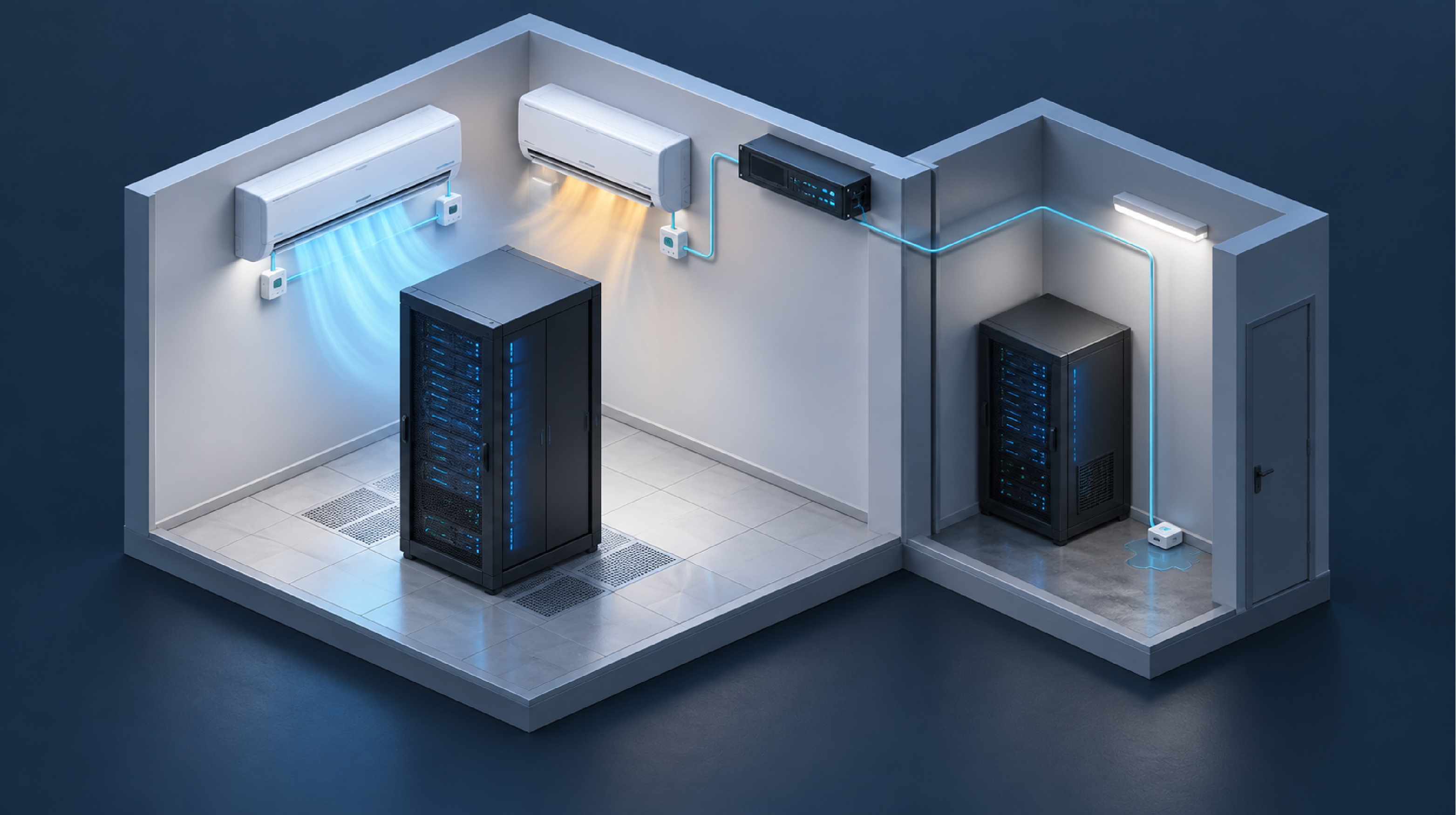
Redundant cooling hides its own failure. When a room has two A/C units and one quietly stops carrying its share, the survivor picks up the load and the room temperature stays roughly normal - until the second unit fails too, and the room goes from fine to flooded in the space of a holiday weekend.
This article explains how to monitor two separate spaces from a single remote telemetry unit (RTU), why sensor placement matters more than sensor count, and which conditions in a server room or IT closet are worth the wiring. It is written for IT and facilities staff responsible for equipment rooms that nobody sits in.
Lead/lag imbalance is the condition where one cooling unit in a redundant pair carries a disproportionate share of the load, usually because the other has degraded or stopped. It is one of the most common silent failures in an equipment room, and a single room-temperature sensor is almost perfectly designed to miss it.
The reason is that redundancy is doing its job. Two units sized for the room mean either one can usually hold the temperature alone, at least for a while. A sensor in the middle of the room reports a normal reading right up until the remaining unit is overwhelmed. At that point the failure is no longer developing - it has arrived.
Placing one temperature and humidity sensor at each unit's discharge changes what you can see:
A single sensor tells you the room got hot. Two sensors tell you which unit failed, and roughly when it started. That distinction is the difference between a scheduled service call and an emergency.
Humidity matters alongside temperature here. A cooling unit that is running but not dehumidifying properly, or a leak beginning to evaporate, shows up in humidity data before it shows up anywhere else. Distributed D-Wire sensors report both from a single node, and temperature monitoring for equipment rooms is a well-established application.
A daisy-chained sensor bus lets one collector unit gather readings from sensors spread across more than one space, rather than requiring a separate monitoring device in each room. For a building with a main server room and a satellite IT closet some distance away, this is usually the difference between one purchase and two.
The practical constraints are simple. Sensors chain in series on ordinary Cat5e or Cat6 cable with RJ12 ends, cut and crimped to whatever length the run requires. A separation of a few dozen feet between rooms is well within normal range. One RTU mounted in the main room's rack can therefore pick up sensors in both spaces on a single run.
What this avoids is worth naming. Two separate monitoring units means two configurations to maintain, two sets of credentials, two devices to firmware-update, and two things to troubleshoot when something looks wrong. One collector with a sensor chain is less hardware and less ongoing work.
The cable itself is usually customer-supplied. There is no proprietary cable to buy - anyone with a crimper and a spool of Cat5e can make the run to the exact length the building requires.
Room monitoring scope is the set of conditions worth detecting in a space that is normally unoccupied. The useful test is not "what can we measure" but "what has hurt us, or would hurt us, before anyone noticed."
| Condition | Why It Belongs on the List |
|---|---|
| Temperature and humidity, per cooling unit | Catches lead/lag imbalance and cooling degradation before the room overheats. |
| Water on the floor | A cooling unit that fails by leaking damages equipment directly. Detection needs to happen at floor level, near the likely source. |
| Commercial AC power fail | The starting gun for everything else: generator start, battery drain, and thermal rise all follow from it. |
| Generator run status | Confirms the generator actually started, rather than assuming it did because power failed. |
| Transfer switch position | Catches the switch failing to return to commercial power after an outage - a fault that can run unnoticed for days. |
| Door open | Physical access to the room, and a count of how often it happens. |
Most of these are simple contact closures. A compact right-sized RTU with eight discrete inputs and a few control relays covers this entire list without stepping up to a larger chassis, which is worth checking before anyone specifies more capacity than the room needs.
Water detection uses either a rope-style sensor, which detects moisture anywhere along its length, or a plate-style spot sensor, which detects water at one location. The choice depends on whether you know where water will appear.
The common mistake is mounting water detection too high or too far from the source. Water finds the floor and the lowest point; a sensor mounted for convenience rather than for drainage will report the leak after it has already reached equipment.
Generator verification is the practice of monitoring what the backup power system did, not merely whether commercial power failed. The two are different events, and only one of them is visible from a power-fail contact alone.
Three points cover most of it:
That third point catches a failure mode that is easy to miss entirely. A transfer switch that fails to return leaves the site running on generator after the outage has ended. Nothing is obviously wrong - the lights are on and the equipment is up - until the fuel runs out. Monitoring switch position turns that into an alarm on the day it happens instead of a discovery later.
Where a generator exposes a serial or Modbus interface, richer data is available. But the basic dry contacts for run status and switch position deliver most of the operational value and require no protocol integration at all.
Alarm delivery is the path between a detected condition and the person who can act on it. In a small equipment room, that path usually has to serve two audiences at once: an existing monitoring platform, and a human being who is not watching a screen.
A practical combination:
On that last point, a typical RTU control relay is rated to around one amp, which comfortably drives a small LED fixture. The fixture itself is usually customer-sourced, since most people have a preference about what goes on their wall.
Trending is the recording of sensor readings over time, as opposed to simply comparing the current reading against an alarm threshold. Thresholds tell you when something has gone wrong. Trends tell you that something is going wrong.
The lead/lag case is the clearest illustration. Two discharge temperatures slowly diverging over three weeks never crosses a threshold, but plotted against each other the divergence is obvious. The same is true of a room that creeps two degrees warmer each month as a filter loads up, or humidity that climbs slowly as a drain begins to block.
Useful capabilities to look for:
Thresholds and trends answer different questions. Both are worth having, and the trend is usually the one that saves the equipment.
Because a room with two cooling units has two things that can fail independently. One sensor per unit discharge lets you see an imbalance between them as a developing trend. A single room sensor only reports the end result, after the surviving unit is overwhelmed.
Usually not. Sensors daisy-chain on ordinary Cat5e or Cat6 with RJ12 ends, so one collector in the main room can pick up sensors in a nearby closet on a single run. That means one configuration, one set of credentials, and one device to maintain.
Rope where the source is known but the spread is not, such as along the floor near cooling units. Plate for smaller spaces or specific low points. In both cases, mount at floor level near where water would actually collect.
Not for the basics. Run status and transfer switch position are typically available as dry contacts and land on ordinary discrete inputs. A protocol connection provides more detail if the generator supports it, but the contacts deliver most of the operational value.
A switch that fails to return to commercial power after an outage ends. The site keeps running on generator, nothing looks wrong, and the failure only becomes visible when the fuel runs out. Monitoring switch position turns that into a same-day alarm.
Yes. An RTU can send SNMP traps to an existing network management system while also sending email directly, so room conditions appear in the platform your team already watches without replacing anything.
If you have an equipment room with redundant cooling and no way to tell whether both units are actually working, the fix is smaller than most people expect: a compact RTU, a handful of sensors placed where failures actually start, and alarms routed to the platform you already use. DPS Telecom can scope a room, recommend sensor placement, and size the unit to the points you actually need rather than the points a catalog offers. Get a Free Consultation, or call 1-800-693-0351 or email sales@dpstele.com to talk through your space.

Andrew Erickson
Andrew Erickson is an Application Engineer at DPS Telecom, a manufacturer of semi-custom remote alarm monitoring systems based in Fresno, California. Andrew brings more than 19 years of experience building site monitoring solutions, developing intuitive user interfaces and documentation, and opt...