
Check out our White Paper Series!
A complete library of helpful advice and survival guides for every aspect of system monitoring and control.
1-800-693-0351
Have a specific question? Ask our team of expert engineers and get a specific answer!
Sign up for the next DPS Factory Training!

Whether you're new to our equipment or you've used it for years, DPS factory training is the best way to get more from your monitoring.
Reserve Your Seat TodayChoosing an alarm master for multi-site network monitoring comes down to a few key decisions: protocol support, scalability, user interface, alarm management features, system architecture, and vendor support. The right choice gives you a single view of every remote site in your network. The wrong one creates blind spots, alert fatigue, and unnecessary truck rolls.
At DPS Telecom, we've spent over 37 years helping telecom providers, utilities, transportation agencies, and government organizations build remote monitoring and management systems that actually work. Our T/Mon alarm master currently supports 30+ protocols because our clients kept asking for new ones, and we kept building them. That experience has given us a clear picture of what separates a reliable alarm master from one that creates more problems than it solves.
This guide covers the factors you should evaluate when selecting an alarm master, regardless of which vendor you choose.
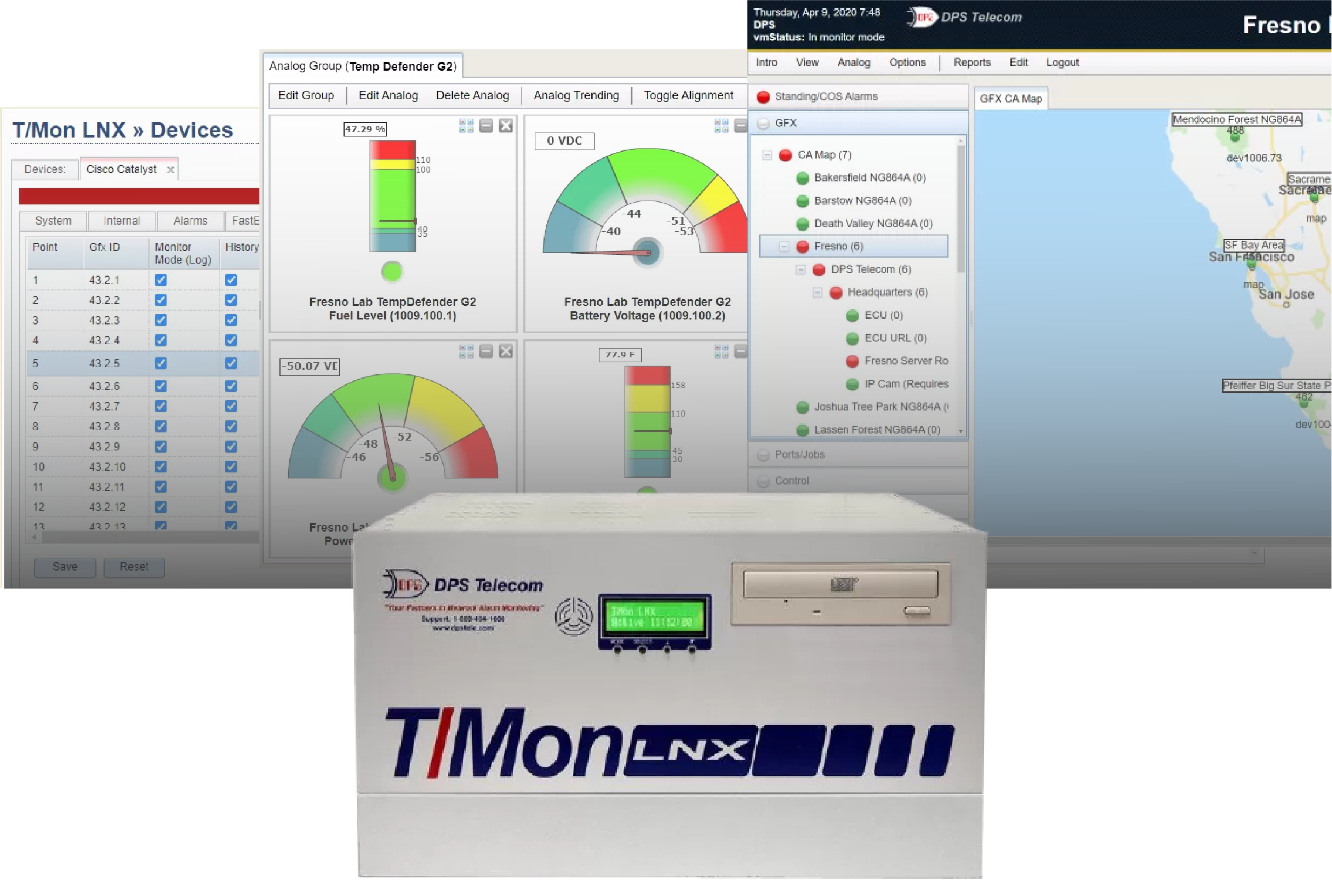
When your network has fewer than about 10 remote sites, you can get by with individual device alerts sent via email or text. Each RTU has its own web interface, and you can log in to check site status as needed.
Once you grow beyond that, things fall apart quickly. You end up with dozens of browser tabs open, each showing one site's alarms with no unified view. As DPS Telecom CEO Bob Berry writes in his book 100% Uptime, a master station "eliminates the need to look at (and manage) each individual RTU" and becomes "absolutely vital if you have more than a handful of remote sites."
A centralized alarm master aggregates alarms from all your sites into a single interface. It filters noise, correlates related events, and helps your team identify root causes rather than chasing individual symptoms. If ten sites report communication failures simultaneously, a smart alarm master can trace them back to a single backbone link failure rather than generating ten separate tickets.
The stakes are high. Downtime costs average roughly $2 million per hour in telecom and $2.5 million per hour in the energy sector. A central alarm master is how you catch problems before they reach that point.
Your alarm master needs to support every protocol your equipment uses, including SNMP, Modbus, DNP3, TL1, ASCII, and any proprietary formats present in your network. This is often the first dealbreaker. Multi-site networks accumulate equipment over many years, and that equipment speaks different protocol languages.
If your alarm master only speaks SNMP, you'll end up running parallel systems for anything that doesn't, which defeats the purpose of centralized monitoring.
Look for a master that supports at minimum:
A capable alarm master also provides a migration path for legacy gear. Rather than forcing a complete equipment replacement, the master can mediate older protocols into modern formats like SNMP. This lets you upgrade your network gradually instead of all at once.
At DPS, our T/Mon master currently supports 30+ protocols because clients have requested them over time. That number keeps growing. If you need a protocol your alarm master doesn't support, the right vendor will add it for you.
Yes, but only if you plan for it. Your alarm master needs to handle your current deployment and have room for the growth you expect over the next 10 to 15 years. A network monitoring system is a long-term investment, and replacing it mid-lifecycle is expensive and disruptive.
Key capacity questions to ask:
Full-scale alarm masters can handle up to about 1,000 remote devices and 1,000,000 alarm points. That's overkill for most organizations, but it indicates a system designed for serious, enterprise-wide monitoring.
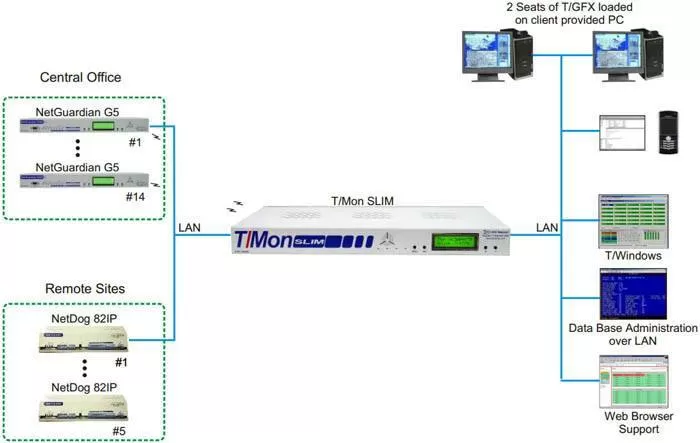
If you run a smaller or regional network, a scaled-down master may be a better fit. Our T/Mon SLIM, for example, supports around 64 devices and 10,000+ alarm points out of the box. It's built for operations that need centralized monitoring without the footprint (or cost) of a full-scale system.
The key is matching the master to your scale today while making sure the vendor offers an upgrade path for tomorrow.
The interface should show alarms in plain language with color-coded severities, geographic map views, and logical site groupings. Your NOC team will spend hours every day looking at this system. It needs to be clear, fast, and intuitive.
Avoid alarm masters that present raw data as walls of numbers or cryptic codes. Your operators should see descriptions of what went wrong, where it happened, and ideally what to do about it. When a new team member can look at an alarm and understand the situation without digging through documentation, you've found a good interface.
Geographic map views are especially useful for multi-site operations. A map-based display plots alarm status as colored icons on an actual map, letting operators instantly see where problems are occurring. You can drill down from a regional view to a specific site's floor plan in a few clicks.
Our T/GFX software does this, and the feedback from clients has been consistent: map views dramatically reduce the time it takes to assess an outage and dispatch the right technician to the right location.
These visual elements reduce training time and speed up response. Ask any vendor for a live demo of their interface. Within a few seconds, you'll know whether it helps or hinders your operations.
The most important features are alarm correlation, nuisance alarm filtering, custom alarm descriptions, flexible notifications with escalation, ping monitoring, historical logging, and derived alarms with automation. Basic alarm collection is table stakes. The features below are what separate a good alarm master from a great one.
Alarm correlation and root cause analysis. Your alarm master has visibility across your entire network, which means it can spot patterns that individual devices cannot. If a fiber cut causes 15 downstream site failures, correlation logic ties those alarms to the single root cause instead of burying your team in 15 separate alerts.
Nuisance alarm filtering. Not every alarm requires action. A signal that briefly dips below threshold and recovers on its own shouldn't wake up your on-call technician at 2 a.m. Good filtering suppresses repetitive, low-priority alarms so your team can focus on what actually matters.
Custom alarm descriptions and corrective instructions. The best implementations attach specific resolution steps to each alarm point. Instead of a generic "Alarm 7 Active," your technician sees "Generator fuel low at Site 7, arrange refueling within 24 hours." This eliminates guesswork and gets the right response faster.
Flexible notifications and escalations. Your alarm master should support email, SMS, and voice alerts with rules based on severity, time of day, and on-call schedules. Escalation rules ensure that if the primary technician doesn't acknowledge an alarm within a set time, the alert moves up the chain automatically.
Ping and heartbeat monitoring. A passive alarm master only knows about problems when a device reports them. But what if the device itself goes down and can't report anything? Active ping monitoring checks connectivity to your remote sites on a continuous basis. If several consecutive pings fail, the master raises an alarm, even though the remote device never sent one.
Alarm history and reporting. Every alarm your master collects becomes part of a historical record. Over time, that data reveals patterns: recurring issues at specific sites, seasonal trends in environmental alarms, or improvements after infrastructure upgrades. Make sure your master stores a large event log and provides reporting tools for post-incident analysis and compliance documentation.
Derived alarms and automation. Some alarm masters let you define custom logic, such as "if commercial power fails AND the generator doesn't start within 5 minutes, escalate to critical." Others can trigger automated control actions, like starting a backup generator when a power failure alarm is received. These programmable responses can dramatically reduce reaction time for known failure scenarios.
The architecture of your alarm master affects its reliability, security, and operational requirements. Here's how the two main approaches compare:
| Factor | On-Premises | Cloud-Based |
|---|---|---|
| Reliability | Runs on your local network. Continues operating even if your internet goes down. | Requires internet connectivity. If the connection or the provider's service drops, you may lose visibility. |
| Control | You maintain full control over hardware, software, and data. Useful for regulatory compliance. | Hosted by a third party. You rely on the provider for security and compliance. |
| Scalability | Capacity is fixed by your hardware. Scaling up may require purchasing additional equipment. | Designed to scale on demand by upgrading your subscription. |
| Cost | CapEx model with upfront hardware purchase plus ongoing maintenance. Can be cost-effective long-term. | OpEx subscription model with lower upfront cost. May total more than a one-time purchase over many years. |
| Maintenance | Your team handles updates, patches, and hardware upkeep. You control update timing. | The provider handles updates and backups automatically. Less control over timing. |
| Data Security | Data stays within your network. You enforce your own security policies. | Data is transmitted and stored externally. You rely on the provider's security standards. |
Source: architecture comparison adapted from Auvik Networks.
For critical infrastructure monitoring (911 centers, electric grid operations, government networks), on-premises systems are generally the safer choice. They don't depend on external internet connectivity, and they give you full control over where your alarm data lives.
Cloud solutions work well for IT-centric networks that prioritize flexibility and fast deployment. Some organizations use a hybrid approach, with an on-premises master for primary monitoring and a cloud system for backup or convenience.
One thing to watch: some alarm systems are just software packages you install on a standard Windows PC. That might work for light use, but a general-purpose PC is not reliable enough for a system that's supposed to be your safety net.
The best alarm masters run on dedicated, purpose-built hardware with a hardened operating system. Purpose-built appliances typically include dual power supplies, RAID storage, and an OS tuned specifically for monitoring. That means fewer crashes and fewer maintenance reboots compared to running monitoring software on a general IT server.
At minimum, your alarm master should support multi-user accounts with role-based permissions and SNMPv3 for encrypted data transport. It collects sensitive data about your network infrastructure, so security controls need to match the sensitivity of that information.
Different team members should have different access levels. A junior technician might be able to view and acknowledge alarms but not issue control commands or change system configuration. An administrator would have full access.
This protects both security and safety. You don't want an untrained user accidentally issuing a control relay command.
For data in transit, SNMPv3 provides authentication and encryption for monitoring traffic. This is especially important if alarm data travels over public or untrusted networks.
If you're deploying an on-premises master, consider physical security features too: rack-mount form factor, dual redundant power supplies, RAID storage, and automatic database backups. Some alarm masters also offer a hot-standby option, where a second unit can take over if the primary fails, ensuring 24/7 uptime for the monitoring system itself.
Look for a vendor with strong technical support, a track record of regular updates, and a willingness to customize the system to your requirements. An alarm master is not a short-term purchase. You'll rely on it through years of network changes, equipment additions, and evolving requirements.
No two networks are exactly alike. At DPS, we create hundreds of product variations per year to meet specific client requirements, everything from custom I/O configurations to new protocol integrations. That kind of flexibility can be the difference between a system that fits your network and one that forces your network to fit the system.
Check the vendor's update policy. Does the alarm master receive regular firmware and software updates? Is there an active knowledge base or user community? Can the vendor add support for new equipment types as your network evolves?
Also consider interoperability. Even if you use a single-vendor solution now, your alarm master should be able to forward alarms to higher-level management platforms or accept alarms from third-party equipment. This keeps your options open and lets you integrate with NMS or SCADA systems as your operations grow.
Telecom providers, electric utilities, transportation agencies, public safety organizations, and healthcare facilities are the most common users of centralized alarm masters. The core selection criteria are the same across industries, but different sectors prioritize different features:
Telecom and ISPs need strong support for telecom protocols (TL1, SNMP), integration with ticketing systems, and 24/7 alerting. Downtime directly impacts revenue and can trigger regulatory penalties.
Electric utilities prioritize reliability, security, and compliance. Many require on-premises systems and need support for utility protocols like DNP3 and Modbus. Networks can include 1,000+ monitored sites, making event correlation and large-scale capacity essential.
Transportation agencies benefit from geographic map-based displays since their infrastructure often spans long corridors (rail lines, highway systems). The ability to drill down by region and site helps operators quickly pinpoint issues.
Public safety and government networks cannot tolerate downtime. These deployments often require operation on closed networks with no internet access, hardened hardware, and integration with security systems alongside network alarms.
Healthcare organizations value ease of use and compliance (HIPAA). The scale may be smaller, but clear, plain-language alarm displays are important when clinical staff need to understand alerts about facility infrastructure.
The right alarm master will serve your network for a decade or more. Take the time to evaluate your options against the criteria outlined here: protocol support, scalability, user interface, alarm management features, architecture, security, and vendor support.
If you'd like to talk through your specific requirements, our engineering team is available for a free consultation. We'll help you map out a monitoring architecture that fits your network, whether that involves DPS equipment or not. Get in touch with us here.

Andrew Erickson
Andrew Erickson is an Application Engineer at DPS Telecom, a manufacturer of semi-custom remote alarm monitoring systems based in Fresno, California. Andrew brings more than 19 years of experience building site monitoring solutions, developing intuitive user interfaces and documentation, and opt...


