
Check out our White Paper Series!
A complete library of helpful advice and survival guides for every aspect of system monitoring and control.
1-800-693-0351
Have a specific question? Ask our team of expert engineers and get a specific answer!
Sign up for the next DPS Factory Training!

Whether you're new to our equipment or you've used it for years, DPS factory training is the best way to get more from your monitoring.
Reserve Your Seat TodayHarness the power of T/MonXM using the ease and convenience of a Windows platform. T/Windows software provides users with point-and-click access to all the features of T/MonXM in a familiar Windows environment, making centralized alarm management easier than ever.
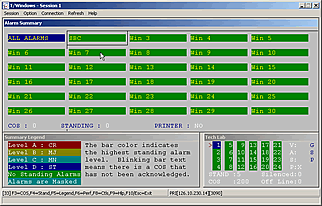
Previous users of T/MonXM will be familiar with the look of the interface, but will be surprised by the user-friendly Windows platform. It provides capabilities for up to four concurrent window sessions and offers improved help text and enhanced reporting features. T/Windows also provides intensive right-click functionality for quick and easy access to the major functions of T/MonXM.
T/MonXM is uniquely designed to monitor a large cross section of equipment so that it can consolidate alarm systems rather than just poll alarms from DPS remotes. This provides a single user interface with one general-purpose terminal instead of multiple systems with specialized terminals and gives telecom managers instantaneous and comprehensive network status information. It also makes possible centralized administration of databasing and alarm history.
Because of it's operational capability and diversity, T/MonXM is actively used in many industries including Cellular, Telecommunications, Utilities, and Transportation. Call us today to find out more about how T/Windows can help you. (FREE to all T/MonXM users with the T/Mon Gold Plan)
Do you have questions about T/Windows or the T/MonXM?
Give us a call at our toll-free number and talk to one of our specialists. They'll help answer any questions you may have.


