Check out our White Paper Series!
A complete library of helpful advice and survival guides for every aspect of system monitoring and control.
1-800-693-0351
Have a specific question? Ask our team of expert engineers and get a specific answer!
Sign up for the next DPS Factory Training!

Whether you're new to our equipment or you've used it for years, DPS factory training is the best way to get more from your monitoring.
Reserve Your Seat Today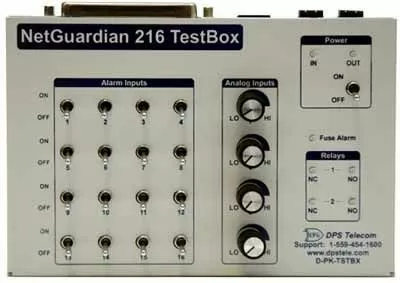
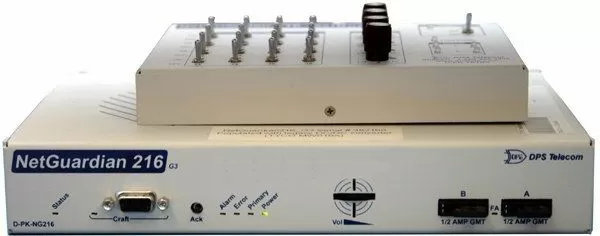
If you've ever set up any piece of network equipment, you know how difficult it is to verify that everything is set up correctly. Maybe you haven't noticed any problems in the first few minutes, but how can you be sure that your gear will function reliably when it counts? The stakes are even higher when it comes to your monitoring system. If you don't test your RTU's in the field, you'll never know if "no alarms" means "no problems with my network" or "I didn't database my alarms correctly." What you need is a simple testing device that allows you to simulate incoming alarms from your equipment. You'd be able to verify that each alarm point and analog input is received correctly. Fortunately, that exactly what the NetGuardian 216 TestBox was designed to do. With this new diagnostic tool, you can verify every discrete alarm input, control relay, and voltage-based analog alarm input on a NetGuardian 216 remote (including NetGuardian 216T, NetGuardian 216F, and other NetGuardians with a single amphenol connector). For larger remotes, use the NetGuardian 3288 Test Fixture.
With 16 discrete alarm toggles, 4 analog knobs, and 2 control relay LEDs, you can verify every alarm input and control output on your NetGuardians in a controlled way.
Diagnose Problems Right From the Field
If an alarm point fails, it's important to know if the problem lies with your NetGuardian, your site equipment, or your analog sensor. With the NetGuardian 216 TestBox, you minimize windshield time driving to sites by diagnosing the problem while you're on-site.
Get Exact Control with Labeled Alarm Points
The labeled toggles and knobs on the NetGuardian 216 TestBox are way easier than working with probes directly on the amphenol connectors. It's also a lot less hassle than counting down a 66 block. You only have two hands, so without a TestBox you can only set a point or two at one time. With a TestBox, you can easily set all of the alarms you want, and you won't have to hope that your hands don't move while you look at your results screen.
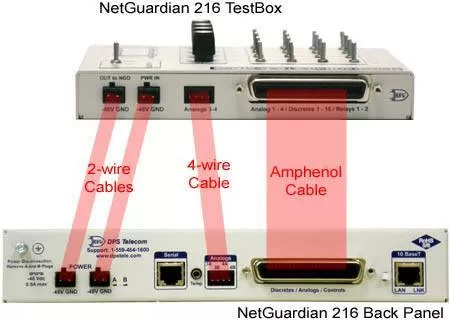
Has 16 discrete alarm toggles. Has 2 Control LEDs. Contains 1 Fuse Alarm LED. Contains 4 Analog Knobs.
| Full Specifications | |
|---|---|
| Discrete Alarm Toggles: | 16 |
| Control LEDs: | 2 |
| Fuse Alarm LED: | 1 |
| Analogs Knobs: | 4 |
| Analog Accuracy: | +/- 1% of actual value |
| Voltage: | 0 - NG |