
Download our free Monitoring Fundamentals Tutorial.
An introduction to Monitoring Fundamentals strictly from the perspective of telecom network alarm management.
1-800-693-0351
Have a specific question? Ask our team of expert engineers and get a specific answer!
Sign up for the next DPS Factory Training!

Whether you're new to our equipment or you've used it for years, DPS factory training is the best way to get more from your monitoring.
Reserve Your Seat TodayYour remote site gear needs a controlled environment. This means a steady electricity supply, the right temperature and humidity, and physical security from intruders, fire and flood.
But providing that controlled environment is tough. Remote sites are usually unmanned and located in isolated places. That makes them vulnerable to all kinds of external and internal threats.
And unless you want your windshield time costs to go through the roof, you need to be able to defend your remote site environment without leaving the NOC. Here's a quick guide to how you can monitor, protect and control everything that affects your remote sites.
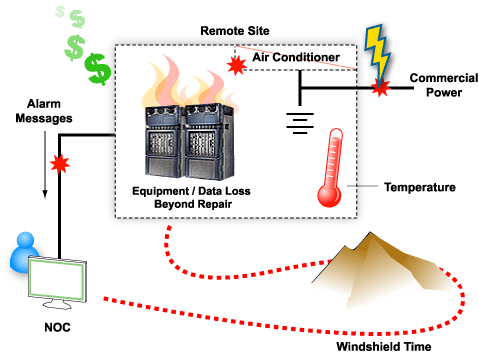
The most important factor to monitor at any remote site is the power supply. Power outages are the most common cause of remote site failures. The result is network downtime, lost revenue, angry bosses and frustrated customers who won't hesitate to shift their business to another provider.
But power outages also cause long-term damage that lasts even after power is restored. Low-voltage shutdowns can cause very expensive damage to telecom switches and other transport gear. It's like frying whole cards that cost thousands of dollars a piece. Backup batteries that are completely drained can be damaged permanently, and if you have a lot of sites, battery replacement costs can really add up.
Power failures also bite into your operational budget. Dark sites mean tech visits, windshield time and overtime pay. None of that looks good on your balance sheet.
Everyone knows they should monitor commercial power and provide a backup power system. But, unexpected power outages and site failures still happen all the time.
Too often, network managers just assume that their backup power systems will be there when needed. A backup system is as prone to failure as a main system.
Monitoring just commercial power isn't enough. You have to monitor every level of your power supply chain:
Since your power supply is dependent on so many factors, you've got to monitor all of them, the failsafe systems as well as the main systems.
You likely have more unmonitored batteries and unmonitored generators than you realize. It's worth it to do a site survey to see how much of your power supply gear is actually being monitored.
To adequately monitor battery voltage, temperature, and other analog inputs, your alarm system needs to support true analog alarms. Some alarm systems simulate analog alarms with "threshold" alarms. For example, you might get a low-battery alarm if the battery voltage drops to -48 volts. But that information by itself is meaningless. After the voltage crosses the -48-volt threshold, does it stay there or does it continue to drop? With threshold alarms, you have no way to tell.
DPS Telecom alarm gear features analog alarms that report live, real-time analog values. This gives you true visibility of these kinds of alarm conditions. Additionally, DPS analog alarms support four user-configurable thresholds (Major Under, Minor Under, Minor Over and Major Over). It provides best-quality alert of changing events.
Excessive heat cooks electronic gear, even carrier-grade telecom gear. It's vital to constantly monitor temperature at your remote sites with four-threshold and live value analog alarms.
Excessive heat also damages other gear. Heat really shortens the useful life batteries. A lead-acid battery will last 10 years under ordinary conditions. It will only last a year if it's consistently operated at temperatures over 122 degrees Fahrenheit.
It's important to also monitor the HVAC systems that maintain your remote site environment. If you can catch an air conditioning failure early, you can intervene, start repairs and restore the remote site environment before gear goes into thermal shutdown or the site goes dark.
Don't forget to also provide a backup power supply for HVAC systems. An often-overlooked danger of power outages is that the telecom gear will continue to run on backup power, while the air conditioning, joined only to commercial power, is out.
The gear keeps running, the heat keeps rising, until the temperature forces a thermal shutdown.
Most remote sites are usually unmanned and often in isolated locations. This makes them highly vulnerable to vandals and intruders. Accidents like short circuits and small electrical fires can become disasters if you don't have any way to detect them and react in time.
Your facility monitoring should begin with at least monitoring open doors and fire alarms. For added security, you may want to consider integrating an electronic building access control system and video surveillance to your alarm system.
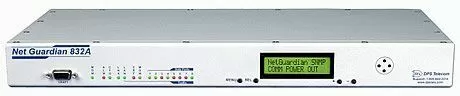
The NetGuardian 832A provides comprehensive tools for managing your remote site environment. The NetGuardian 832A is a NEBS-certified, LAN-based alarm collection device with everything you need to manage your remote site. This includes stand-alone local visibility options for monitoring alarms directly through the RTU, bypassing the need for a master.
With the NetGuardian you can:
Other Helpful LinksNetGuardian 832A: Remote Site Monitoring Made Easy
The NEBS-certified NetGuardian 832A is your most reliable tool for remote site management. Monitor alarms directly from the Web without a master ... access remote site gear through terminal server ports ... get email alerts of every alarm ... learn everything the NetGuardian 832A can do for you.


