Check out our White Paper Series!
A complete library of helpful advice and survival guides for every aspect of system monitoring and control.
1-800-693-0351
Have a specific question? Ask our team of expert engineers and get a specific answer!
Sign up for the next DPS Factory Training!

Whether you're new to our equipment or you've used it for years, DPS factory training is the best way to get more from your monitoring.
Reserve Your Seat TodayThe SNMP protocol allows you to monitor your remote devices through the manager/agent architecture.
An agent is a device that will collect information about your remote devices and will send it to the manager. The manager, then, is a master station that communicates with all the agents you have. The manager is the main interface that will unify all your agents' information in one single screen.
There are seven key telemetry functions that standard SNMP managers do not support - functions that are crucial for effective protection of your network.
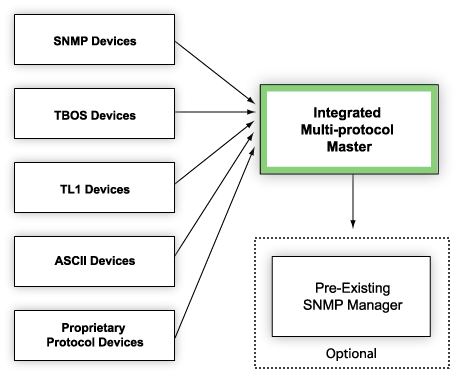
An integrated, multiprotocol master can receive SNMP traps and process them as standard telemetry alarms. The result is greater visibility of your SNMP devices, with support for:
An advanced alarm management system can act both as an SNMP trap processor and an SNMP agent. It can both receive SNMP traps and forward SNMP traps to multiple SNMP managers.
Different from the commands that are initiated by the SNMP manager, Trap messages are initiated by the agents. Network technicians will configure their SNMP agents to be able to send a trap notification to the manager right away when an important change of statues happens, instead of waiting for a poll.
This function is perfect for any application where alarm data needs to go to different places. You can monitor a regional network locally and forward alarms to an upper-level manager monitoring the whole network; you can forward alarms to multiple managers as part of a geodiversity backup plan, or you can send specific types of traps to different SNMP managers.
A multiprotocol master will also give you a wider range of options for displaying your alarm data and sending notifications. A full-featured master supports multiple notification and display methods to ensure that critical information gets to the people who need it, including pager/e-mail notification, a Web Browser interface, and optional presentation software that displays information on a physical map of your network.
An integrated, multiprotocol master will poll all your non-SNMP devices, allowing you to consolidate all your alarm monitoring on a single platform. You can eliminate the need for specialized terminals and reduce the number of screens your staff needs to monitor to one. All of your alarm data is integrated into a single display that can show you - at a glance - the state of your entire network.
See Also
Integrated Network Monitoring Software To Monitor Both SNMP And Non-SNMP Devices