
Download our free Monitoring Fundamentals Tutorial.
An introduction to Monitoring Fundamentals strictly from the perspective of telecom network alarm management.
1-800-693-0351
Have a specific question? Ask our team of expert engineers and get a specific answer!
Sign up for the next DPS Factory Training!

Whether you're new to our equipment or you've used it for years, DPS factory training is the best way to get more from your monitoring.
Reserve Your Seat Today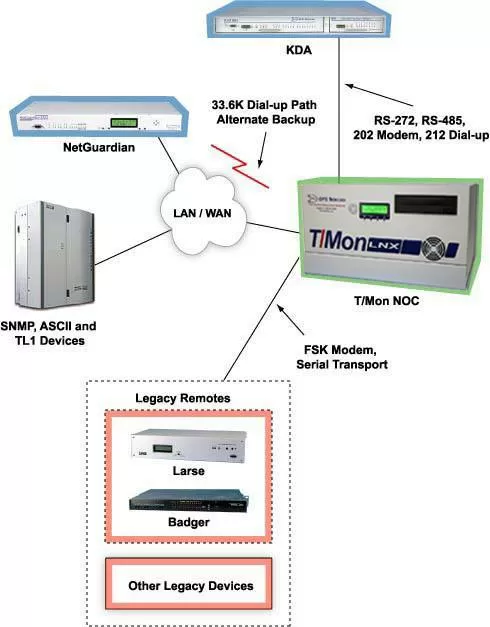
A lot of network monitoring equipment is designed for one kind of network. It works with a serial interface, or modem access, or LAN, but not all three. That creates a huge barrier when you want to upgrade your equipment.
If you want to preserve your investment in your data transport network, you're stuck with your failing legacy gear. And if you want to move up to advanced monitoring capabilities, you have to rip out and replace your existing dedicated lines, at considerable expense.
The T/Mon NOC network alarm management system breaks through that barrier. With support for RS-232, RS-422, RS-485, 202 modem, 212 modem, FSK modem, and LAN, the T/Mon NOC fits perfectly with your existing network. You can upgrade to the advanced, multi-user, multiprotocol T/Mon NOC without incurring any unnecessary expenses for new network infrastructure.
When you upgrade to the T/Mon NOC, you'll have responsive, reliable polling over the interface you choose - plus you'll get advanced alarm processing features like after-hours monitoring, automatic notification, and nuisance alarm filtering.
The T/Mon NOC's multiple interface support allows you to always have an alternate path to your remotes. If your communications network fails, the T/Mon NOC can automatically maintain communication with your remotes via dial-up connection.
The T/Mon NOC is built for today's large networks, with room to expand your network monitoring as your network grows.
Your T/Mon NOC can be equipped with as many as 24 I/O ports. More ports means more polling legs and fewer bridges. If you've been bridging several polling legs together to one port on your legacy master, you can immediately implement more efficient bridging when you upgrade to the T/Mon NOC.
Optimized bridging can quadruple your polling speed, allowing you to see network threats as they happen. And it distributes failure risk across several legs for better fault-tolerance, so one bad RTU can't bring down your whole system.
Best of all, you can build this improved polling system on your existing network infrastructure without creating additional costs.
And if you're looking for a painless way of moving your alarm monitoring from serial data transport to LAN, the T/Mon NOC is the ideal basis for a controlled migration strategy.
The T/Mon NOC is designed for both backwards and forwards compatibility. The T/Mon NOC equally supports your existing legacy serial devices and modern LAN-based remotes. You can gradually replace your legacy remotes with modern remotes, at a pace suited to your budget and installation capacity.
As you replace remotes, you can gradually transition your monitoring to LAN transport. Step-by-step, you can add LAN-based remotes and take down service channels. The T/Mon NOC polls both the old dedicated circuit remotes and the new LAN remotes, displaying your whole network on one screen. When you replace the last legacy remote, just turn down the last channel.



