
Download our free SNMP White Paper. Featuring SNMP Expert Marshall DenHartog.
This guidebook has been created to give you the information you need to successfully implement SNMP-based alarm monitoring in your network.
1-800-693-0351
Have a specific question? Ask our team of expert engineers and get a specific answer!
Sign up for the next DPS Factory Training!

Whether you're new to our equipment or you've used it for years, DPS factory training is the best way to get more from your monitoring.
Reserve Your Seat Today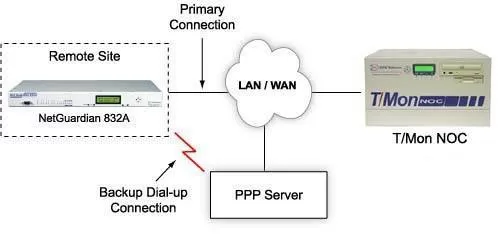
SNMP remotes are typically used with a direct LAN connection, but it's a smart idea to also have a dial-up connection for your SNMP remotes. A primary or secondary dial-up path will give your SNMP manager visibility of your remote sites when LAN access is unavailable.
The NetGuardian 832A is principally a LAN-based remote, but it also has an internal 33.6K modem, which can be used as a primary or secondary connection path.
You may have remote sites that are so distant that they don't have access to your LAN. But that doesn't mean that you can't integrate them into your network's SNMP monitoring solution. The NetGuardian mediates alarms from the remote site as SNMP traps and forwards them through a dial-up connection to a PPP server linked to your LAN. As your network expands, these distant remote sites can be integrated into your LAN without disrupting your network monitoring.
With network monitoring, more security is always better. Even if your remote site has access to your LAN, you should plan for the contingency that your LAN may go down. And it is precisely when communication links are having problems that you most need access to your network monitoring. A NetGuardian with LAN connection and dial-up backup will ensure that you have constant visibility of your site.
The NetGuardian is also an ideal way to migrate your existing dial-up sites to LAN-based SNMP. Sites that are currently monitored by legacy remotes using dial-up connections can be immediately upgraded to NetGuardians reporting SNMP over a dial-up connection. With the NetGuardian, these dial-up sites can be integrated with network-wide SNMP monitoring, without adding new transport layers.
When LAN access is later added to the site, the NetGuardian can be easily switched to reporting over the LAN, with minimal provisioning and without disconnecting alarm inputs. The dial-up path can be retained as an emergency backup in case of LAN failure.


