
Download our free SNMP White Paper. Featuring SNMP Expert Marshall DenHartog.
This guidebook has been created to give you the information you need to successfully implement SNMP-based alarm monitoring in your network.
1-800-693-0351
Have a specific question? Ask our team of expert engineers and get a specific answer!
Sign up for the next DPS Factory Training!

Whether you're new to our equipment or you've used it for years, DPS factory training is the best way to get more from your monitoring.
Reserve Your Seat TodayWhat is Simple Network Management Protocol? SNMP is an application layer protocol created in 1988 as a short-term solution to manage network elements for growing networks - like the Internet. Simply put, as an open-source protocol, it lets different SNMP-enabled devices communicate with each other to provide robust monitoring and management.
SNMP is a valuable network monitoring tool because it allows for the collection of data, as well as the management of equipment in a network. Since its beginning, it has achieved widespread acceptance and become a standard protocol for tons of applications. As a whole, SNMP information is greatly beneficial in remote monitoring, as it provides insight into issues and facilitates swift responses to potential network failures.
Monitoring a network's health is just as crucial as constructing it. With SNMP, administrators have a powerful ally to ensure that networks run smoothly. This tool is a staple in networks of all sizes, making it indispensable for maintaining operational efficiency.
Enhanced Efficiency: SNMP simplifies the management of network devices, reducing the workload on administrators while ensuring comprehensive oversight.
Widespread Deployment: Its presence in most network infrastructures highlights its importance in the field, acting as a universal language for network management.
Proactive Issue Resolution: By providing real-time data, SNMP enables quick identification and resolution of potential issues, safeguarding network integrity.
Feel free to use our SNMP tutorial download, or contact us for expedited monitoring.
SNMP architecture is based on the manager/agent model. The model consists of the following pieces (SNMP components):
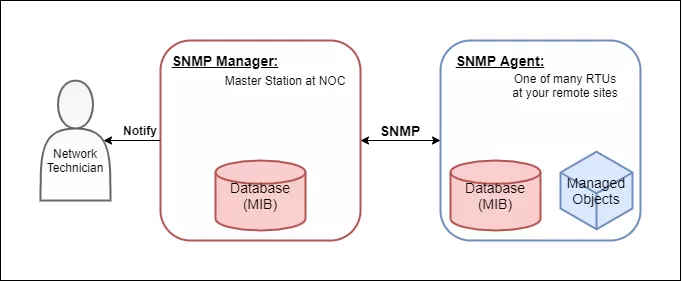
To understand its functionality within the network, consider the following:
The manager and agent use a Management Information Base and a relatively small set of commands to swap information. The MIB file is a formatted text file that defines the data objects used by a particular piece of equipment. Each data object is defined with a unique Object Identifier (OID), and the manager and agent know what the OID corresponds to via the MIB.
As a NOC technician, you would load a MIB file into your SNMP manager so it knows how to communicate with its agents. They should have the MIB loaded already from the manufacturer. Installing MIB files in your manager is analogous to installing drivers on a PC to communicate with a printer, for example.
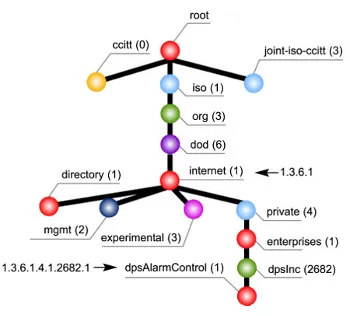
MIB tree used by DPS equipment, before it specifies a device and alarm point.
The MIB is organized in a tree structure with individual variables, such as point status or description, being represented as leaves on the branches. A long numeric tag or Object Identifier is used to distinguish each variable uniquely in the MIB and SNMP traps.
SNMP uses a few basic commands to communicate between the manager and the agent.
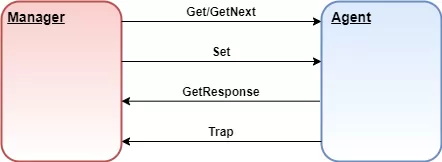
A few of the most common SNMP commands sent between an agent and the manager.
To get status information from the agent, the manager can issue Get and GetNext messages to request information for a specific variable. Once a Get or GetNext message is received, the agent will issue a GetResponse message to the manager. It will contain either the information that was requested or an error explaining why the request cannot be processed.
A Set message allows the manager to request a change be made to a managed object (i.e. a control relay). The agent will then respond with a Get-Response message if the change has been made or an error explaining why the change cannot be made.
Trap messages are initiated by the agent and are sent to the manager when an important event happens. This makes Traps perfect for reporting alarms to the manager - rather than wait for a status request from the manager when it gets around to polling the agent.
However, TRAP messages have a significant limitation: they are inherently unreliable. Since SNMP communicates via UDP, there's no guarantee that the message will reach its destination. The sender cannot confirm if the SNMP Manager has received the TRAP message, leaving a gap in communication reliability.
Inform messages are very similar to traps, except they are slightly more reliable. Inform messages are initiated by the agent, and once the manager receives it, it will send a response to the agent to let it know the message was received. If the agent doesn't receive the response from the manager then the agent will resend the Inform message.
This acknowledgment mechanism is what sets INFORM messages apart. By allowing the SNMP Manager to confirm receipt of the message with a response protocol data unit (PDU), INFORM messages ensure that critical notifications are more likely to reach their intended destination.
SNMPWALK uses multiple Get-Next requests to retrieve an entire tree of network data from a managed object. These are especially useful when using a tool like iReasoning MIB Browser to view all OIDs an agent offers.
Aside from the small number of commands SNMP uses, it is considered simple because of its reliance on an unsupervised or connection-less communication link. The simplicity of SNMP communication has led directly to its widespread use, especially in internet applications. SNMP is considered "robust" because of the independence of the managers and agents. Because they are typically separate devices, if an agent fails, the manager will continue to function, and vice versa.
Basic serial telemetry protocols, like TBOS, are byte-oriented with a single byte exchanged to communicate. Expanded serial telemetry protocols, like TABS, are packet-oriented with packets of bytes exchanged to communicate.
The packets contain header, data, and checksum bytes. SNMP is also a packet-oriented protocol. The packets are composed of the message types discussed earlier: Get, GetNext, GetResponse, Set, and Trap.
Each packet, or variable binding, contains an identifier, a type, and a value (if a Set or Response). The agent uses its MIB to determine whether the object is managed and changeable (if processing a Set). The manager uses its MIB to display the readable name of the variable and sometimes interpret its value for any techs who may need to take corrective action.
To send information, SNMP uses a layered communication model.
Layer 1 - Application layer (SNMP layer)
Layer 2 - Transport layer (UDP)
Layer 3 - Internet layer (IP)
Layer 4 - Network Interface layer (i.e., twisted pair copper, RG58 co-axial or fiber)
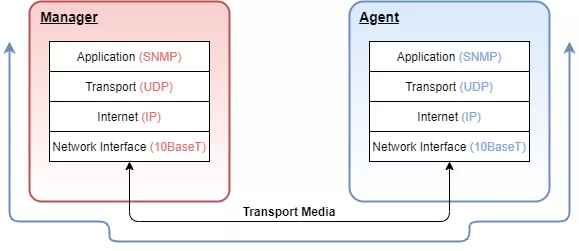
How data is transported through SNMP communication.
While this multi-layer model may seem a bit confusing, it effectively isolates the tasks of communication and ultimately assists in designing and implementing a network.
To illustrate the function of this layered model, let's look at a single SNMP GET request from the agent's perspective.
Step 1: The SNMP manager wants to know what the Agent's System Name is and prepares a GET message for the appropriate OID.
Step 2: It then passes the message to the User Datagram Protocol (UDP) layer. The UDP layer adds a data block that identifies the manager port that the response packet should be sent to.
Step 3: The packet is then passed to the IP layer, where the data block containing the IP address and Media Access addresses of the manager and the agent are added.
Step 4: The entire assembled packet gets passed to the Network Interface layer. The Network Interface layer verifies media access and availability. It then places the packet on the media for transport.
Step 5: After working its way across bridges and through routers based on the IP information, the packet finally arrives at the agent.
Step 6: Here it passes through the same four layers in exactly the opposite order as it did at the manager.
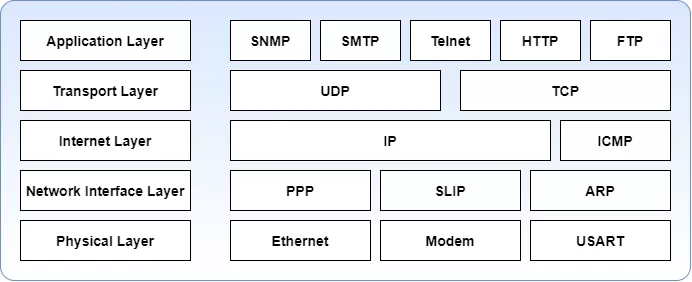
5-layer network model or Internet Protocol Suite.
Understanding this layered model makes it easier to troubleshoot communication problems. When there is a problem, you can simply trace it down, out one end, into, and up the other. LAN/WAN link and activity status indicators provide some visibility to the Network Interface layer.
While ICMP echo requests and responses (Pings) provide some information regarding the proper functioning of the IP layer, active SNMP processing indicators can be used to verify the passage of the packet through the UDP layer and the functioning of the Application layer. Each step can be verified independently until all steps are working correctly for end-to-end communication.
There are currently three commonly used versions of SNMP: v1, v2C, and v3.
The standards for the SNMP protocol are defined in documents called RFCs (request for comments), proposed by the Internet Engineering Task Force (IETF). You can take a look at the RFCs list for SNMPv1, v2c, and v3 here.
Like any advancement in technology, as newer versions of the protocol came out, the complexity of SNMP rose with them. Take a brief look at the differences between them:
In addition to the Inform command, SNMPv2c brought several key enhancements over SNMPv1:
GETBULK Messages: This feature allows the retrieval of large blocks of data, improving efficiency in network management tasks by reducing the number of requests needed.
Security Considerations: Like SNMPv1, SNMPv2c employs community strings for security, which are essentially clear text passwords. These strings come in two types:
Read-only (RO): Provides access to view Management Information Base (MIB) objects without the ability to alter them, enhancing security by limiting changes.
Read-write (RW): Grants permission to modify MIB objects, allowing configuration changes to managed devices. This can be risky if not properly secured, as it opens the network to potential tampering.
While SNMPv2c added functionality and efficiency, it did not address the fundamental security weaknesses of using unencrypted community strings, leaving data vulnerable to interception.
If you'd like more information on how you can implement the best SNMP network monitoring software for your scenario, let us know what you're trying to accomplish and we'll design a perfect-fit solution for your needs. You'll have 30 days to free trial your monitoring device, and if you don't like it for any reason, simply return it for a full refund.


