
Check out our White Paper Series!
A complete library of helpful advice and survival guides for every aspect of system monitoring and control.
1-800-693-0351
Have a specific question? Ask our team of expert engineers and get a specific answer!
Sign up for the next DPS Factory Training!

Whether you're new to our equipment or you've used it for years, DPS factory training is the best way to get more from your monitoring.
Reserve Your Seat Today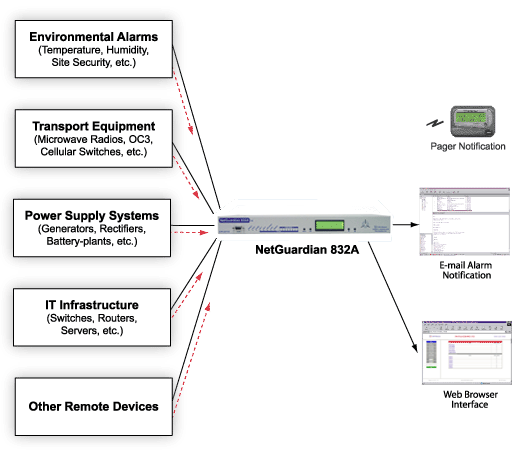
The NetGuardian 832A is a comprehensive tool for monitoring your remote site, including options for monitoring alarms directly through the RTU, bypassing the need for a master.
The NetGuardian can send alarm notifications via pager and e-mail directly to personnel, whether they're in their office or in the field. Or you can browse to the NetGuardian from any web browser on any computer, giving you easy access to alarm data from anywhere, without using specialized software.
The built-in notification and alarm monitoring capabilities of the NetGuardian several useful applications:
Maintenance technicians need network visibility in the field to rapidly respond to network integrity threats. The NetGuardian's pager notifications bring up-to-the-minute information about network problems directly to the maintenance personnel who can immediately correct them. The NetGuardian includes full support for alphanumeric paging, so you can automatically send detailed notifications and instructions to alphanumeric pagers, cell phones, and PDAs.
Senior supervisors don't have the time to monitor alarms from the NOC, but they need to stay informed of network events. E-mail notification lets busy managers know what's going on with their networks and provides an easily accessible alarm record. The familiar e-mail interface provides network visibility to everyone without the need for specialized training. And with e-mail notifications, alarms can be acknowledged simply by sending a reply e-mail.
Many people in your organization need access to alarm monitoring data, and not all of them are in your network operations center. The NetGuardian's Web Browser interface lets personnel view and acknowledge alarms from any computer on your network. With the Web Browser interface, you're not tied to proprietary monitoring consoles to control your system, supervisors have instant access to monitoring information from their desktops, and it's easy to rotate monitoring staff at different locations.
System security for multiple users is guaranteed. The system administrator can create a individual security profile for each user, allowing precise control of user access. For each user you can limit what alarms may be viewed, which alarms may be acknowledged, which controls and system commands may be issued, and what modifications may be made to the system configuration.



