
Check out our White Paper Series!
A complete library of helpful advice and survival guides for every aspect of system monitoring and control.
1-800-693-0351
Have a specific question? Ask our team of expert engineers and get a specific answer!
Sign up for the next DPS Factory Training!

Whether you're new to our equipment or you've used it for years, DPS factory training is the best way to get more from your monitoring.
Reserve Your Seat TodayYour T/Mon system is a powerful tool for safeguarding your network's reliability - but are you using this tool to the fullest? Here are three key features of T/MonXM that will can immediately improve your network reliability. If you're not using them, you're missing out on improved uptime and increased revenue.
T/Windows brings the power of T/MonXM to the Windows desktop. With T/Windows, any PC anywhere on your network can become a complete T/MonXM monitoring station, with the full power of monitoring and acknowledging alarms, operating control relays, and generating reports for in-depth analysis of network events.
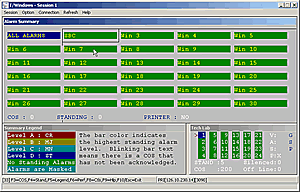
Windows interface refinements make T/MonXM even easier. You can view Standing Alarms just by double-clicking an alarm window in the Alarm Summary screen. You'll have handy right-click access to view Standing and COS alarms, ack alarms, and view site performance and protocol debug data.
T/Windows will simplify and shorten your training. Techs can be quickly brought up to speed with T/Windows' familiar, easy to know and use Windows interface. You can rest assured that your staff know how to use the system to protect your network.
An easy interface means your techs will have faster access to the many user-friendly features of the standard T/MonXM interface. It's logically organized alarm windows, clear English descriptions of alarm conditions, detailed text messages giving instructions for correcting each alarm event. All this means faster response to network threats, letting your staff take rapid action against all network problems.
Plus, with T/Windows, you'll be able to use your T/MonXM monitoring data anywhere in your network. Your monitoring isn't tied to your NOC - instead, any computer becomes your NOC. Alarms can go directly to techs in local offices. Admins have immediate access to alarm data for analysis. And T/Windows is perfect for monitoring when the NOC is closed or with staff at different locations.
Too many companies depend on human intervention to provide analysis of alarm data. T/MonXM's root cause analysis features let you automate the process. Then, even your newest tech can identify and get rid of network threats with the same skill as a 30-year veteran.
It's often difficult to diagnose the cause of network failures. For example, different switches at different remote sites may report a connection loss. Are these separate failures on separate lines, or a single failure on a line connecting the two?
If your network monitoring these sites separately, it may take hours of patient testing to find the real cause. Experienced technicians may be able to diagnose the problem faster, but not everyone has access to experienced techs.
T/MonXM takes the guesswork out of root cause analysis. First, T/MonXM brings the separate pieces of your network into one platform, so you have an eagle-eye view of every alarm. Second, T/MonXM's derived alarms features tie in alarms by logical formulas, automatically identifying the single cause behind apparently unconnected alarms.
You can create a derived alarm formula for any repeatable conjunction of events. The combined knowledge of your most experienced staff can be captured in a software format. And when that conjunction of events reoccurs, your monitoring technicians won't see a meaningless collection of alarms, but a straightforward identification of the real problem.
A lot of companies rely on embedded scan points and meaningless summary alarms to monitor their vital, revenue-generating gear. A summary alarm can tell you there's a problem - some problem, somewhere - but it can't help you identify or correct it.
You could be looking at hours of testing and troubleshooting before you find the problem. And those are hours that cost - in technician man-hours, in network downtime, and in lost revenue.
But there's a richer source of information right there in front of you. Your gear can output ASCII alarm reports that contain detailed information about the problem. The only trouble is, you have to somehow extract the meaningful data from a mass of raw text.
Here's where T/MonXM can help. T/MonXM's ASCII Processing Software Module can automatically parse ASCII text, extract the alarm data, and convert the information to a standard T/MonXM alarm that inherits all of T/MonXM's powerful alarm processing and alert features.
Instead of struggling to identify the network threat, you can find it, correct it, and get your network back on line fast.
These are just three of the network reliability tools available with T/MonXM. The latest edition of T/MonXM, Version 4.2, contains over 50 separate improvements, each of which is designed to improve your network reliability and add value to your business.


