
Check out our White Paper Series!
A complete library of helpful advice and survival guides for every aspect of system monitoring and control.
1-800-693-0351
Have a specific question? Ask our team of expert engineers and get a specific answer!
Sign up for the next DPS Factory Training!

Whether you're new to our equipment or you've used it for years, DPS factory training is the best way to get more from your monitoring.
Reserve Your Seat TodayThis month, DPS Telecom has released a new accessory in the T/Mon product line to make using your T/Mon NOC easier than ever. The new rackmount NOC LCD and Keyboard package enables you to access your T/Mon NOC right from your equipment rack, allowing you to conveniently manage your alarms on site.
"With the rackmount LCD and keyboard, the T/Mon NOC becomes a more integrated monitoring platform," said Eric Storm, DPS Telecom President. "We knew our clients were looking for walk up access to their NOCs, so we designed this new rack configuration to make it easy for them to perform administrative functions."
Rackmount LCD and Keyboard Provides Alarm Access from Your Equipment RackThe new rackmount T/Mon NOC LCD and keyboard turns your T/Mon into a console. This allows operators to conveniently view T/Access screens right at your master station LCD to adjust settings, such as setting the IP address without requiring another PC, and more. Without requiring a LAN connection, this solution makes it quick and easy for you to deal with critical monitoring issues without leaving your master site.
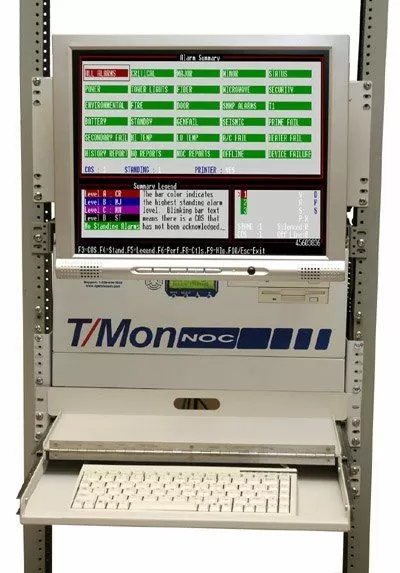
This solution also provides for better diagnostic capabilities. With the rackmount LCD and keyboard, you'll be able to view information directly as it comes from the video card without any transport lag. With this view, you will even be able to view the NOC's power-up self-test for deeper diagnostic capabilities.
The new package includes a mini keyboard designed to fit in a single 19" rack unit. The keyboard includes all of the keys you will need for your monitoring applications. The new rackmounting has a slide rack for housing the keyboard, allowing you to pull it out only when needed. The slide rack also closes, allowing you to cover your keyboard to protect it from dust when it is not in use.
The 17" LCD screen is swivel-mounted, allowing you to tilt-adjust your screen (up, down, left, and right) as needed to best view your incoming alarms, diagnostic tests, and more. In addition to the mounting swivel, the package also includes a 19" rackmount aluminum panel to attach the LCD to your rack. With this new rackmounting, you can deploy your T/Mon, LCD, and keyboard in any configuration you choose, allowing you to place the equipment where it is most convenient for your monitoring operations.
LCD and Keyboard Package Works with All T/Mon NOCs
"This capability can be easily added to your existing T/Mon NOC," said Storm. Of course, you can order your new NOC with this option right from the start. To order your rackmount LCD and keyboard for your T/Mon NOC, call your DPS sales representative at 1-800-693-0351.


