
Check out our White Paper Series!
A complete library of helpful advice and survival guides for every aspect of system monitoring and control.
1-800-693-0351
Have a specific question? Ask our team of expert engineers and get a specific answer!
Sign up for the next DPS Factory Training!

Whether you're new to our equipment or you've used it for years, DPS factory training is the best way to get more from your monitoring.
Reserve Your Seat TodayHave you been put in charge of finding a new telemetry system for your company? Wondering "what is telemetry" and how it applies to your network? This process not only involves understanding the basic functions but also recognizing the benefits of telemetry for improving network efficiency.
Where do you start? What telemetry equipment do you need? What monitoring features are key, and which can you live without? How can you make sure your network is fully protected, without spending money on equipment you won't use? Particularly, how can you remotely monitor critical systems to avoid unnecessary site visits?
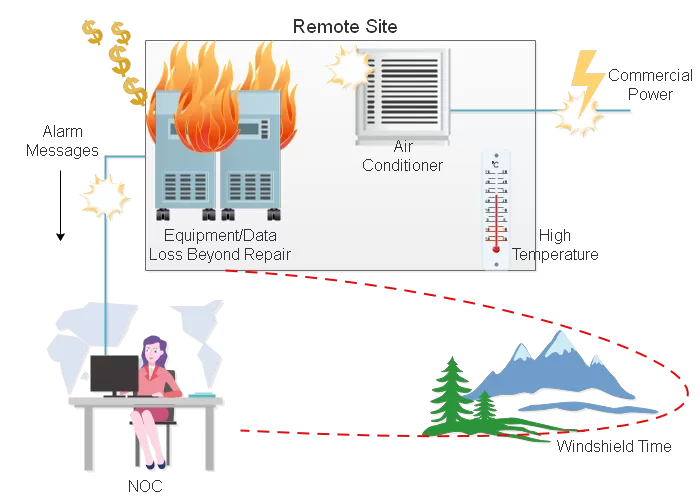
Before beginning your search for telemetry equipment, you may have asked yourself "what is the definition of telemetry" or "how does network telemetry work". Understanding this is the first step to successful implementation. Let's start with the basics. Telemetry plays an important role in real-time monitoring of equipment health and system performance. We define telemetry as the process of collecting data from equipment and reporting it to your Network Operations Center (NOC). Telemetry allows your central station operators to respond to alarm events from remote sources, gaining insights into potential issues before they escalate.
To understand how telemetry differs from monitoring, it is essential to recognize that monitoring is a subset of telemetry. Here's how these concepts differ:
Monitoring focuses on a narrow scope with it's primary objective being detecting potential issues with equipemnt on your network. It typically measures metrics such as resource usage, enviromentals, and network activity allowing for prompt action to prevent incidents or escalations. When used in conjunction with other equipment, like remote power switching, it gives you the ability to inteact with equipment in the field remotely.
Telemetry, on the other hand, encompasses a broader range of data collection and analysis. While it can be used for troubleshooting it's more often used to gain an understanding of user behavior and system performance. By leveraging broad performance metrics, telemetry provides a comprehensive view of the system allowing for improved descion making.
In summary, while both monitoring and telemetry are integral to system health management, telemetry offers a wider range of insights and is more suited for enhanced descion making where as monitoring is best suited for wide area networks, remote sites, and giving you more contorl over your equipment.
Every network is different. A universal system won't provide the singular coverage you need, and may cost more money than you really need to spend.
Before you can decide what system to buy, you need to analyze your network and determine its monitoring needs. Figuring out what your telemetry system really needs to do is your first step to designing a "perfect fit" system. A "perfect fit" system is one that's custom-designed for your network equipment, your available data transport, and your budget. This allows for long-term efficiency and scalability.
Your first step to getting your telemetry upgrade rolling is a complete survey of your current network and remote sites. Completing this survey will help clarify what telemetry is in the context of your operations. You'll also gather data about how each remote site interacts with your central network. This survey will also document your existing situation in order to build a road map for your upgrade.
In your site survey, you're looking for three things:
It takes a lot of equipment working together to keep your network running. Telemetry and dependable data collection systems help provide critical insights into this process. Using IoT devices can enhance your ability to remotely monitor a wider range of equipment and environmental conditions. You need accurate, detailed information about everything involved.
That means monitoring not only your base telecom equipment but also all the equipment that supports it. This typically includes environmental conditions, building access and power. All things necessary for your equipment to operate correctly. Monitoring user engagement with system alerts can also streamline response times.
The necessary things you need to monitor fall into four categories:
Don't settle for monitoring your revenue-generating equipment with alarms that only tell you when the equipment is up or down. Ideally, you want a broad series of alarms that identify problems down to the card level.
Monitor your power supplies as wholly as possible - power outages are the most common cause of remote site failures. Just as your power supply has multiple fail-safes and backup systems, each of those backups should be monitored.
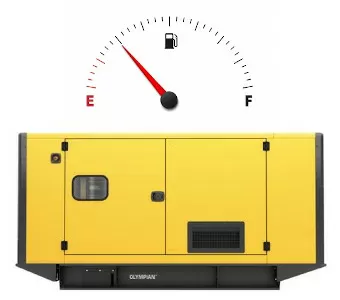
At the basic level, you must monitor commercial power and battery level. It's also a good idea to monitor rectifiers and generators, including whether the generators perform their regular self-start tests. If you want the earliest possible warning, monitor every link in the power supply chain. This includes the fuel levels in generator diesel tanks.
It's vital to monitor the safety of the buildings that house your key equipment. Since remote sites are usually unmanned and often in isolated locations, they're more at risk to vandals and intruders. Short circuits and small electrical fires can become disasters if you don't have any way to detect them.
Your site monitoring should begin with at least monitoring open doors and fire alarms. For more security, you may want to consider adding a building access control system to your alarm system.
Most electronic equipment operates best within a defined range of temperature and humidity. Monitoring these factors will give you early warning of potential problems.
You'll probably want to monitor different environmental conditions, depending on the location of the remote site. If the remote site is in a desert, humidity might not be a concern to you, but the temperature probably will be. Or, if your remote site has to function through a Georgia summer, humidity is a major concern to you.
Another factor is the staying power of your equipment. If it's rated to operate under extreme conditions, you won't have to monitor environmental factors quite so closely. You'll still want to make sure the site stays within the range specified for your equipment, though.
If your remote site is an environmentally controlled facility, you have a different set of factors to worry about. You need to monitor the continued operation of the heating, ventilation, and air conditioning (HVAC) equipment that maintains the facility environment. Also, you must be sure to monitor the power supply to the HVAC system. You should still monitor temperature and humidity, as another safety check to make sure the HVAC is doing its job.
In the network management system of your dreams, you'll have an alarm for everything without spending extra money. In the real world, time and budget constraints usually mean you have to carefully select which telemetry you're going to monitor. Through leveraging software developers' expertise, you can automate parts of this prioritization to optimize resource allocation. Once you understand the meaning of telemetry and prioritize its applications, you'll help balance costs and benefits effectively.
When you're choosing network elements to monitor, keep these three principles in mind:
Now that you have an idea of what you should be monitoring, how are you going to monitor your telemetry system? Using the right tools makes sure data is accurately collected and reported. Real-time monitoring tools are particularly useful for gaining insights into equipment performance and user behavior.
These tools leverage telemetry data to uncover performance bottlenecks, such as over heating components, inefficient cabaling, and power fluctuations. By analyzing this data, NOCs teams and tehcnicans can identify specific areas that require optimization. Once bottlenecks are identified, actionable steps can be taken to enhance system performance.
Incorporating telemetry insights into your optimization strategy means continuously monitoring performance metrics and making data-driven decisions. This ongoing process helps maintain and improve system reliability, ultimately leading to less site visits and costly downtime.
There are three phases to telemetry: acquisition, transport and presentation. Let's look at each phase in order, breaking down telemetry as well as its processes to provide clarity on its implementation.
There are three types of alarm inputs to consider in your system's telemetry design: contact closures, analog inputs and serial inputs.
Contact closures are also called discrete alarms or digital inputs. A contact closure is a simple on/off switch that produces an electrical impulse when it's activated or deactivated. Contact closures are the simplest kind of alarm input. They're often used as the most basic means of getting some kind of alarm from any kind of equipment.
Analog inputs accept current or voltage level inputs over a continuous range. They're the ideal kind of alarm for monitoring things like temperature and battery charge. Analog inputs are important for alarms where it's important to get an actual, physical measurement of the condition in real-time.
Serial inputs are electrical signals formatted into code that denotes much more complex information than contact closures or analogs. There's a wide variety of protocols for transmitting telecom telemetry data. The most common telemetry protocols are open standards like SNMP, Modbus, ASCII, and DNP3. However, there are also proprietary protocols specific to the manufacturer.
Once data is collected at your remote sites, the streaming telemetry data occurs over your network to your NOC. This data can be sent over nearly any kind of data transport. This includes Ethernet LAN/WAN, dial-up modem, dedicated circuit, overhead channel, etc.
There are two things you should keep in mind about telemetry data transport:
1. As much as possible, you want to work with transports that are already available in your network. You don't want to create added expenses by committing yourself to install new network infrastructure. It's best to choose a system that is compatible with the transports you already have.
2. It's a good idea to have a secondary backup path for your telemetry data in case your primary path fails. No transport is 100% reliable, and you don't want to lose visibility of your revenue-generating network under any circumstances.
The final phase is presenting the data in a useful way. This makes it human-readable and usable to direct repairs. This is done through a specialized computer called a telemetry presentation master.
The master is a centralized location that collects the telemetry reports from RTUs. It also formats, sorts and displays the information for a human operator.
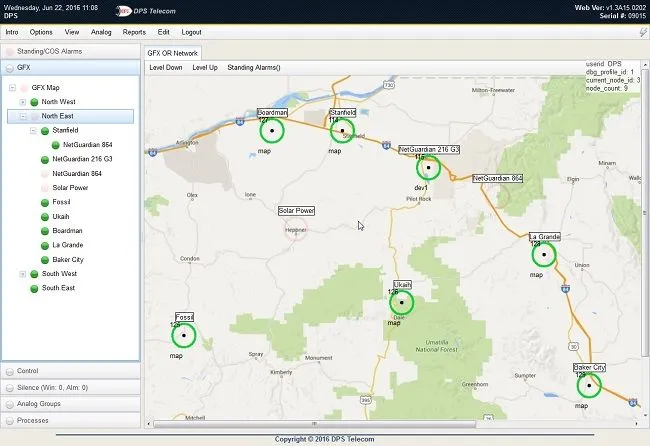
The master is really the most important part of the entire telemetry system. For the NOC technicians who monitor dispatch repairs and telemetry, the master IS the telemetry system. It's the only window they have to see what's going on in the network.
The features and capabilities of your master directly control how much useful information your NOC techs can see. A high-quality, full-featured telemetry master gives you the tools to substantially lowers your network maintenance costs.
It's very rare for a company to be able to suddenly leap from its current telemetry system to its ideal system. Budget restrictions and the cost of installing equipment mean you can't usually get everything you want in one budget year. Evaluating telemetry and its potential impact on budget planning is essential.
Here are some strategies that will help you find a smooth, gradual upgrade path. This will let you transition to a new telemetry system over several budget cycles:
Incorporating telemetry systems into your network can revolutionize your operations - if done right. Follow the best practices to make sure your telemetry upgrade is efficient, cost-effective, and scalable.
Understand what you're working with. Document all your current equipment, transmission methods, and existing alarm systems. This step identifies both what you need to replace and what can be integrated into the new system.
Focus on monitoring the most crucial components first:
This prioritization helps allocate budget and resources effectively.
Avoid using too many device models. Select 2 - 3 RTU types to reduce training time, simplify spares management, and streamline integration. Consider modular solutions like DPS NetGuardian RTUs, which can expand as your network grows.
Add at least 15% extra capacity for future needs. Your network will grow, and your telemetry system must adapt. Scalable systems like DPS's T/Mon Master Stations and expandable RTUs are designed to grow with your network.
Make sure all data has a backup path to the NOC. No transport method is 100% reliable. For example, dual power feeds or failover paths in devices like the NetGuardian 864A add resilience.
Before deploying system-wide, test your telemetry system in varied conditions:
DPS's rigorous EMI and temperature testing processes allow for durability, even in harsh environments.
Partner with a vendor like DPS Telecom that offers:
Leverage analytics for predictive maintenance. Devices such as DPS's BVM Sensors monitor batteries for voltage and internal resistance, sending threshold alarms for proactive management. You should also use automated tools to streamline NOC responses. T/Mon Master Stations can mediate alarm data across multiple protocols, upholding compatibility with existing systems while introducing automation.
Following these best practices will set the foundation for a strong and reliable telemetry system. Such a system not only reduces downtime but also optimizes operational efficiency. This saves you both time and money in the long run.
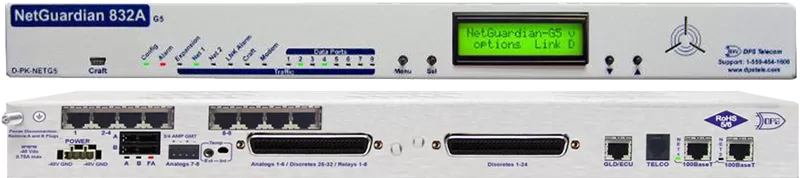
The NetGuardian 832A is a full-featured remote telemetry unit. The NetGuardian supports 32 discrete alarms, 32 ping alarms, 8 analog inputs, 8 controls, and 8 serial reach-through ports.
The optional NetGuardian Expansion Unit can expand the NetGuardian's discrete alarm capacity to 80, 128 or 176 discrete alarms. The NetGuardian reports to T/Mon LNX or to multiple SNMP managers. Or use the built-in Web Browser Interface and email alarm notification to monitor your remote site without a master. This RTU exemplifies telemetry meaning in action by providing clear network visibility.
All DPS Telecom products include comprehensive technical support. If you've purchased one of our products and are encountering any kind of issue, contact DPS Tech Support today at 559-454-1600.
At DPS Telecom, the representative who answers your call isn't an intern reading from a script. DPS Tech Support representatives are engineers who contribute to product development. And, if your problem requires additional expertise, the DPS Engineering Department that designed your product is right down the hall.
Help us connect you to the right engineer by filling out this quick questionnaire. Simply leave your contact information to get started, and we'll call you back. Most preliminary discussions are about 15 minutes, and afterward, we'll send you a custom application diagram of a recommended solution that'll make it easier to justify your project to management.


