
Download our free Monitoring Fundamentals Tutorial.
An introduction to Monitoring Fundamentals strictly from the perspective of telecom network alarm management.
1-800-693-0351
Have a specific question? Ask our team of expert engineers and get a specific answer!
Sign up for the next DPS Factory Training!

Whether you're new to our equipment or you've used it for years, DPS factory training is the best way to get more from your monitoring.
Reserve Your Seat TodayIT infrastructure is a crucial aspect of most actions, and the data center is the heart of IT resources. Data center monitoring systems play an essential role in this infrastructure by maintaining constant oversight. Your servers and routing gear are key to the standard activities that many employees and clients may take for granted: accessing their data, communicating with each other, accessing the internet, or, in some cases, even dialing an outside line. If the data center suffers a failure of some sort, your clients, colleagues, and managers, will also have a problem. And if you're even remotely involved with the data center, you'll hear about it.
To prevent outages and long conversations with angry parties affected by outages, you'll need to monitor your data center. Investing in strong data center monitoring systems provides a proactive approach to system health. Data center monitoring systems help keep you informed of the goings-on in your data center. They can alert you to problems before they become service-affecting, so you can keep everything running smoothly. Or, even if a problem does result in an outage, monitoring systems can help you pinpoint the problem, so you can minimize the length or seriousness of an outage.
To keep fully aware of what happens in your data center, you'll want to monitor the gear and the environment. Equipment monitoring consists mostly of tracking gear to make sure that any single piece doesn't malfunction. This is a key function of effective data center monitoring systems, which can include both hardware and software tools. Environmental monitoring involves using analog sensors to check on the heat, humidity, and air flow in your data center. This ensures that your HVAC and other systems are working properly to prevent gear malfunction.
Of course, you'll have to make sure that all of your data center monitoring systems report to the right staff. According to the Uptime Institute, even 1st tier data centers are expected to maintain 99.671% availability, so you'll need a fail-proof way to make sure that you always know what's going on in your data center, without being glued to a terminal. And when something does go wrong, you can't afford to waste time searching for the location or the exact nature of the problem. By integrating advanced data center monitoring systems with your workflows, you enhance both visibility and response times. Typically this means you'll need to employ a master station in to bring in all the gear and environmental monitoring data and report it in quickly and meaningful ways.
The gear in the data center is basically your employer. If it goes out of business, so do you. So monitoring your gear is a good place to start. Data center monitoring systems allow you to keep tabs on your equipment with precision, allowing for optimal performance. You'll use RTUs in your racks to report back on the status of your gear. Most RTU's are easily rack mountable and fit in line with your gear. The RTU's discrete points, joined to gear in your racks, will report back critical, major, and minor alarms.
Your RTU should also have analog inputs that you can use to measure gear temperatures, air flow, and other environmental data. If an exhaust fan in a cabinet goes out, a simple air flow sensor can clue you in to the problem. This level of detail is achievable through sophisticated data center monitoring systems designed to prevent unexpected failures. You can respond early to prevent a high temperature alarm or gear damage resulting in an outage. If racks are liquid cooled, analog sensors can help you monitor for humidity and condensation.
Any RTU you install should also be able to report ping alarms. You can configure ping alarms to ping various network gear and ensure that communications are still active (or working). If not, the RTU will set an alarm and inform you of the issue before somebody else can. This integration of RTUs into data center monitoring systems provides a comprehensive approach to maintaining network health.
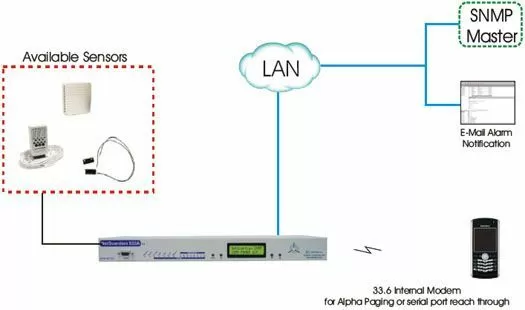
DPS Telecom recommends their NetGuardian series remotes for monitoring. In addition to the above features, NetGuardians have simple web interfaces, so you can simply punch in the IP address, login, and configure or monitor your gear. From the web interface, you can set alerts, so when an alarm occurs, the RTU can send you an email or send an SNMP trap. You can also monitor the RTU's discrete points and analog inputs, and even operate control relays.
Using NetGuardians as part of your data center monitoring systems allows for easy communication between devices. You don't necessarily want to use the web interface as a full-time monitoring solution for your RTUs. Keeping 20 browsing windows open to monitor gear can be a hassle. You can though, use it to check up on your alarms when you're on the go or if you receive an alarm alert. Even from your BlackBerry or other smartphone, you can keep aware of what's going on in your data center.
Beyond monitoring gear for problems, monitoring your data center's environment can help clue you into problems before they result in gear alarms or service-affecting damage. Data center monitoring systems include environmental monitoring tools to make sure that conditions stay within safe thresholds. Your data center likely has computer room air conditioners (CRAC's) and other sorts of HVAC gear to keep the server room from getting to hot or humid. Data center cooling typically relies on air flow as well, cool air in, hot air out. (Or something to this affect. You'll usually want to recycle your hot air, because hot return air helps maintain a high differential for the heat exchanger. This results in cooler air coming out of the CRAC units and into the data center.)
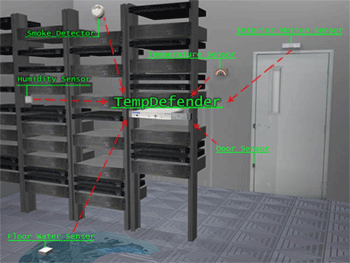
To monitor your data center's environment, you'll need to monitor your data center's crucial HVAC gear with discrete contacts to make sure that your environmental control systems are working. Incorporating sensors into your data center monitoring systems provides real-time data on airflow, temperature, and humidity. It's also helpful to place analog sensors throughout the data centers in areas that will give you an indication of whether or not your environmental systems are working properly. Measure airflow in hot and cold aisles to make sure that the right kind of air is moving in the right places throughout the data center. Place temperature sensors in hot spots around the room to give you an indication of when gear is in danger.
A device like DPS Telecom's TempDefender can help with analog data center monitoring. It takes up very little rack space and can monitor up to 16 analog sensors. These sensors are an important part of advanced data center monitoring systems, delivering precise measurements. Sensors for the TempDefender can be daisy-chained together, and the chain can run up to 600 feet from the small RTU. The TempDefender's range helps ensure that you can monitor every corner of your data center without much regard for RTU placement.
Because there's so much to monitor in your data center, you'll need a way to organize and report back on the status on your data center. A master station polls the network monitoring systems in your data center and provides a standard, unified interface from which you can view your monitoring data or alarms. When there is a problem, the master station will bring it to the forefront, so you can view the alarm without directly accessing the interface for the RTU.
DPS Telecom recommends the T/Mon alarm master series to collect your alarms. T/Mon can poll and interpret alarms from gear with integrated legacy monitoring systems in addition to standard RTU's. Then you're not limited to deploying a whole new fleet of RTU's. You can use existing monitoring paths and deploy new RTUs to cover blind spots, and all of your monitoring gear can report to a single, top-level master. This simplifies things for you while maximizing visibility. In addition to consolidating alarms, advanced master stations like T/Mon can help you sort your alarms. You can quickly narrow down a problem to its root cause when it does occur.
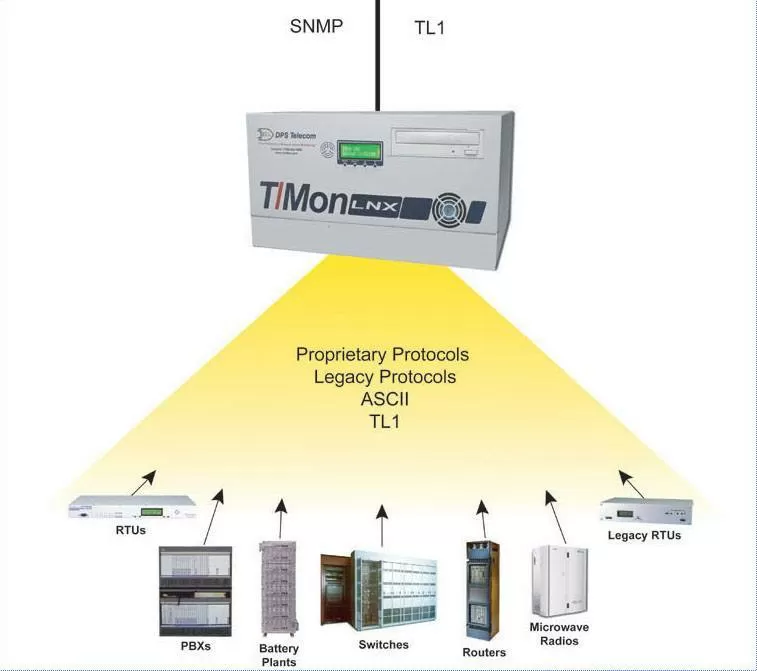
The T/Mon alarm master can also report alarms the same way RTUs do, via pager, email or SNMP trap. With an accessory, you can even report alarms via voice call and acknowledge alarms via DTMF. If you always need to be aware of your network, than you should have a lot of ways for the data center NOC to get in touch with you and let you know what sort of problems you've got.
With a capable alarm master station, you can monitor your alarms locally or remotely, and with a lot of programs. T/Mon offers virtual access, a web interface, and a map-based interface that can be access remotely. The T/GFX map based interface for T/Mon allows you to view your data center on a floor-plan level, with your gear mapped out. So you can see exactly where the problem is when something goes wrong. For added convenience, you can even access the interface for devices joined to your RTU's terminal server through the graphical interface.
A robust monitoring system with the right monitoring gear and strategy can automate data center monitoring and will make maintaining uptime easier. That way, you can spend less time in the data center and more time focusing on increasing performance. The key to automating data center management is making sure that you're monitoring your gear, environment, and consolidating reporting with an advanced master station.
Click Here to Learn About Data Center Cooling and Management


