
Download our free Monitoring Fundamentals Tutorial.
An introduction to Monitoring Fundamentals strictly from the perspective of telecom network alarm management.
1-800-693-0351
Have a specific question? Ask our team of expert engineers and get a specific answer!
Sign up for the next DPS Factory Training!

Whether you're new to our equipment or you've used it for years, DPS factory training is the best way to get more from your monitoring.
Reserve Your Seat TodayRemote temperature sensor tech will help you to keep gear at your remote sites online when they may have failed due to overheating or (less commonly) severe cold.
Temp sensors are important whenever you're working with computer gear. Computers make a lot of heat as they operate, and that heat must be cooled or ventilated to prevent thermal shutdowns.
Remote temperature sensors are unique in that they allow you to monitor temps across vast areas. Since direct viewing of the temperature reading is impossible with such range, remote temperature sensors transmit their temperature reading in one of a few different methods. If you have just a few remote temperatures to monitor, you can configure your remote temperature sensor to send you an e-mail, text message, or phone voice message. The advantage of this direct approach to temperature alerts is that no other gear is required.
If you have more than a few remote temperatures to keep track of, however, you'll gain from using a central master. It can collect many temp readings at the same time. It then sorts them into one display and sends you e-mails or phone messages as needed for the most important events.
It's important now to clear up a bit of technology for you. Although I've talked about a remote temperature sensor so far as a single device, I've actually been talking about a combo of two boxes that work together to provide remote temperature alerts.
The first key component of any remote temperature sensor system is the sensor itself. In industrial cases, these are most commonly powered by +12 VDC. If you have sites that run on either 110 VAC or -48 VDC, you can create +12 VDC using wall transformers. There is, however, a much better way to power your sensors that gets rid of the need for wall transformers.
Whether you have this sensor power advantage depends on your pick of an alarm remote to collect data from your temperature sensor(s) and send it back to you. An alarm remote is a small box that you deploy at your remote site to provide intelligence for a lot of "dumb" sensors. Alarm remotes are most commonly powered by -48 VDC, so they're convenient to install at remote sites that run on protected battery power.
The best alarm remotes for remote temperature monitoring provide an on board +12 VDC power supply. This eliminates a whole lot of wiring headaches, as you don't have to run a separate power feed (and somehow convert to the required +12 voltage) from the wall.
Alarm remotes vary in the number of sensors that they can accept. Your choice should depend on the number of measurements you need to make at a single remote site, but know that you do have a choice.
Alarm remotes connect to remote sensors in one of two ways. First are discrete inputs, which are also called "digital" or "contact closure" inputs. These simply see whether a joined dry contact is open or closed. While these inputs are simple, they do limit your choice of temperature sensors to discrete sensors only.
Discrete temperature sensors cannot tell you a precise temp value. Much like you might set your thermostat in your home, you'll need to pre-set a single temperature boundary when you're setting up your discrete sensor. When this threshold is crossed, your discrete sensor will latch/close its internal contact closure. This will be detected by your alarm remote, sending an automatic alert back to either you or your central office.
Let's say that you set your discrete temperature sensor with a threshold value of 85 degrees F. If the closure is latched (meaning "active"), you know the temp is above 85 degrees. You don't know, however, if it's at 86 or 186. There's no way to gauge the scope of the problem.
There is a superior tech for logging temp. You'll be able to use it if you select an alarm remote that has one or more analog inputs. An analog input, in most cases, measures a precise value between 0-5 volts DC or 4-20mA. The best analog inputs can be toggled between these two standards using a simple hardware DIP switch.
Unlike with the discrete remote sensors I mentioned earlier, analog sensors are able to return a highly accurate value (usually within 1 degree). This means that, at any time, you can check the temperature at your remote site. If you receive an alert that the site temp has exceeded 85 degrees, you'll know whether it's 86 or 87 or 88 or 186.
Let me take a minute to explain how alerts work with analog temperature sensors. Since analogs are based on a endless range of values, it may not be clear to you at first how analog sensor can trigger threshold alerts. In this case, you are correct to think that your sensor will not output discrete threshold alerts to your alarm remote at the site. Instead, you'll be leveraging the built-in smarts of your alarm remote. Any good alarm remote, at minimum, will support at least two software threshold temperature alerts. This is the minimum number of threshold values because it allows you to specify one "too high" and one "too low" value.
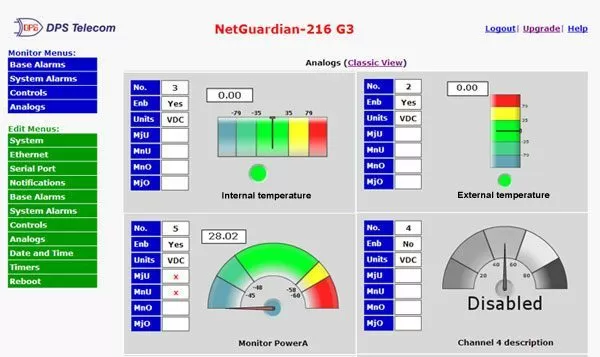
Better remote temperature sensor systems will have more supported threshold values. Ideally, you'll have four software thresholds. This allows you to specify both major and minor variants of high and low temperature alerts. While a minor high-temperature might warrant continued monitoring and a routine response, a major high-temperature should most likely trigger an emergency response to prevent thermal failures and expensive gear damage.
Review of Today's Remote Temperature Sensor Equipment.
No review of remote temperature sensors would be complete without reviewing the current technology for remotely monitoring temperature.
First, let's start by looking at a small remote designed for light industrial telecom and IT cases. The TempDefender IT is a very compact alarm remote with a highly specialized sensor interface that eases wiring by talking with and powering a lot of remote sensors over one wire.
The TempDefender has four "D-Wire" sensor inputs that support a grand total of up to 16 remote sensors (of course, other sensors like humidity sensors are available). How can this alarm remote support four times more sensors that it has ports? The specialized sensors of the TempDefender have both "in" and "out" ports, so they may be daisy-chained together from a single alarm remote input port.
If you'd like to receive automated voice messages on your phone when your temperature exceeds a set value, you will need to choose an alarm remote that has the capability. One good small remote that can do this is the NetGuardian LT. Simply plug in a phone line and set up your phone number(s), this small NetGuardian can call you whenever you have an important temperature alarm. The voice is programmed, so there's no need to pre-record each alert message.
If you have a lot of remote temperature sensors (plus other telecom gear and environmental values to monitor), you should consider a larger RTU like the NetGuardian 832A. It has 32 discrete inputs and 8 analog inputs, so you can monitor a variety of sensors. Plus, the other input not used with external sensors can be used to monitor gear alarms, power input voltage, or battery levels.
When it's time to select the actual external remote sensor you will deploy with your alarm remotes, it's best to use sensors recommended by a trusted alarm remote manufacturer. How do you know who to trust? One way is to look at the build quality of alarm remotes. A solid build indicates two advantages.
First, the manufacturer that built it knows what they're doing. They know remote monitoring, including remote temperature monitoring, and they have enough experience to recommend a remote temperature sensor that will work well for your project and survive in your site environment.
Second, they will only recommend sensors that are as reliable as their remotes. Why recommend gear that won't last as long as the master device it's attached to? So, by looking at the quality of a company's alarm remotes, you will know their ability to recommend temperature sensors for remote temperature monitoring.
I hope that you've found this intro to remote temperature sensors useful. Please review the links below for more gear recommendations and information:
Related Topics:
Remote Temperature Monitoring.
Network Temperature Sensor.


