
Check out our White Paper Series!
A complete library of helpful advice and survival guides for every aspect of system monitoring and control.
1-800-693-0351
Have a specific question? Ask our team of expert engineers and get a specific answer!
Sign up for the next DPS Factory Training!

Whether you're new to our equipment or you've used it for years, DPS factory training is the best way to get more from your monitoring.
Reserve Your Seat TodayTelco alarms are alerts for problems indicated by telco equipment. They are typically weighted by importance as critical, major, or minor "severity" levels. These problems are normally related to failures in the chassis - high temperatures, fans breaking down, and other hardware issues.
Telco alarms are most likely monitored by discrete contacts, small contact closures that issue a burst of voltage when an alarm condition is present. Discretes only provide binary reporting functionality. Remember that your telco gear will generally have discrete outputs that each designate alarm severities. This provides another dimension when planning your response.
These discrete contacts are monitored by a remote telemetry unit (RTU), a device that sits inline with your telco gear and reports alarms as they occur. The RTU serves as your eyes, ears, and, occasionally, hands at your remote sites, keeping you up to date on problems throughout your network.
Sophisticated RTUs, like the NetGuardian 864A, can monitor up to 64 discretes per unit. Expansions are available to increase capacity. By expanding, you can monitor even your largest remote sites.
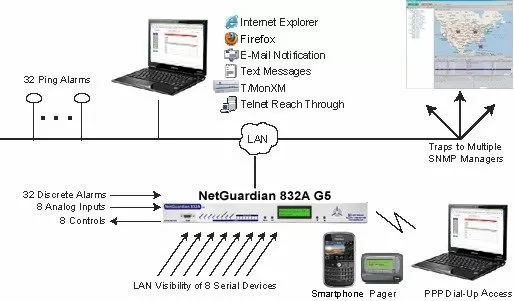
Good RTUs will report to a log file, requiring the user or a third party program to weed through terminal entries to determine when there's a problem. The best RTUs will send alerts.
The NetGuardian series from DPS Telecom can send notification via email, phone, or text. When a telco alarm "set" occurs, your techs can monitor directly from a smartphone or laptop. They won't have to wait for dispatch from the Network Operations Center (NOC).
NetGuardian RTUs also offer an easy-to-use web interface. Your technicians can access detailed information from their laptops, smartphone, or any other device with a browser. They must simply have access to the RTU via the internet or your intranet.
To supplement telco alarms, some RTUs offer analog inputs and control relays.
Analog inputs allow technicians to measure conditions that might affect the gear without directly monitoring the equipment. Analog sensors typically report four alarm thresholds, major and minor, over and under, and are used to monitor conditions such as temperature.
Let's say, for example, you were to set a "minor over" threshold at just above the set point for your site HVAC. Then you receive that "minor over" alarm. That would mean that your HVAC equipment is malfunctioning. While this doesn't indicate an alarm from your equipment directly, it does indicate a condition that could potentially affect your telco equipment.
Control Relays are Simple Circuits Wired to Your Telco Equipment to Perform Functions Remotely
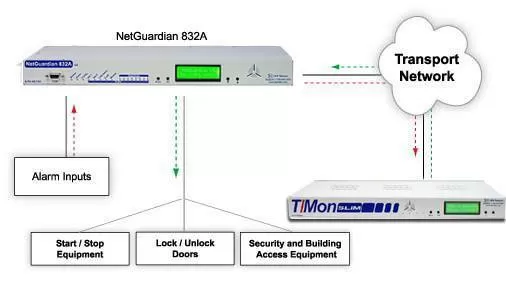
Control relays perform on-off functionality and help you avoid making a trip to your site to perform minor maintenance duties. You can even derive control relays to operate based on your telco alarms and analog thresholds. When an issue occurs, your RTU can handle the problem without bothering you.
Consider one of your telco sites. Let's say, for example, you had an analog sensor monitoring fuel for the main generator. You could derive a control for it. When the analog sensor set an alarm for low fuel in the primary generator, it would power on the secondary generator automatically.
This would keep your telco site powered and operational without requiring any manual action. You would receive an alert.
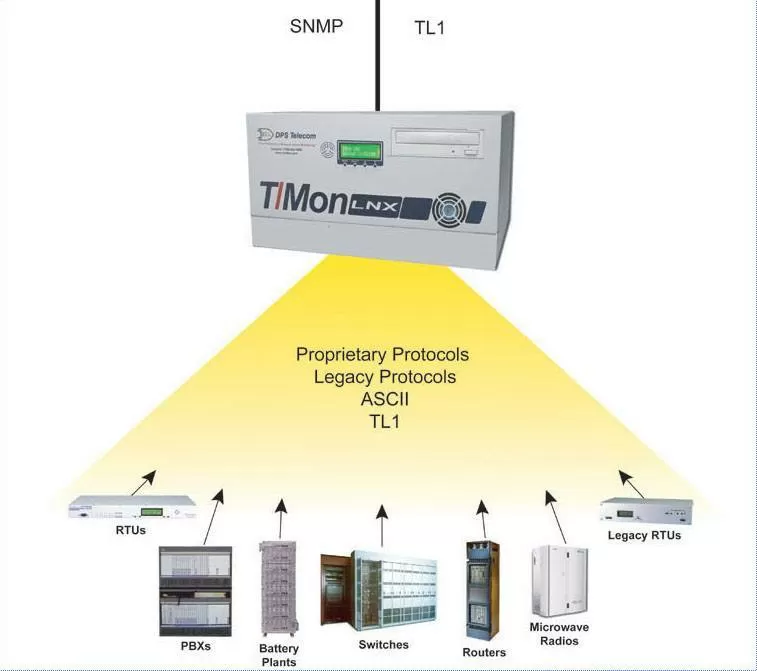
Telco networks are most likely large and incorporate a number of sites. You'll be monitoring those sites with your RTUs. That's why you'll likely want a master station. It will incorporate all of your telco alarm rationalization and other monitoring information into a single interface.
The master station will save you the trouble of having to associate a point reference with a site whenever you receive an alert. The master should do it all for you. This provides a very complete view of your network. This is better than you could possibly have by monitoring your RTUs individually.
A strong master station, like T/Mon, will bring in your telco alarms from sources under any available protocols. Whether you're working with equipment in legacy or proprietary protocols, T/Mon will capture all of your telco alarms, so you can keep all of your alarms on one screen.
Outside of that, your telco master should provide alerts, and an easy-to-use interface to simplify alarm management practices.
T/Mon can send notifications for any of the alarms you collect via email, text, pager, or with the SiteDialer accessory, voice. You can even set up progressive alerts, so if the primary technician for a particular site or alarm fails to acknowledge an alarm, T/Mon will alert the next person down the line, and so on.
As technicians acknowledge alarms, the NOC will know where the technician is headed and can help ensure that operators response don't overlap in attempting to deal with alarms. These sorts of alerts help you ensure that your telco network is maintained and repaired quickly and efficiently, whenever a problem occurs.
Your telco master station should also employ an easy-to-use interface. This makes alarm monitoring simple enough for anyone in the NOC to understand. Many master stations provide a simple terminal interface. These interfaces are powerful, and quick to navigate, but most likely require intricate knowledge of your telco network and a great deal of training.
Novice users won't be able to help you effectively manage your network. Better master stations employ a graphical interface, something that displays alarms in an intuitive way, both reducing errors and allowing more users to monitor the network.
T/Mon does this with the T/GFX interface.
T/GFX displays your telco alarms on a map, so when an alarm sets, you can see exactly where the problem is. The map-based interface also allows users to "drill-down" from higher levels of the map. They can move from your network at large all the way down to the floor plan view at your sites. There's no mistaking the location of an alarm.
On one screen, T/GFX consolidates trouble tickets, text messages, and a list of standing alarms. A technician accessing the program can instantly see all available information associated with any of your telco alarms.
Telco alarms don't have to be hard to manage. With the right RTUs and the right telco master station, you can keep track of network failures when and where they occur. This increases maintenance efficiency and reduces the likelihood or duration of network downtime.


