
Check out our White Paper Series!
A complete library of helpful advice and survival guides for every aspect of system monitoring and control.
1-800-693-0351
Have a specific question? Ask our team of expert engineers and get a specific answer!
Sign up for the next DPS Factory Training!

Whether you're new to our equipment or you've used it for years, DPS factory training is the best way to get more from your monitoring.
Reserve Your Seat TodayA T1 RTU is a Remote Telemetry Unit that can communicate over a T1 connection instead of being completely reliant on Ethernet availability. This capability has the potential to radically improve your visibility of remote sites that are currently outside the reach of your LAN and expand your Remote Alarm Monitoring and Control system.
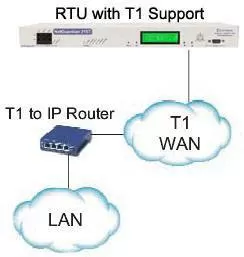
Historically, you were forced to use dedicated point-to-point units to provide LAN to your remote sites. With a finite amount of rack space and a limited budget, it just isn't feasible to create visibility at small sites outside of your LAN with traditional equipment. With a T1 RTU, however, you get this capability (along with monitoring and routing) in a single box. This saves rack space and eliminates the headache of dealing with multiple vendors and multiple support teams.
You do need to be careful, though, before making a purchase decision. To avoid a very costly mistake, use the following list:


