
Download our free SNMP White Paper. Featuring SNMP Expert Marshall DenHartog.
This guidebook has been created to give you the information you need to successfully implement SNMP-based alarm monitoring in your network.
1-800-693-0351
Have a specific question? Ask our team of expert engineers and get a specific answer!
Sign up for the next DPS Factory Training!

Whether you're new to our equipment or you've used it for years, DPS factory training is the best way to get more from your monitoring.
Reserve Your Seat TodayAn SNMP Trap is an unsolicited message sent from an "agent" to a master station. It provides a means for devices at your sites to alert your master station to events at your sites - even when the master station has not polled the device.
To understand the usefulness of a trap, we must first take a look at the architecture of a network management system. At the top, you'll have your master station, the device to which all of your remote devices report. Down from here, you'll have "agents," devices that report to the master. Now, in a typical network management system, the master station would have to poll agent devices prompting agents to send status information to the master.
Of course, what happens every time the master station needs an update? It would cause a massive burst of traffic. It would send a request for information to all network agents. All the agents would respond - whether they had any changes to report or not. To reduce traffic, a network manager could reduce the frequency of these polling requests. This also reduces network visibility and increases the risk of network alarms going unanswered. This leads to network outages.
No matter how traffic was optimized, as networks grew and network monitoring systems grew with them, it became impractical. An alarm master couldn't efficiently poll a large number of agent devices. Each device was monitoring a large number of points, adding up to significant traffic and effort expended by the master station. The Trap is the solution to the problem.
Traps don't require a request from the master. They are only sent when something within the agent changes state. That's why they can result in substantial network traffic savings. This can also improve your response time. For example, what if an agent that is configured to send SNMP Traps sets an alarm at a site? It doesn't have to wait to be polled by a master station to send the alarm update. The master station likewise doesn't have to receive frivolous updates about the agent's other unchanged points.
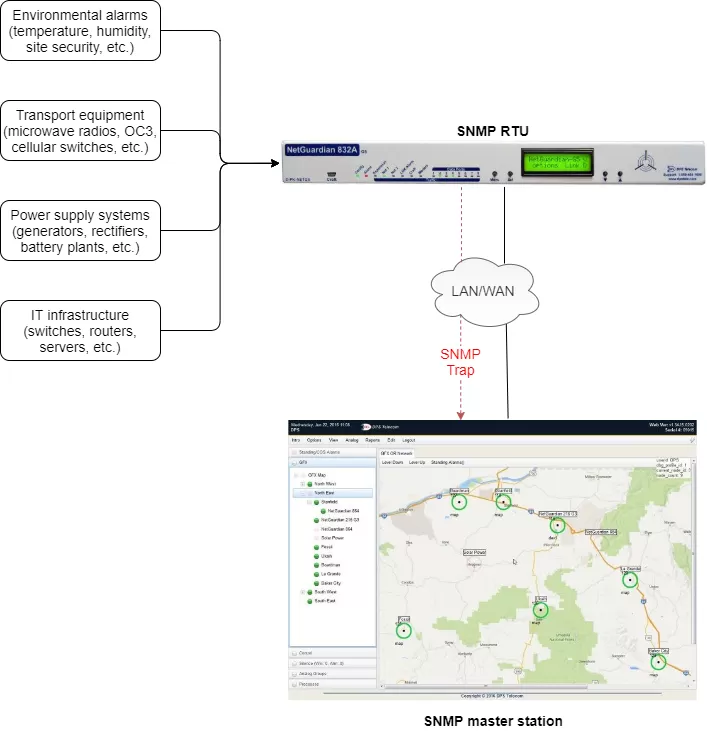
A master station won't natively understand the traps it receives. The master station must be able to decode OiDs (Object Identifiers) to decode traps sent to it. The OiD is loaded from a MiB file. These are usually available from the manufacturer for your agent devices. If a MiB is not available, you can edit and compile one yourself without too much trouble. Only a simple text editor is required.
Agent devices must similarly be configured to send traps. (Otherwise, they will simply wait to be polled by the master station). Typically, you will configure traps as a "notification,". You'll define the destination of traps and enable the trap notification for alarm points and analog thresholds on your agent devices. If working with telecom and other equipment that is not capable of sending SNMP Traps, you'll need to install an RTU capable of mediating alarms to SNMP. NetGuardian remotes are recommended as agent devices at your sites because they can mediate alarms to SNMP traps. They can send traps to multiple managers, along with notifications direct to technicians. When an alarm occurs, you can be sure that the right people know about it.
Firstly, when setting up a network management system, you must consider using devices that are SNMP compatible. This is true for both masters and agents. There are RTUs that can report alarms directly to you or output to a terminal in your CO, and that may be fine when your network is small. (Again, not optimal, but any problems it causes in managing your small network may not be very pronounced.) However, you may well want to employ SNMP Traps as your network grows. You'll find that consolidating your network management information will help coordinate maintenance and repair efforts. With the right RTU, you'll be able to forward SNMP traps for alarms, analog thresholds, and ping targets. This way, your master station can get all the information it needs to help you make intelligent decisions about your network status.
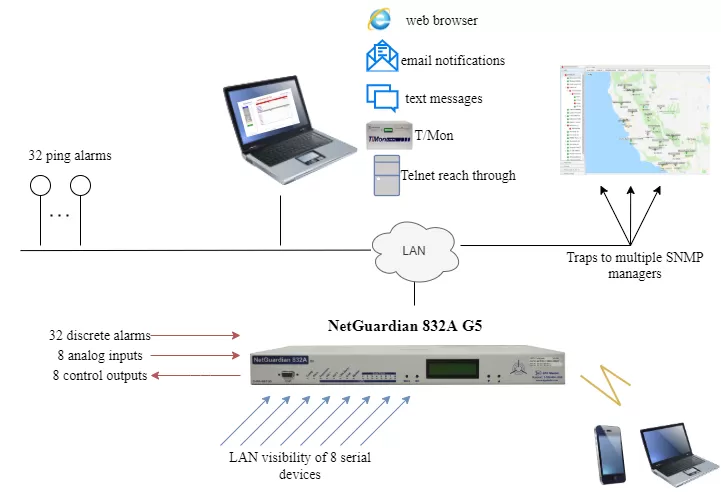
Similarly, a master station can forward SNMP traps to a higher level master station. If your network has tiers, regional networks or data centers reporting to higher-level master stations, traps become even more necessary. As your network increases in size, so does the effort required to poll all of your agent objects. Consolidating alarming at a mid-level manager and forwarding traps to the top-level master helps you organize alarm data. You'll also reduce network traffic and decrease response time.
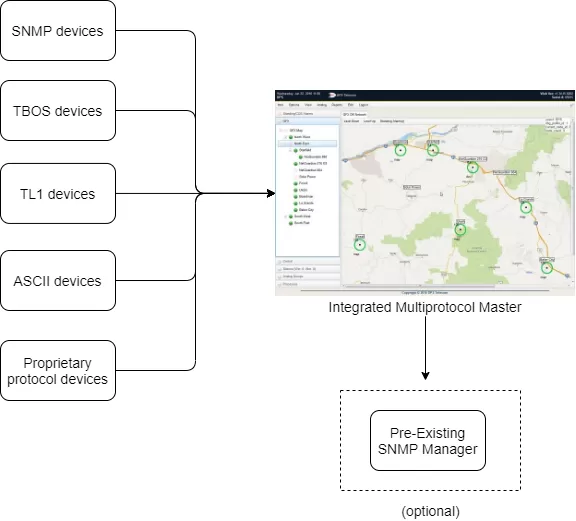
Of course, this also assumes that you can build your network from the ground up with SNMP-compatible devices. Your network may have some devices in it running either legacy or proprietary protocols. And while SNMP provides an efficient means for dealing with network traffic, this doesn't mean you can discard your non-SNMP equipment. You may not even be able to mediate all of your alarms to SNMP. So, you'll want a multi-protocol master station capable of both polling your legacy/proprietary equipment and receiving your SNMP traps.
T/Mon is capable of doing just this. It handles SNMP traps gracefully; MiBs are easy to load into the master. It can poll legacy and proprietary equipment and parse rules for anything outputting ASCII. There's no worry about whether T/Mon will be compatible with your equipment. It can also forward SNMP Traps to a higher-level master. You can make T/Mon your top-level master or make it a regional solution for your large, sophisticated network.
SNMP Traps will help you streamline your network monitoring systems, reducing network traffic and decreasing response time. It's important that, when considering network management systems and expansions, you look for devices that support SNMP traps.


