
Download our free SNMP White Paper. Featuring SNMP Expert Marshall DenHartog.
This guidebook has been created to give you the information you need to successfully implement SNMP-based alarm monitoring in your network.
1-800-693-0351
Have a specific question? Ask our team of expert engineers and get a specific answer!
Sign up for the next DPS Factory Training!

Whether you're new to our equipment or you've used it for years, DPS factory training is the best way to get more from your monitoring.
Reserve Your Seat TodaySimple Network Management Protocol (SNMP) Traps are alert messages sent from a remote SNMP-enabled device to a central collector, the "SNMP manager". In more technical terms, SNMP Traps are asynchronous, unpacked messages used to notify an entity in your network management system, i.e. central management, of significant issues and events.
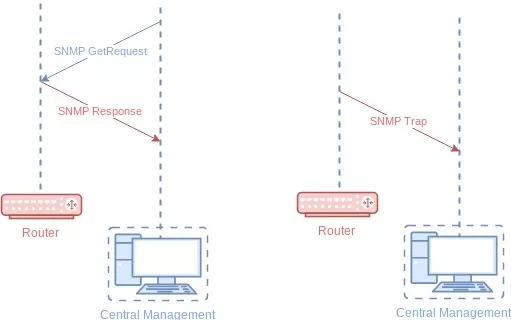
A Trap might tell you that a managed device is overheating, for example. Trap messages are the main form of communication between SNMP monitoring tools - an SNMP Agent and an SNMP Manager.
As you'll recall, SNMP is one possible protocol that managers and agents can use to communicate.
Incoming traps are used to inform an SNMP manager when an important event happens at the Agent level. A benefit of using Traps for monitoring and managing alarms is that they trigger instantaneously, rather than waiting for a status request from the manager.
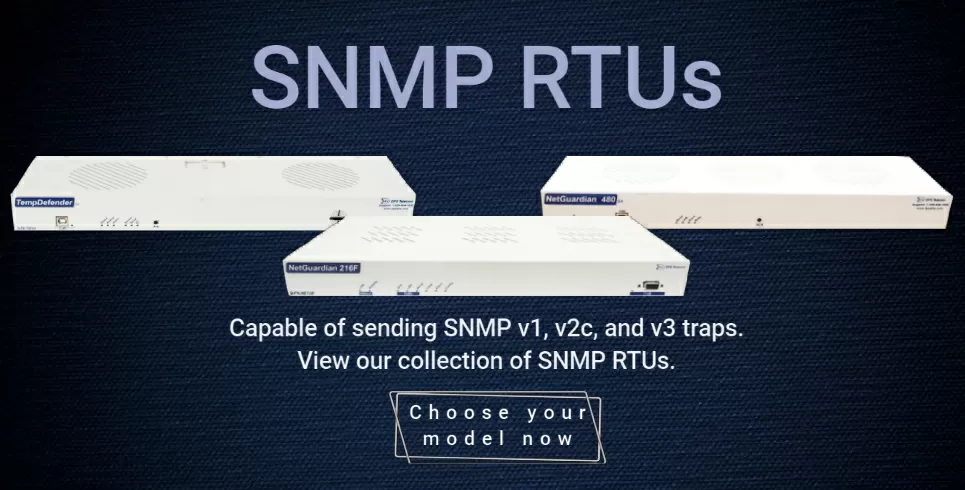
SNMP traps are most commonly issued by one of two device types. Newer monitoring devices are able to send traps on their own to alert an SNMP trap manager when they experience a problem. For older devices that do not support SNMP, an SNMP RTU may be used to collect alarms from multiple legacy devices, convert them to SNMP traps, and transmit them (most commonly over LAN) back to your SNMP manager.
Yes. The most important thing to keep in mind is SNMP versions, like v1, v2c, and v3. Each version has different pros and cons, and you need to think about compatibility when managing your network.
SNMPv3 supports encryption for security, while SNMPv1 is very simple to set up. If you have standardized on SNMPv3, for example, you're going to need SNMPv3 devices. Older devices will need to be upgraded. You can also install a translation device to convert between SNMP versions.
There are two different methods for encoding alarm data in SNMP traps.
One is to use what are known as granular traps". Granular traps each have a unique OID so that you can tell them apart from one another. The SNMP manager getting the SNMP traps from the device will look up the OID in a translation file called a management information base or MIB.
Because granular traps use unique numbers to support this lookup method, no actual alarm data needs to be contained within the SNMP trap. This reduces bandwidth consumed by SNMP traps because they are not sending redundant information through the network.
Unlike other protocols, an SNMP trap provides no proof that the message is received by the SNMP manager. SNMP traps are a mechanism used by devices to send information about events without needing acknowledgment. They are efficient for alerting about occurrences but lack the assurance of delivery.
Newer versions of SNMP include a new type of message called an "inform" message. An SNMP inform message is confirmed by the SNMP manager. If the SNMP agent does not see confirmation from the SNMP manager that its SNMP inform message has been received, it will resend the inform message. This makes informs particularly useful when reliability is key, as they ensure that the information reaches its destination.
SNMP Traps: Ideal for scenarios where rapid notification is key and the volume of data is high, but absolute confirmation isn't necessary. They are best suited for less critical alerts where immediate action isn't required.
SNMP Informs: Suitable for critical operations where the delivery of information must be guaranteed. They are essential in environments where missing a notification could have significant consequences.
In summary, the choice between SNMP traps and informs depends on the importance of the data being sent and the need for delivery assurance. Understanding these differences helps optimize network monitoring strategies and ensures infrastructure reliability.
Because SNMP is asynchronous (messages are sent only when something must be reported), there's also no automatic way to be sure a device is still online. This is a disadvantage compared to polled protocols, where the central master is frequently asking each device for an update.
Because SNMP is one specific protocol it's incompatible with others, like Modbus or DNP3. To solve this problem, you'll need an SNMP conversion device:
It's not prominent in SNMP textbooks, but real-world network administrators know that making multiple protocols work together is part of the job. Here's an example of protocol conversion, as configured in an RTU web interface:
To make it easier to understand how you can monitor SNMP traps, let's look at a real-world example: the NetGuardian 832A.
This RTU sends SNMP traps based on many inputs. Typically, the 832A will send traps to your manager when one of its 32 discrete alarm inputs is triggered by a contact closure output from one of your devices. This could indicate anything from generator failure to a door open, to a motion sensor.
This 832A can also send SNMP traps based on the current status of its eight analog current or voltage inputs. Since analog inputs are never completely on or off, but rather a value in a range, the firmware and user configuration are used to decide when to send traps. Helpful software and good build quality are reasons it has been used at many telecommunications, utility, and transit companies.
The Fast Track Introduction to SNMP by Marshall DenHartog is a quick, 12-page introduction to SNMP. You'll learn about traps, message formats, the MIB, and other fundamental SNMP concepts.
 Download SNMP Tutorial PDF
At DPS, we're totally focused on remote monitoring, including SNMP protocol. We've worked on thousands of projects that involve SNMP in one form or another.
That experience means that we have SNMP experts on staff. Send us a quick online message (or just give us a call) and we'll answer any SNMP question you have.
Related Topics:
All DPS Telecom products include comprehensive technical support. If you've purchased one of our products and are encountering any kind of issue, contact DPS Tech Support today at 559-454-1600.
At DPS Telecom, the representative who answers your call isn't an intern reading from a script. DPS Tech Support representatives are engineers who contribute to product development. And, if your problem requires additional expertise, the DPS Engineering Department that designed your product is right down the hall.
Help us connect you to the right engineer by filling out this quick questionnaire. Simply leave your contact information to get started, and we'll call you back. Most preliminary discussions are about 15 minutes, and afterward, we'll send you a custom application diagram of a recommended solution that'll make it easier to justify your project to management.


