How to Choose SNMP Remote Monitoring Equipment

NOTE: The phrase "SNMP Remote Monitoring" can mean either "the monitoring of SNMP remotes" or "remote monitoring involving SNMP protocol". I'll discuss both of these closely related meanings during the article.

SNMP remote monitoring is a critical function for any company with a distributed network. When you have a network that isn't isolated within a single area, you need technological assistance to manage it remotely. There's just no way (at least, no economical way) to station a live human being at each remote site to monitor everything that happens there.

What distinguishes SNMP remote monitoring from other types of remote monitoring is the use of SNMP ("Simple Network Management Protocol") to transmit messages between central alarm master (an SNMP manager, by definition, in this case) and the SNMP remotes at each network site. The advantages of SNMP are many, and the disadvantages are quite few.

The primary advantage of SNMP is that it is an open standard. Open protocols are designed to combat the wasted effort and costs generated when one manufacturer develops its own "proprietary" protocol that only it will support. Anyone who purchases remote monitoring devices that use proprietary protocols is asking for trouble. The manufacturer may raise prices with little threat of damaging sales volume, since they are "the only game in town." Worse yet, the manufacturer may cease operations completely. At this point, there is no way to get new products or parts to add or repair your remote monitoring system. You'll generally end up suffering with a dead-end system as long as you can, then switching over to a new system (probably an open-protocol system like SNMP if you've learned your lesson) all at once. There's no way to gradually transition between systems if one side isn't compatible with the other.

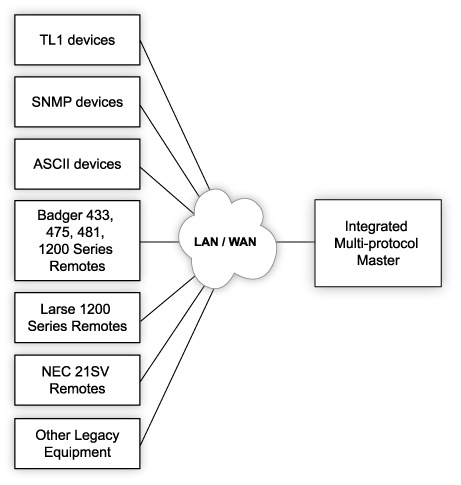
SNMP and non-SNMP equipment remotely monitored by the same manager
With the right multi-protocol manager, you can integrate SNMP remote monitoring with other types of remote monitoring in the same management system.

The disadvantages of SNMP, which are vastly outweighed by its openness, include security risks inherent whenever using an open standard. There is "security through obscurity" associated with any little-used communications standard. Still, the release of SNMPv3 added new encryption and privacy options that had never before existed within SNMP. SNMP is also a rather verbose protocol (meaning that detailed messages are sent between devices, not just minimalistic predetermined codes). This potential disadvantage has been rendered quite immaterial in most applications, since bandwidth availability has skyrocketed in recent years.

In an SNMP remote monitoring system, the two major components are an SNMP manager and SNMP agents.

The SNMP manager is the central console used by a human operator. It aggregates alarm data received from each remote SNMP agent throughout the network.

SNMP agents are located at remote sites, and they fall into two major categories. A lot of equipment (especially that which is more modern) supports SNMP natively. It can send its own alarm messages to the SNMP manager directly. Since not all equipment that must be remotely monitored is SNMP-capable, however, SNMP remotes are also required. These devices accept alarms from non-SNMP gear, usually in the form of a discrete contact closure. The alarm remote, which is SNMP-capable, then sends an SNMP messages back to the SNMP manager. In this way, both SNMP and non-SNMP devices can be managed under the same SNMP manager umbrella.

Solutions for SNMP Remote Monitoring

Over the years, I've learned a few things about making SNMP remote monitoring more effective.

First, there's the transition to SNMP. If you're currently running an older non-SNMP remote monitoring system, you might be put off by the apparently high cost. Perhaps it's not the total dollar amount that's upsetting, but rather the idea that you must replace the entire system all at once (or run two incompatible systems side-by-side).

That's where the T/Mon master station can be helpful. T/Mon accepts SNMP alarms like any standard SNMP manager, but it's also compatible with over 25 legacy and proprietary protocols. This multi-protocol compatibility provides a way to gradually transition toward SNMP monitoring - instead of requiring a big budget outlay all at once.

Even if you already have a different SNMP manager in place, T/Mon can be used to bring non-SNMP gear under your SNMP umbrella. Devices that output ASCII text alerts (including TL1 gear like SONET devices), legacy protocols, proprietary protocols, and many other alert types can be quickly mediated to SNMP, then forwarded to your SNMP manager. This eliminates redundant monitoring systems and makes it easy for the operators you have to do the job of remote monitoring (as well as their many other duties).

An SNMP RTU mediates traditional gear to SNMP
Here, an SNMP remote generates dozens of potential SNMP trap messages (OIDs) based on the current health of non-SNMP equipment and the site's environment (humidity, temperature, etc.)

In a reverse of this SNMP mediation capability, T/Mon is also capable of mediating alarm from SNMP to a different protocol. If you have some modern SNMP equipment in your network, but you're satisfied with the central master console you are using now, you can use T/Mon to collect SNMP alarms from your equipment and mediate them to your TL1, Modbus, DNP3, or other master station.

Then, after you have an SNMP manager in place, NetGuardian SNMP remotes can be used to convert contact closure to SNMP trap messages. Analog values like temperature can also be converted to SNMP and sent back to the SNMP manager.

Several NetGuardian models are also capable of sending SNMP traps in SNMPv3 format. This allows you to encrypt your SNMP trap messages, which is especially valuable if you're part of a security-conscious organization like a utility or government. While this feature is valuable, any SNMPv3 alarm remote that you select should also support SNMPv1 or SNMPv2c. This is important if you find yourself working with an SNMP manager that only supports older versions of SNMP. This is the reason why all SNMPv3-capable NetGuardians also have support for SNMPv1 and SNMPv2c. Compared to SNMPv3, v1 and v2c don't require much processing power, so it made sense to include them as well.

Returning for a moment to SNMP managers, you to make sure that any SNMP manager you choose for a telecom or IT management environment is capable of displaying an "standing alarm" screen. This is different from merely displaying the SNMP traps that have been received in descending order. Smart SNMP managers actually correlate received "clear" trap messages with the original alarm a message. With this information, your SNMP manager can display only the alarm points (OIDs) that are still in a state of alarm. This greatly reduces the distraction your operators will experience from having unimportant alarms present on their SNMP manager screens.

How SNMP Remote Monitoring is Done in Real Networks

One DPS client named Andrew came to DPS looking for the following characteristics in an SNMP remote. First, he needed a 10/100 Ethernet interface port. This was necessary to make sure that all alarms and reach the SNMP manager quickly. Andrew also required 16 discrete contact closure inputs, eight analog inputs to support analog measurements like temperature, into discrete control relays to remotely operate equipment at the site. Control relays are useful for activating equipment like backup generators and HVAC systems.

Andrew also needed his SNMP remote to support temperature and battery monitoring, a web interface to be able to monitor the device in a standalone mode without requiring an SNMP manager. The device had to be mountable in a single rack unit of a standard 19" rack, and it needed to accept 120 VAC power.

The right SNMP remote monitoring solution for Andrew turned out to be the NetGuardian 420. He spoke highly of the web-browser editing and provisioning, SNMP outbound (only v1/v2c was required for his project). The NetGuardian 420 can also support SNMPv3 for more future-proofing. If Andrew was to shift to an SNMPv3 remote monitoring system in the future, his NetGuardians would be ready to make the shift without requiring any additional purchasing.

Another DPS client named Mitch approached DPS with a need to monitor 2 SONET rings via TL1 and some additional SNMP devices. 20 RTUs would be required to monitor battery voltage and the pressure of copper wires at each site. Mitch had 45 nodes on his SONET network, plus many channel banks that output SNMP traps. In total, he wanted to monitor 150 remote devices.

Mitch didn't want to monitor individual battery cells. He just needed to know the thresholds of overall battery voltage. His need for copper pressure monitoring stemmed from the pressurized lines he had that hold copper for his phone lines. Any drop in pressure would indicate that a line had been cut, either as an accident or (more likely) during a copper theft incident.

Mitch received an online web demonstration of T/Mon LNX and a few different NetGuardian SNMP RTU models to help him in his decision. This was an important choice for Mitch, since this SNMP remote monitoring setup would be used by at least six users, and probably more.

Related Topics:
Monitoring SNMP Networks
SNMP Monitoring Tools
SNMP Tools

Request More Info
(simple online form)
Get Pricing Info
Next Page >>
most related to this one
Mac Smith - DPS Sales
Mac Smith

Monitoring expert Mac Smith is here to answer your technical questions

  What is your question?

Where should Mac send his answer?

Name: Company Name:
Email: Phone Number:
State:


Give Us a Call!

To find out more about this and other DPS applications, give us a call at our toll-free number and talk to one of our network specialists. They'll help you put together a perfect fit solution for your network!

Sales: 1-800-693-0351 · Fax: 559-454-1688