
Download our free SNMP White Paper. Featuring SNMP Expert Marshall DenHartog.
This guidebook has been created to give you the information you need to successfully implement SNMP-based alarm monitoring in your network.
1-800-693-0351
Have a specific question? Ask our team of expert engineers and get a specific answer!
Sign up for the next DPS Factory Training!

Whether you're new to our equipment or you've used it for years, DPS factory training is the best way to get more from your monitoring.
Reserve Your Seat TodaySNMP monitoring tools can help you if you have a telecommunications network spread out across a large geographic area, regardless of your industry. Because your network is so large, and most sites rarely get human visitors (your technicians stop by only occasionally), you need a monitoring system that will allow you to remotely keep tabs on all threats to your network uptime. You can't anticipate whether you'll have runaway temperatures or an equipment failure or a break-in, but a monitoring system will protect you against these and similar problems. If you want to keep your customers happy and keep your costs down, you need SNMP monitoring tools.
Of course, there are tools for monitoring that are not based on SNMP protocol. SNMP, however, is generally superior because it is an open standard. If you ever been trapped by one manufacturer's proprietary protocol (a protocol that only one manufacturer supports), you know how frustrating it is when it comes time to expand your monitoring. If you're lucky, you'll just be overcharged for equipment that has only one seller (the definition of a monopoly). If you're unlucky, the manufacturer will have gone out of business. Then you're really in a jam because there is no way to get new or replacement parts to expand and repair your system. Throwing away everything and starting over is extraordinarily expensive.
SNMP avoids all of these problems because it is an open standard. Any manufacturer can support SNMP protocol. Aside from incompatibility caused by different versions of the protocol, SNMP equipment from one manufacturer will completely work with SNMP equipment from a different manufacturer.
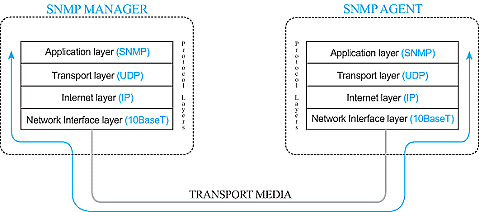
Like many remote monitoring systems, a system built on SNMP monitoring tools has a star topology. This means that many Remote Telemetry Units (RTUs) communicate to an SNMP Master station. In SNMP terminology, the central master station is referred to as an SNMP manager.
So how do you know if you have equipment that can report SNMP back to your SNMP manager? Essentially, there are two types of SNMP agents that you may have at your remote sites. First is the equipment you have that's an integral part of the operation of your network. This might be transport gear, switches, etc. It can also include critical support equipment like generators and batteries. Your network won't remain online without those, after all.
The other type of SNMP agents that you can deploy at your remote sites are dedicated SNMP monitoring tools. Each of these devices is capable of accepting non-SNMP alarms from equipment at your remote sites, converting them to SNMP, and sending SNMP traps up your SNMP manager for processing. Using this type of SNMP monitoring tool, you can easily bring all of your remote equipment under your SNMP monitoring umbrella.
You do need to understand that there are a variety of remote-site SNMP monitoring tools that you can use to bring SNMP equipment into your monitoring system. The biggest difference in choosing among your various options will be the capacity that they are capable of monitoring. It makes no sense to choose capacity that is either too small or too large for your monitoring needs in the foreseeable future. When it comes time to purchase SNMP monitoring tools for deployment, be sure to work with a vendor that gives you a variety of capacity options. Otherwise, you end up wasting your budget or, worse yet, not getting as much capacity as you need to monitor your network effectively.
I've been at this a long time, and I'm happy to say that I've made quite a few mistakes along the way. With this experience, I can help you avoid these mistakes as you develop your SNMP monitoring system.
If your company has been in business for more than 30 seconds, I'm willing to bet you already have some kind of remote monitoring system in place. Even if it's very primitive, at least some of your equipment should have some kind of built-in system. Maybe you're running on a proprietary protocol. Maybe you have inherited multiple incompatible monitoring systems and you're forced to run them all in parallel.
When it comes time to transition to SNMP, you might find that the cost of a wholesale switch can quickly become prohibitive. Perhaps you could fit it in your budget if you could spread the project out across multiple years, but that presents some significant monitoring challenges during that extended transition.
That's where the master station known as T/Mon can become incredibly useful for you. T/Mon is capable of processing SNMP alarms like any standard SNMP manager. The wonderful transitional strength of T/Mon comes from its ability to interpret and process about 25 legacy and single manufacturer protocols. This multi-protocol interoperability give you tremendous transitional flexibility.
If you deploy a master station like this that can understand both modern open standards and older legacy protocols, you can transition from your older equipment at a controlled pace (most importantly, the pace is controlled by you).
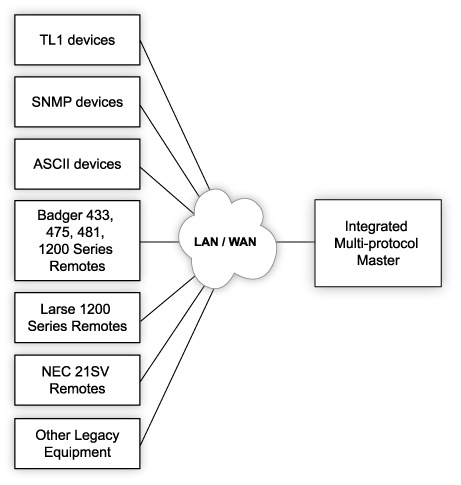
Maybe you're running an SNMP manager currently in your central office. In this case, T/Mon is still useful as a protocol mediator. Because it can accept non-SNMP protocols, then forward the alarm data via SNMP to your SNMP manager, you can push just about any type of alarm into the SNMP manager interface that you're already using and your team is already used to using. Devices that output ASCII text alerts (including TL1 gear like SONET devices), legacy protocols, proprietary protocols, and many other alert types can be quickly mediated to SNMP, then forwarded to your SNMP manager. This eliminates redundant monitoring systems and makes it easy for the operators you have to do the job of remote monitoring (as well as their many other duties).
If you have a non-SNMP master already in place, it's quite likely that T/Mon will be able to send alarms to that master as well. This presents you with yet another way to continue using the interface and equipment you're comfortable with (and that you've already purchased) while you pave the way for cost-effective future growth.
Example of an SNMP monitoring project:
Let's take a minute now to review some of the SNMP monitoring tool projects that DPS Telecom has worked on in the last several years. These should be useful examples for you as you plan your own SNMP project.
One client called in to request information about SNMP remotes. He had a few hundred sites to monitor, and most of them had LAN. He already had an SNMP manager in place that he really liked. In fact, he had actually customized it to meet some of his more specific needs.
About 150 sites have standard LAN, which presented no problem for us. All standard NetGuardian remotes include LAN for remote management and sending SNMP traps. In fact, the NetGuardian 832A has two LAN ports that enable it to communicate on two networks at once. This is a common safety measure, allowing the NetGuardian to straddle a public and private network configuration.
At about 100 other sites, T1 connections were available. This presented an opportunity for a specialized SNMP remote like the NetGuardian 216T. The 216T has a standard LAN connection, but it also has the ability to use a T1 to send alarms back to the SNMP manager.
This was an important project, because the client's network was expanding at a rate of about 30 sites per year.
This project involved solving a lot of problems for the client. Existing sites that were using embedded alarm monitoring were not providing enough alarm granularity, capacity, analogs, or control relays. The client also wanted a consolidated monitoring platform. At the time, he was monitoring two incompatible systems. This created a lot of headaches and practically doubled the amount of staff required to achieve anywhere close to the same level of monitoring effectiveness.
Understanding the lessons that I've explained to you in this article, the client did not want a proprietary RTU communication protocol. He wanted to select an open protocol like SNMP to ensure he would not be trapped by a manufacturer in the future.
SNMP monitoring tools, like all remote monitoring systems, must be able to solve serious problems if they are to pay for themselves in a reasonable period. For this client, deployment of SNMP monitoring was easy to justify. It would reduce expensive windshield time. No one likes to waste the high wages that skilled technicians earn as they drive out to remote sites. In this case, traveling to some sites to conduct repairs took six hours by snow cat. Talk about expensive.
In situations like this, it's very difficult to spend too much on SNMP monitoring. You're going to be saving a whole lot of money, so you need to act quickly to keep your network online, keep your customers happy, and stop losing profits to expensive maintenance and emergency repair operations.


