
Download our free SNMP White Paper. Featuring SNMP Expert Marshall DenHartog.
This guidebook has been created to give you the information you need to successfully implement SNMP-based alarm monitoring in your network.
1-800-693-0351
Have a specific question? Ask our team of expert engineers and get a specific answer!
Sign up for the next DPS Factory Training!

Whether you're new to our equipment or you've used it for years, DPS factory training is the best way to get more from your monitoring.
Reserve Your Seat TodayMonitoring SNMP devices is more common in the world of network management. Although there was a time when many proprietary protocols competed for dominance, SNMP is now the most common network management protocol in telecom and IT environments.
A discussion about SNMP monitoring requires at least a brief introduction to SNMP concepts. SNMP ("Simple Network Management Protocol") is based on the Manager-Agent architecture. This simply means that, when monitoring SNMP, you'll have one central "master". You might actually have a few masters in back up or multi-level architectures, but it's easiest to begin thinking about a simple one-master layout. This foundational understanding is critical to monitoring SNMP effectively.
Your SNMP master (or "manager") will collect data from many remote SNMP "agents", whose job it is to collect remote site data and transmit it back to the master using SNMP protocol.
SNMP agents aren't dedicated SNMP monitoring devices like alarm remotes. In fact, the majority of SNMP devices you'll likely collect data from have a different main function. Devices like servers, switches, and generators all commonly output SNMP if they were manufactured reasonably recently. These multi-functional devices add to the versatility of monitoring SNMP.

Of course, you will have network gear that does not support SNMP natively. In this case, you'll need an SNMP agent that can translate the outputs available on these devices into SNMP to send to your SNMP manager. Most commonly, devices will output one or more contact closures as system alarms. An SNMP RTU is capable of bringing alarms from older gear under your SNMP monitoring umbrella.
You might be wondering, "Why has monitoring via SNMP become so widespread?" One factor, more than any other, was responsible for SNMP's rise: openness. Monitoring SNMP is easier for businesses to justify because it is an open standard. This openness makes monitoring SNMP a future-proof choice.
In the last few decades, many companies have found themselves burned by closed or proprietary protocols. Manufacturers use such protocols as leverage to charge higher prices. Even worse, your manufacturer could simply close its doors, leaving you with no way to get replacement parts or gear.
As you can see, network staff were hoping for a system that did not have the problems of closed and proprietary protocols. Monitoring with SNMP proved to be a good solution. Despite some quirks, SNMP has made good on its promise of being an open, and therefore a smarter, protocol to use. It is now widely regarded as the industry standard for monitoring SNMP.
So what happens after SNMP messages (known as "traps") are received by your SNMP manager? Depending on your needs, one of a few things might happen. Most common at large and medium companies is to have a 24/7 staffed NOC. At all times, at least one staff person is monitoring SNMP-transported alert messages looking for problems. When a network threat is identified, that user will dispatch a tech to the site, issue an automatic response, log the problem for later correction, or otherwise respond.
At other companies, however, the SNMP manager may take different action. If your company has a NOC center, but staffs it only during business hours, you might set up automatic text messages or even automated voice messages to your cell phone. These would be triggered when your SNMP manager, which is on duty even when your NOC center is closed, receives an alarm vital enough to trigger an after-hours alert. "Critical enough" is a very important concept here, because you don't want to be woken up at 3 AM for alarm that can wait until morning. Monitoring SNMP with automated alerts helps streamline response processes.
Finally, if your network is quite small, you might not have a NOC center at all. Instead, you might rely on text messages and voice messages all day. In each of these three cases, however, monitoring SNMP forms the core of a remote monitoring solution.
At DPS Telecom, NetGuardian remotes are most commonly used when monitoring SNMP. They're used, as described earlier, to convert contact closures and analog voltages into SNMP traps that can be sent to an SNMP manager. Contact closures can include gear alarms, discrete sensors, door openings, etc. Analog voltages can be direct from gear, in the case of monitoring battery/power voltage. This allows you to remotely monitor remaining battery life or the status of commercial power at your sites. Voltages can also be used to monitor indirectly. When you set up analog sensors for temperature, humidity, etc., you sensors will commonly output 0-5v. The voltage level matches to a temperature/humidity level within the measurement range of the sensor. Some sensors also output 4-20mA, and NetGuardian analog inputs can be configured to accept this current input as well.
Depending on your company's needs and existing gear, you might already have an SNMP manager that suits your needs. If this is the case, you can configure NetGuardian remotes to send SNMP traps (v1, v2c, or v3) to your existing SNMP manager (or even a lot of managers for backup redundancy).
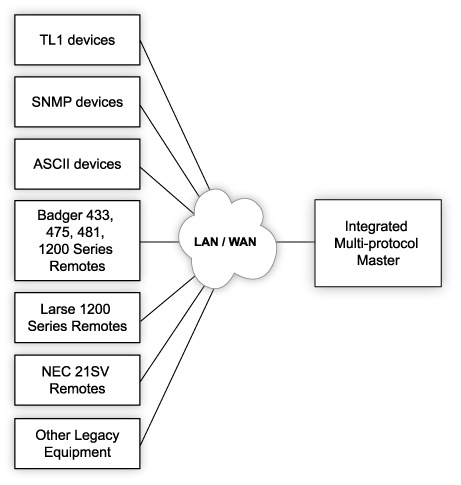
If you don't already have a central alarm master, for monitoring SNMP or other protocols, T/Mon might prove to be a good solution. T/Mon is a multi-protocol alarm master station, capable of monitoring SNMP and dozens of legacy/proprietary protocols. This is useful if you, like many companies, have a mix of gear running in your network. It's never a good idea to scrap gear that's still working well, but it can be tough to bring gear from multiple generations and protocols into a single management system. T/Mon helps you to bridge this gap with its multi-protocol compatibility.
If you choose to use T/Mon for monitoring SNMP, the one feature you should be aware of is "Auto-SNMP". This indicates T/Mon's elimination of tediously entering all possible SNMP traps before they are received. Instead, you can input just a few rules that allow T/Mon to automatically parse traps received from your device. Then, as new traps are received, they will be automatically databased within T/Mon.
You should also be careful when choosing an SNMP manager that you choose one with a "standing alarms" list. Some inexpensive options (especially free software) only show a timestamped list of traps received. This means that you'll see an alarm SNMP trap and go looking for the clear. This gets out of control very quickly in all networks. You need an SNMP manager that can display only alarms where the alarm trap has been received and no clear has been received. These alarms are currently "standing" and require your attention. All others, aside from providing historical records of alarms, are distractions that should be hidden.
Real Stories of Monitoring SNMP.
Many clients have come to DPS during SNMP deployments and upgrades. Robert Lane of ARCOM was reselling gear to his customers, and they needed a way to begin monitoring SNMP at remote sites where they could not feasibly swap out their older gear. As they moved to the modern monitoring of SNMP, these customers had to have a multi-protocol central master that could bring both SNMP and non-SNMP devices under the same monitoring umbrella.
And when they said, "Swapping out gear at our sites is not feasible," these customers meant it. Many of their sites were so remote that they had to be accessed by helicopter. It costs enough just to travel to those sites for routine maintenance and repair actions. Replacing legacy gear just to support a transition to monitoring SNMP was simply out of the question at helicopter-accessible sites.
Older non-SNMP gear to be brought into the system monitoring SNMP included transport gear and multiplexers ("muxes").
In the end, the DPS Telecom solution had two components:
First, all legacy alarms were mediated to SNMP. T/Mon was deployed to mediate alarms from newer sites as well as older sites to one stream of SNMP traps that was sent to a lot of SNMP managers at the NOC center. T/Mon collected alarms from older switching gear, muxes, transport gear, and many brands of legacy RTUs.
Second, all sites where a new RTU was required received new NetGuardian 832A SNMP RTUs. These were installed at either old or new network sites, depending on need. They were compatible at both types of site. Containing both LAN and dial-up connectivity, these NetGuardian RTUs were important tools for Robert Lane to install at any site, regardless of the available transport.
After the install, Lane said, "When we were looking around the marketplace for different solutions, we found that DPS had the best value and the most flexible product for our needs. Our client's NOC technicians wanted a 'keep-alive' signal on the NetGuardian. We requested that DPS incorporate this feature, and they implemented it. Our customers are very happy with that flexibility. The valuable part of DPS Telecom's solution is that it offers an end-to-end solution, not just one piece or building block. Our customers can approach DPS for any part of their alarm gathering, transport, and presentation requirements."


