Download our free SCADA tutorial.
An introduction to SCADA from your own perspective.
1-800-693-0351
Have a specific question? Ask our team of expert engineers and get a specific answer!
Sign up for the next DPS Factory Training!

Whether you're new to our equipment or you've used it for years, DPS factory training is the best way to get more from your monitoring.
Reserve Your Seat TodayA SCADA (Supervisory Control and Data Acquisition) system is used to monitor a remote network. A SCADA system allows users to monitor an entire plant or single piece of gear by grouping real-time data from various sensors in a network. It is very important for companies to monitor these network items, as doing so informs them of problems with their vital processes. By monitoring this, companies can quickly respond when there are problems within their network.
To install a good SCADA system, you must first give yourself a strong knowledge base of SCADA concepts. Let's start by reviewing the typical components.
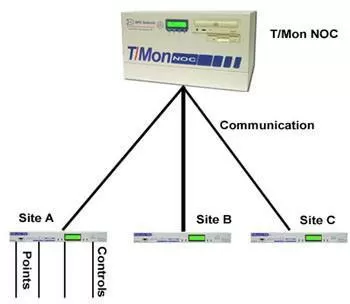
A SCADA monitoring system contains a few components that, when joined, allow staff to monitor their network. A SCADA system used to monitor a network includes alarm sensors, RTUs, SCADA master units, and the communication network.
These parts unit to allow staff to monitor the system. By using advanced RTUs, staff can monitor vital processes through both discrete and analog alarms. "Derived Controls" can also be programmed into these advanced RTUs. This provides for quick reactions of the monitoring system in the event that user set alarm combos occur.
Monitoring Can Save Repair Costs and Reduces Downtime.
Here is an example of how a SCADA alarm system works to provide staff status alerts and alarms. Your SCADA system will most likely monitor 1000s of single sensors in your network. If two sensors sent major alarms through the monitoring system, your SCADA master would be alerted. If one of these alarms shows an outage at a site, and another shows a battery failure at the same site, the RTU would gets these inputs, translate them, and send them to the master. The system master would then react to this alarm combo. It uses a user set control relay, such as turning on the back-up generator at the site, stopping a network failure. Monitoring saves costs on repairs and lost revenue due to network downtime.
These benefits make it vital for staff to employ a system to monitor their network. However, older SCADA systems are not capable of these control processes. Older systems can monitor the network, but they cannot respond to these monitored alarms using control relays. Instead, network staff employed to monitor the network would have to manually respond to these alarms, which often involves a lot of time and expense.
NetGuardian Allows Operators to Effectively Monitor Their Network.
Deploying a SCADA system with NetGuardian 832A RTUs allows staff to monitor their network more effectively. The NetGuardian supports up to 32 discrete alarms and 8 analog sensors. It also has 8 control relays for quick, remote response to user-specified combinations of alarm signals. This full-featured RTU allows operators to monitor a large number of sensors and set Derived Controls to automatically respond to certain Change-of-State (COS) events.
All DPS Telecom products include comprehensive technical support. If you've purchased one of our products and are encountering any kind of issue, contact DPS Tech Support today at 559-454-1600.
At DPS Telecom, the representative who answers your call isn't an intern reading from a script. DPS Tech Support representatives are engineers who contribute to product development. And, if your problem requires additional expertise, the DPS Engineering Department that designed your product is right down the hall.
Help us connect you to the right engineer by filling out this quick questionnaire. Simply leave your contact information to get started, and we'll call you back. Most preliminary discussions are about 15 minutes, and afterward, we'll send you a custom application diagram of a recommended solution that'll make it easier to justify your project to management.