Download our free Monitoring Fundamentals Tutorial.
An introduction to Monitoring Fundamentals strictly from the perspective of telecom network alarm management.
1-800-693-0351
Have a specific question? Ask our team of expert engineers and get a specific answer!
Sign up for the next DPS Factory Training!

Whether you're new to our equipment or you've used it for years, DPS factory training is the best way to get more from your monitoring.
Reserve Your Seat TodayRemote monitoring tools, in an industrial telecom or IT context, provide visibility of revenue-generating equipment and environmental conditions from distant locations. For example, a telephone company might use remote monitoring tools to keep track of its far-flung telecom sites, which contain the switching equipment that make phone calls possible. Cable television, utility, and transportation companies, as well as governments and militaries of all sizes, have very similar needs for remote monitoring tools. Although the services that they provide vary wildly, the need to monitor a geodiverse telecommunications network is one constant among them.
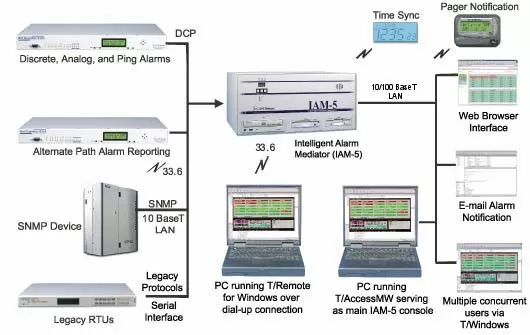
Remote monitoring tools fall into two basic categories: Remote Telemetry Units (RTUs) and Master Stations. The RTUs (aka alarm remotes) collect system alarms and environmental conditions from remote sites. In all but the largest sites, only one RTU is required per location.
Each alarm remote reports back to a single Master Station (or dual if redundant Masters are used). The Master Station collects all alarms throughout the network (or a specific region in the case of very large networks) and displays them for a human operator to manage.
When a company's collection of remote monitoring tools detects a new problem (ex. an important piece of equipment has reported a serious error, or "alarm" via an RTU), the human operators will receive alerts in a variety of different forms. At companies with a dedicated network operations center (NOC), alarms are sometimes presented on a console screen with dedicated monitoring personnel making real-time response decisions.
At smaller companies, where the network operations center may close down after business hours or not exist at all, remote monitoring tools will typically send voice alert messages or text messages to the cell phone of an "on-call" technician.
Some small companies, especially when they are just getting started in their industry, will choose to have a third-party monitor their network. This can be a useful solution, but only to the extent that you trust the company you contract with. Often, it's better to have a local master that you monitor directly, which then forwards alarms to the third-party companies you've selected. This is known as having your own "regional" network monitoring tools.
When selecting which remote monitoring tools you will standardize on, you must be very careful not to fall into the trap of using embedded remote monitoring. These are monitoring functions built into the very devices that are to be monitored. The problem here, as you may already see, is that a malfunction with revenue-generating equipment will generally cause a failure of the very monitoring system that is supposed to kick into action and report the problem. It also presents significant issues when the revenue-generating equipment is upgraded to keep up with your competition and the telemetry suddenly changes or disappears from the new service solution.
Instead, you should select a dedicated monitoring system designed to be the last piece of equipment that will fail at your site and not subject to 2-3 year upgrade cycles like some service equipment.
Remote Telemetry Units (RTUs) should also be scaled to the capacity needs of each site. It makes very little sense to purchase a RTU with dozens of alarm points at a site that only needs four. It makes even less sense to purchase a RTU with four alarm points for a site that needs many more. This puts you in the uncomfortable position of choosing which alarms are "important enough" and will be monitored or creating increasingly vague summary alarms.
Are your labor costs on the rise? Do you want to labor use time more efficiently? Are truck roll costs on the rise?
Once high-quality remote monitoring tools are in place, most companies will realize a dramatic improvement in "windshield time". This is the time that highly paid technicians spent driving to and from distant remote sites. Windshield time represents wasted labor, fuel, and vehicle expense. Slowly but surely, you can eat up an astonishing amount of profit with a group of technicians who spend more time driving than using their technical abilities.
Remote monitoring typically yields a tremendous amount of windshield time reduction. When you understand what's going on in your remote sites, you are much less likely to send technicians from site to site and a random attempt to find a problem. You will send the right technician to the right site at the right time to solve the problem before it becomes a network outage. There is simply no way to accomplish this without good visibility of your remote sites, and remote monitoring tools are the best way to achieve that visibility.
Network monitoring tools are absolutely critical if your company enters into service-level agreements (SLA) with your customers. For example, you might guarantee that your network will have 99.999% uptime. If you fail to meet this standard, a typical SLA agreement will require you to pay hefty penalties to your customer. If you are subject to the terms of SLA agreement, it doesn't take much time at all for remote monitoring tools to pay for themselves.
Real-World Examples of Monitoring Tools Used in Real Networks
Real-world applications of remote monitoring tools are as varied as the networks they monitor, but learning about them will improve your understanding.
DPS has worked with a telco in Canada to send alarm messages from remote sites via a T1. Each RTU uses only a single DS0 (Digital Signal 0), so a sizable fleet of RTUs is able to report back to the central master using just that single T1.
In a much smaller application, another DPS client on the East Coast used a dial-out RTU as a stand-alone remote monitoring tool to send alert messages to technician's cell phones. Originally, this client deployed a very small RTU supporting just two 2 numbers. Later, he upgraded to a medium-size RTU supporting up to 8 phone numbers.
Another telco client uses the T/Mon alarm master station as a monitoring tool to convert ASCII (plain-text) alarm messages from equipment like switches and SONET into computer-readable SNMP messages. This is accomplished using algorithms that automatically parse alarm data contained in formatted text alerts. This data may then be converted into a standardized, computer-readable format like SNMP protocol.
Although ASCII text messages are typically sent to the T/Mon master via LAN for parsing, they may also be sent over older dedicated circuits (serial connections). In some cases at this company, T/Mon will also proactively send ASCII text messages to interact with a device's remote console connection. This can be used to force the display of a complete list of active alarms, protecting against the (generally infrequent) occurrence of a missed incoming ASCII text message.
Related Topics:
Remote Monitoring
Related Monitoring Tools:
Featured Master Station: T/Mon
Featured RTU: The NetGuardian 832A G5