
A network temperature sensor is a tool for monitoring temperature at a distant network site in a telecom environment. If, instead, you work for a company with IT resources housed in a data center, server room, or server closet, a network temperature sensor can also be used for monitoring of your mission-critical IT assets.
Industry-standard temperature sensors monitor temperature, then report it back to a more intelligent alarm remote as a value between 0-5v or 4-10mA. In your alarm remote, you'll input a pair of values to describe the range (ex. 0 volts = -15 degrees, 5 volts = 170 degrees). Good alarm remotes will then extrapolate all other values within the range, typically giving you network temperature sensor accuracy within 1-2 degrees Fahrenheit.
Next, you need to consider how you want to monitor your temperature sensors. The size of your network will be a major factor in determining what is the most convenient. If you work for a small or medium company where a 24-hour monitoring center is not available, you'll need some way of getting temperature alarms after hours. Server rooms and remote sites, it seems, always like to overheat in the middle of the night when you'd rather be sleeping.
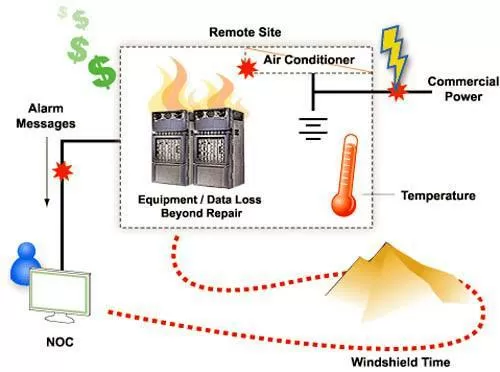
A temperature sensor can alert you to HVAC equipment failure before your equipment is damaged, so you can act quickly either to get your HVAC equipment back online or shut down equipment to prevent damage.
For this type of situation, you'll be best served by a network temperature sensor wired into an alarm remote that can notify you directly if the temperature level is becoming a concern. One way to do this is via email. Of course, if you choose this method, you need to make sure your email address is feeding into a BlackBerry(R) smartphone or a computer or some other device with a nice audible alert. Otherwise, you could wake up in the morning with a downed network and an email inbox full of alert messages that could have saved you.
Another method that many DPS clients prefer is an alarm remote with voice dial-out capability. In this scenario, your phone's ringing handles the "wake up!" requirement for you. Once you pick up the phone, the alarm remote will begin using synthesized voice to describe the temperature problem to you. If you do not pick up, some of the better alarm remotes are also intelligent enough to call again in a few minutes. If that doesn't work, some remotes also have the ability to move down a list of number to call. Eventually, someone on the list will wake up, acknowledge the alarm, and take care of the problem. In this way, a simple, directly monitored alarm remote wired into a network temperature sensor will save your company from costly (and embarrassing) network downtime and equipment damage due to high temperature.
Of course, if you work for a large company that already has a 7x24 network operations center (7x24), you know that the preferred method for monitoring network temperature sensors is via an alarm remote that will report alarms back via SNMP or some other standard communications protocol. All of the same monitoring benefits I described above will apply here, but the method of alert will be different. Instead of the alarm remote notifying you that the temperature is moving out of the acceptable range, it will send an alert message to your SNMP manager or other central monitoring master.
Then, as with all of your other network alarms, your SNMP manager will make decisions about who to contact. If your NOC center isn't staffed 24 hours a day, it may make after hours phone calls in just the same way the alarm remote did in the previous example. If your NOC is staffed 24 hours a day, however, your SNMP manager will probably just display an alert message on the continuously staffed console screen.
How Alarm Remotes Integrate with Network Temperature Sensors
It's probably worth taking a few minutes to examine the interaction between alarm remotes and network temperature sensors.
As you know, there are some network temperature sensors out there that actually have a built in NIC to connect via LAN. While these are potentially useful if you have an incredibly small monitoring need, more capable alarm remotes can provide much more monitoring ability, greater reliability, and don't involve dramatically more investment than temperature-only sensor devices.
Even if you only want to monitor temperature at your various network sites, an alarm remote device helps you to do that better. Whereas a standalone device only has one temperature sensor (meaning it can only monitor temperature next to one device at the site), an alarm remote can accept inputs from several or even dozens of temperature sensors. That gives you a much more granular ability to spot troublesome "hot spots" within your equipment racks.
Alarm remotes offer another advantage over standalone sensors. If you're monitoring the temperature of your network gear, that's a great idea. But it also suggests a variety of other important things you should be monitoring. What about the humidity at your remote sites? It's an important value to monitor in many regions worldwide, and you can even purchase combination temperature sensors and humidity sensors to get double-duty from your sensor investments.
What about water on the floors surrounding your equipment racks? There are sensors to monitor this as well? What about generator fuel levels? What about battery voltage? What about open doors? What about motion sensors? What about the equipment alarms that your network gear outputs via contact closure?
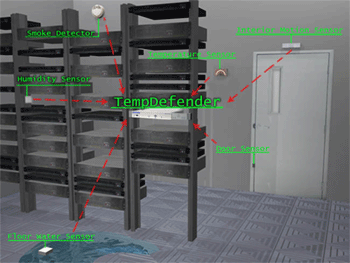
The TempDefender IT is a complete environmental monitoring solution, monitoring temperature, humidity, air flow, and other qualities at your remote sites.
As you can see, choosing an alarm remote over a standalone network temperature sensor really fills out your ability to monitor your network. Your investment may be somewhat larger, but your return on that investment should be monumentally higher. Instead of focusing purely on temperature, you can monitor other important things at the same time.
If you'd like an alarm remote to call your phone with a voice alert when it notices a problem like "high temperature", consider the NetGuardian LT. It's recommended for its small size, good capacity to host multiple sensors, high durability and reliability, and reasonably low cost.
If you have a larger network with a NOC center, look instead at the NetGuardian 832A. It can collect alarms from dozens of devices and sensors, and it will output alarm information via SNMPv1, SNMPv2c, or SNMPv3. It can also output alarm messages to multiple SNMP managers simultaneously to support redundant geodiverse SNMP managers for improved disaster recovery.
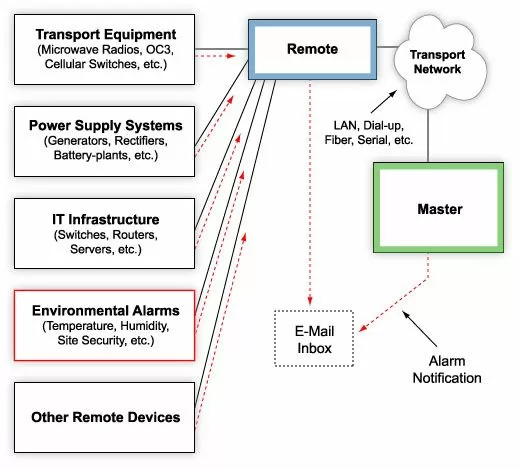

A NetGuardian RTU is a full remote monitoring solution, monitoring temperature/HVAC equipment at your site in addition to your other equipment's discrete contacts.
Sales Stories
To help you better understand how temperature monitoring systems work, let's take a look at a few projects from DPS Telecom's recent history.
One day recently, Ernest called in looking for a small RTU. He had 1-4 sites that needed to be covered by a temperature monitoring system, among other types of monitoring. Evan needed about 8 discrete alarms points, 3 control relays, and 1 serial port for COM port redirect. He also wanted 1-4 generic analog inputs (for collecting sensor data from temperature sensors and other sensors).
A big issue for Ernest was windshield time, the hours that technicians spend traveling to and from remote sites. For Evan's company, some sites were up to two hours away from the central office. This puts wear and tear on vehicles and costs a lot of money for gas, not to mention the highly paid technicians who are logging hours for driving around.
Ernest had a couple of sites that were solar powered with generators that run when the panels do not create enough electricity. The generators had problems when they had to kick on and off a couple times a day.
If the generator did not start, they would have the inverter cut out so the batteries were not drained to point of damage. This would cause the site to go down.
A good option here was the NetGuardian 216. It has roughly half of the capacity of the NetGuardian 832A I mentioned earlier, making it a good fit for Ernest's project. While he would have enough capacity to grow a bit, he wouldn't be wasting investment on capacity he was unlikely to ever use.
The NetGuardian 216 also has a build option for additional analog inputs, allowing you to multiply from the base level of two analog inputs. This is important if you plan to install more than 2 network temperature sensors at a single site. With flexible build options, your technicians are less likely to become confused. Although some of the 216's might be ordered without the additional analogs, all of the NetGuardians will be identical in all other respects. In this way, ordering the same alarm remote with different capacities based on the site's needs is a way to reduce training requirements for your network installers.
Thank you for reading this introduction to network temperature sensor basics. Please continue reading other articles on the site for more information, or call DPS at 1-800-693-0351.
Related Topics:
Remote Temperature Monitoring
Remote Temperature Sensor
|
Request More Info
(simple online form) |
|
Next Page >> most related to this one |
Give Us a Call!
To find out more about this and other DPS applications, give us a call at our toll-free number and talk to one of our network specialists. They'll help you put together a perfect fit solution for your network!


RSS


