
Check out our White Paper Series!
A complete library of helpful advice and survival guides for every aspect of system monitoring and control.
1-800-693-0351
Have a specific question? Ask our team of expert engineers and get a specific answer!
Sign up for the next DPS Factory Training!

Whether you're new to our equipment or you've used it for years, DPS factory training is the best way to get more from your monitoring.
Reserve Your Seat TodayNetwork performance management is the practice of ensuring that network communications are fast, reliable, and stable. Generally, most people think of performance management as a soft enterprise, tracking and controlling packets as they flow through the network, but there's more to it than that. If you're in charge of network performance, you'll also have to ensure that your physical network resources are protected and running properly. The prime component of network performance is network uptime.
Typically, managers can measure a few different network performance metrics. They can measure latency, the time it takes for a packet to travel between two points in the network. They'll look at packet loss, the percentage of network traffic that actually makes it to the desired destination. And retransmission, the time it takes for lost packets to be sent again and put back into the corrected order. Throughput, the capacity of traffic that a network can handle, is also measured.
Those four things can be measured via end-user statistics and logs, flow monitoring, or packet sniffers. They are used to show whether or not traffic is being effectively routed and shaped. As networks increase in size, it becomes imperative to manage traffic to and from single network resources to improve performance. Without managing traffic on a large network, it's likely that the network will suffer high latency to the point of being unusable.
High tech routers will manage your network's traffic by queuing traffic and sending it to its appropriate location (using VLAN tagging and other strategies). Your routers are very important to your network's performance. (As are all pieces in your network, but we'll get to that.) Solid routing practices and capable staff will help keep your network performing optimally for all client systems.
However, while all of the above performance management practices are important, the first step to managing a high-performance network is ensuring that your network hardware is always running in optimal conditions. If your network goes down, it won't matter how smoothly traffic once flowed through it.
As such, managing your network's physical resources is every bit as important as managing network performance. The good news is monitoring your physical network is a relatively easy thing to do. Once properly setup, it can be monitored from anywhere.
You'll know when your router stops working. People will be sure to call you when something goes wrong. But if you'd rather take a more proactive approach, you'll want to have a robust but simple to use network monitoring system. Then you'll know when you have a problem, what the problem is, and where, so you can fix it and ensure the performance of your network.
Distributed Remote Telemetry Units (RTUs) are a proven way to monitor and safeguard your networked gear. You'll need to monitor your equipment's discrete points to know whether your network hardware is working properly or not. If it isn't, you'll see an alarm, before a client calls in to report a network outage or your network is compromised. Top performing RTUs can also set ping targets, alarms that send a simple ping to an IP address you configure. If the ping either doesn't respond or reaches an unreasonable latency, your RTU will set an alarm so you'll know you have a performance issue.
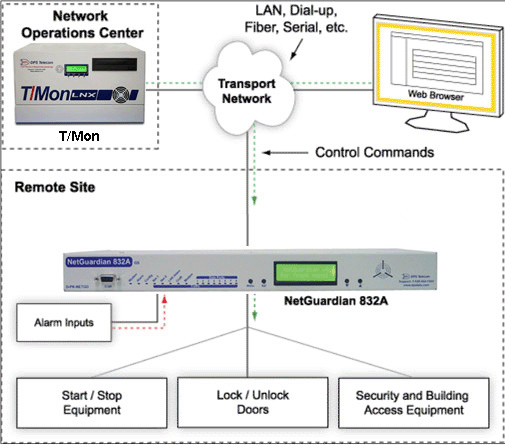
More than that, you'll need to monitor conditions near your network hardware to ensure that it isn't in danger from the elements. You'll want to use analog sensors to monitor temp, to make sure that your gear isn't overheating (or, however unlikely, freezing). At your remote sites, you'll have to monitor generator levels or battery voltages to make sure that your gear isn't in danger of running out of power. You'll monitor other environmental factors like humidity and airflow to make sure that the HVAC systems at your sites and in your server room are all working properly to maintain the integrity of your network.
It may also help to utilize devices with a series of control relays or terminal server capabilities, so that you can operate gear remotely as needed. With a terminal server, you can reach through to your serial only equipment and prevent a truck roll when you need to access gear you would have otherwise only been able to access locally. You can also derive control actions to occur in the event of an alarm or other conditions. This way, if you need to remotely turn on a generator to keep your network gear powered, or you need to operate HVAC services, you don't have to make a trip out to a site. It saves you time and helps keep your network in check so you can focus on fine-tuning your network's performance.
Monitoring systems are totally needed to ensure the integrity of your network. But, you can't be stuck in your NOC all day, watching a terminal to make sure nothing's going wrong. You've got things to do. You'll need a master station to collect alarms and report them to you, so you can stay aware of goings-on in your network from wherever you are. DPS Telecom recommends the T/Mon LNX master station, which collects your network alarms and even mediates protocols from your legacy gear and proprietary protocols.
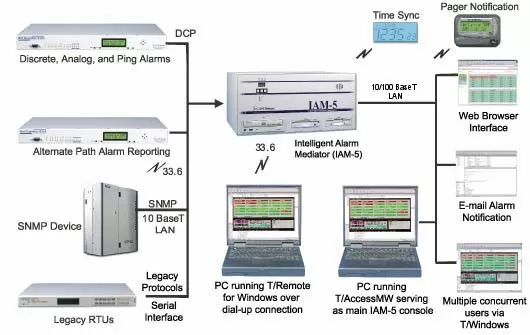
Your master station should also be capable of sending you email alerts. You can then be aware of any network problems via smart phone, laptop, or any where you can get mail. You should also set escalating alerts, so if you're busy or out of range of a problem, the alert will roll over to someone who can take care of the problem. Having a top level master station like T/Mon collect and report your network alarms ensures that you'll always know when something is wrong in your network. Then you will have time to respond before the problem results in serious network performance issues.
Your network's performance depends, first and foremost, on the network being online. Since you can't be everywhere at once, and you don't want to spend every waking moment driving between your sites to ensure the integrity of the network. You'll need a network monitoring system to help you stay online. Luckily, with the right setup, ensuring network uptime is a relatively simple, painless task. You just need the right RTUs and a master station that makes sure you always know when there's a problem.
Related Topics:
Network Manager


