Check out our White Paper Series!
A complete library of helpful advice and survival guides for every aspect of system monitoring and control.
1-800-693-0351
Have a specific question? Ask our team of expert engineers and get a specific answer!
Sign up for the next DPS Factory Training!

Whether you're new to our equipment or you've used it for years, DPS factory training is the best way to get more from your monitoring.
Reserve Your Seat TodayAre you responsible for developing or improving a network management system at your company? Have you recently suffered a costly problem? Was it because your network management capabilities proved to be inadequate? If so, you've come to the right place.
Network management is always a crucial function in telecom and IT environments. With the push for more efficiency in recent years, it has received much less attention than it deserves. This is ironic. Why's that? Because network management will actually improve efficiency by reducing costs and increasing customer satisfaction. When it comes to your customer satisfaction, even a small but repeatable improvement over your competitors is key. It will yield a strong improvement in your share of the market.
When your number of network sites is growing rapidly, network management unfortunately become ignored. When building new networks sites, you frequently have "more important" concerns that network management. The problem is compounded by having newer gear. It is perceived to require less maintenance than older equipment. If you do not properly manage your network, however, you run a serious risk of driving your customers to your competitors. Obviously this has a distinct negative impact on your bottom line.
Making matters worse, today's consumers are much more likely to switch service providers. Price is a huge factor, but providing poor service is the factor you control. With a wealth of information available online, it's quite easy to share of negative experiences with other consumers. It's easy to view the general perception of each company within the marketplace.
A network management system is really composed of two elements. First, you have the remote monitoring function. This gives you visibility over all of the critical activities occurring at the remote site. This includes equipment failures, intrusions, and environmental conditions.
Since "management" is a two-way street, network management also includes the ability to remotely control site gear from your central office. This is useful whenever an equipment or environmental problem needs to be handled remotely. As an example, you might change from one transmitter to a backup system when the first fails. If you experience an HVAC failure, you can activate a backup system or even open a vent to resolve the problem. You won't having to visit the site physically.
Modern network management equipment typically communicates over LAN. Still, it is not uncommon for a company to have many different types of transport activity in its network. This is the product of networks that evolved over decades of development. It makes very little sense to abandon transport that is still serving a useful function. Likewise, network management systems typically operate over a lot of transport forms simultaneously.
When choosing a network management system, it's important to select open protocols. If you fail to do this, you'll really find yourself in a tight spot when it comes time to expand your system. One of two things will happen. You might be at the mercy of the pricing of the single manufacturer. Worse yet, the manufacturer could go out of business. Then you will have no way to get replacement products or replacement parts.
You should also avoid IP based network management systems that use UDP for delivering events. This protocol features no confirmation that message and received, making it wholly unsuitable for use in network management applications.
It's important that you work with an experienced expert in the field. The two pitfalls I mentioned are not to be taken lightly. They will help you develop a network management system. They'll also help you avoid pitfalls outside the scope of this article. Look for a manufacturer that's willing to customize solutions to fit your needs. Your network is unique, and your management system must embrace that.
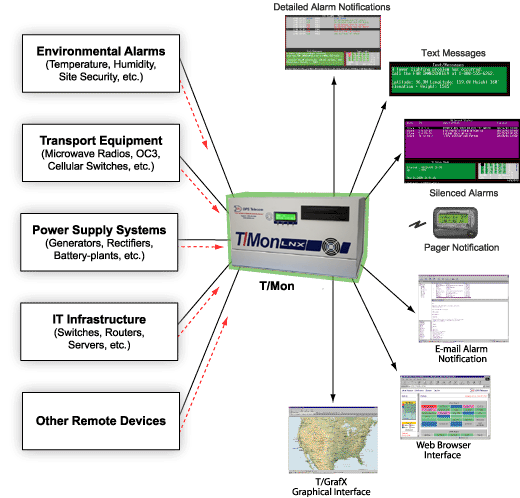
As an example, the T/Mon master station has evolved gradually over the years to encompass a wide feature set. Many SNMP managers to this day simply show a list of inbound SNMP traps. T/Mon has responded to user concerns by showing all alarms transmitted via SNMP traps that still remain active. Furthermore, any alarm for which the clear message has been received will be removed from the "standing alarm" list. It will not confuse or distract human staff.
T/Mon also supports more than 20 communication protocols for maximum compatibility with a wide range of network equipment. It makes very little sense to have multiple network management systems for different types of equipment in your network. This scenario requires extra human operators and generates more confusion and training costs.
Another concern when selecting a network management system is to make sure you are purchasing industrial grade gear. Far too often, the expensive alarm Master station that you purchased ends up being a simple off-the-shelf PC with preloaded software. Look for a device that comes in a metal (preferably powder coated aluminum) chassis and has a hardened power supply. Also look for redundant hard disk drives. These are usually the first components to fail in any computer system.
Of course, a network management system must include more than just the central master console. When selecting "alarm remotes" to be placed at each of your sites, what matters? It's important to know which features contribute to an ideal design and which are pitfalls to be avoided.
Look for alarm remote that is built to industrial-grade specifications. This is as vital for RTUs as it is for master stations. A metal chassis, again, is ideal. This is especially important for alarm remotes. They will be the devices stationed in small huts and enclosures. They're likely experience more than their fair share of extreme weather.Also look for multiple capacity options. You don't want to overload your installation technicians with thousands of different alarm remote builds. It's also important that you be able to standardize on perhaps two or three different RTU designs. This will cover sites of different sizes. Otherwise, you're going to have a lot of sites have far too little capacity, and still others that have far too much.
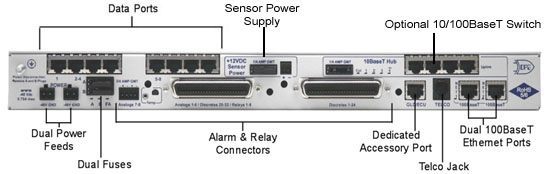
As an example, the NetGuardian family of alarm remotes have capacities that vary from 4 to 256 alarm points. This range is accomplished via a variety of 1 RU alarm remote designs, as well add extra 1 RU expansion chasses that can stack below the main unit.
NetGuardians also include multiple transport options, another industry best practice when selecting alarm remotes. This is important. Why? Because not every one of your sites that will be managed by your network management system will have the same available transport. Some may have LAN, while others will not.
Real-World Examples of Network Management.
One DPS telecom client has deployed a T/Mon central master station. It is running T/Mon XM software. It monitors a variety of railway and communication gear throughout the Western United States. All new sites (and those where the old RTU has failed) feature NetGuardian remotes. Still, there are a variety of older RTUs in place in other sites throughout the network.
Another client needed to manage a network of 10 sites, and chose to use three of them as a test case for a new network management system. The company had used alarm remotes from a different manufacturer, but had outgrown them. For this reason, they elected to begin rolling out NetGuardian remotes. Although this client had initial concerns about the types of inputs that a NetGuardian could support, these were quickly resolved. A NetGuardian remote can support alarms including commercial power, high temperature, intrusion, motion sensors, temperature, and timidity.
In the past, DPS has had experience with a relatively small four alarm point rectifier project. Monitoring backup diesel generators was also part of this project. This is not uncommon. Network management frequently involves rectifiers and other vital power equipment. Ultimately, this project grew into hundreds of sites.
In some countries, network management systems can grow to incredibly large proportions. The have many people to serve. We've been contacted by companies who have up to 14,000 remote sites. These are gargantuan networks that require very capable network management systems to be effectively monitored and controlled.
Remote power switching is also a common element of network management systems. DPS has seen a big rise in interest for DC and AC power distribution units. These can remotely turn on, turn off, or reboot servers and other network gear. It is also common for a power distribution unit (PDU) to include current monitoring for each of its power outputs. Especially in this new world of "green" networks, monitoring power consumption at the device level is particularly important. Of course, remote power switching will also help the environment. It reduces truck rolls when a server becomes "jammed up" or "gummed up". Such nonresponsive servers can be remotely restarted without requiring a technician to physically visit the site.
Network management systems can also be used to monitor fossil fuels. This can include propane levels at remote site generator tanks. A technician won't have to visit sites on a semi-regular basis. Network admins can simply have propane levels be monitored remotely. Technicians will automatically summoned when the fuel level runs low. This sort of network management is also common among diesel generator sites, which operate with very similar mechanics.
Related Network Management Devices:
Master Console: T/Mon
RTU: NetGuardian 832A G5