
Download our free Monitoring Fundamentals Tutorial.
An introduction to Monitoring Fundamentals strictly from the perspective of telecom network alarm management.
1-800-693-0351
Have a specific question? Ask our team of expert engineers and get a specific answer!
Sign up for the next DPS Factory Training!

Whether you're new to our equipment or you've used it for years, DPS factory training is the best way to get more from your monitoring.
Reserve Your Seat TodayManaging network security is more than simply making sure that everyone on the network has the correct firewall or antivirus installed. Managing your network's security also means protecting your network's physical resources and ensuring that your hardware-based security devices are always up and running. You will have to secure your network not only from online threats but from physical ones, so your network is always available for staff and clients to access.
As your network grows, you'll find yourself relying on hardware to secure your network. Firewalls, routers, intrusion protection systems, and other such devices will make it much easier on you and take the pressure off of your software protection systems.
You may find yourself finding ways to route info within the network. A good VLAN setup will help you control the flow of info on your network. Sorting your network helps you better control your things and can narrow your focus when a breach occurs or another security problem arises.
However, this level of network security requires your network resources to be working at all times. If a firewall loses power, it could create a serious breach. If a router goes offline, it could cut off parts of your network. This leaves clients and staff unable to access the resources they require.
As your network grows and resources spread out, it becomes imperative that you monitor your network's resources. This helps you both maintain security against malicious threats, but from accidents, gear failures, and otherwise unforeseeable network threats. Managing your network's security with remote monitoring systems will also reduce the amount of work you have to put in to manage your network.
A series of RTUs will become the backbone of your network's security. You'll need to monitor your gear's discrete points to know whether your network hardware is working or not. If it isn't, you'll see an alarm, before a client calls in to report a network outage or your network is compromised. More than that, you'll need to monitor conditions near your network hardware to ensure that it isn't in danger from the elements. To properly manage your network's security, you'll use analog sensors to monitor temp, to make sure that your gear isn't overheating (or, however unlikely, freezing). You'll have to monitor generator levels or battery voltages to make sure that your powered gear isn't in danger of losing power. You'll monitor other factors like humidity and airflow to make sure that the HVAC systems at your sites and in your server room are all working properly to maintain the integrity of your network.
It may also help to use devices with a series of control relays so that you can operate gear remotely as needed. Or, even better, so you can derive control actions to occur in the event of an alarm. This way, if you need to remotely turn on a generator to keep your network gear powered, or you need to operate HVAC services, you don't have to make a trip out to a site. It saves you time and helps keep your network in check.
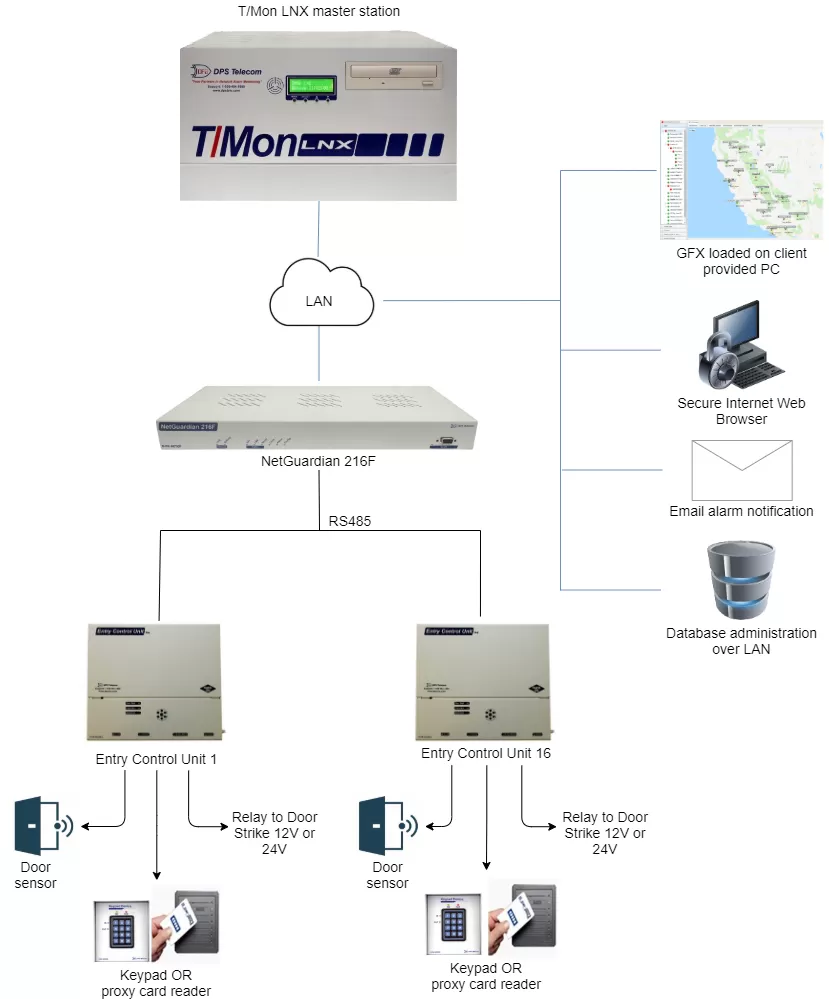
However, you don't want to have to dial in and check up on all your network resources one at a time. You'll need a master station to collect alarms and report them to you. This way you're not stuck in your NOC, staring at a terminal all day. DPS Telecom recommends the T/Mon LNX master station, which is capable of collecting your network alarms and even mediating your alarms from different brands of gear. It can also send email alerts, so you can see alarms from your smartphone, laptop, or wherever you can get your mail. The point is, with a solid master station to collect your network alarms, you can manage your network's uptime and security from anywhere you have network access without losing sight of your network.
But that's not all. Managing network security doesn't stop at simple hardware monitoring. You'll have to control physical access to your network's resources. A person with access to your gear will have a much easier time getting around your network's defenses than someone who doesn't. Or, rather than breaking into your network, a person with access could just as easily steal or break your expensive network hardware.
With all of that expensive gear at stake, even at your unmanned sites, you can't rely on an old-fashioned lock-and-key system for security any longer. Not only do locks get picked, but a tech who forgets his keys while on a trip to a site will waste time going back. Even if he doesn't forget his keys, finding the right one is a waste of time when a single proxy card or key code can be configured to let the user access sites as needed. As a network security manager, you'll need an access control system to manage entry at your sites.
You'll join building access into your remote networks, to reduce complications and cost involved in adding a building access system. You'll want proxy readers or keypads at sites housing gear only some personnel should access. At your remote sites, you may even want to employ a CCTV system to deter threats and catch those responsible in the event of a physical breach.
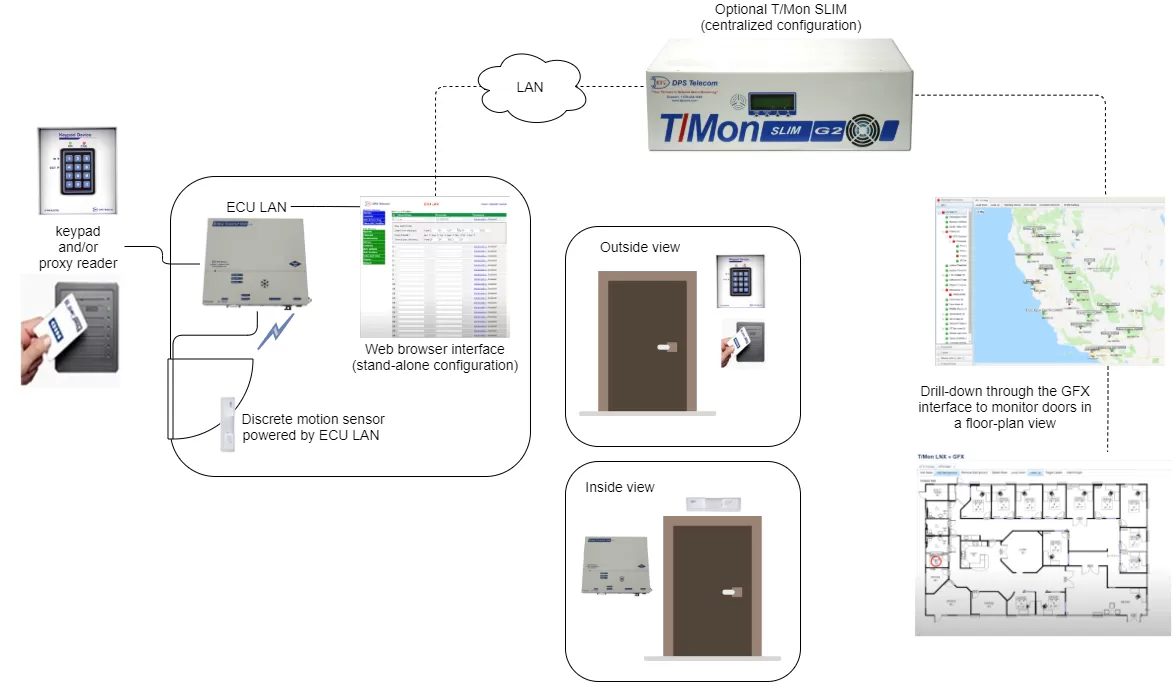
To control building access using your network security systems, you'll first install Entry Control Units (ECU) at every door with access to your network resources. You can manage access with an ECU by keypad, proxy reader, or motion sensor. You'll connect up to 16 ECUs to the serial ports on your RTUs. The RTUs will store access profiles from your master station and issue control logic for the ECU units at your doors.
At sites where you don't have an RTU or don't need RTU functionality, but still need building access, you can install door control gear that talks directly with the NOC. DPS Telecom makes a new ECU unit that connects via LAN and executes control logic for a single door. You could install a stand-alone, high-capacity door controller at offices and other high-density sites, where you need to control access but don't have a lot of network resources to control.
IP cameras like the SiteMON IP series from DPS Telecom can be joined into your building access system as well. This camera, which also monitors a couple of discrete contacts and analog inputs to augment monitoring at your site, can be configured to capture images on a "trigger," such as motion or a door-breach alarm. Not only will the cameras help deter intrusion at your sites, but if someone does attempt to circumvent your network's physical security, you can capture the image. SiteMON will even send triggered images to your T/Mon master station too, so you can turn your NOC into a surveillance room as well.
Once you've logged access profiles in your NOC, you can manage building access just like your standard network alarms. Breaches, open doors, and other sorts of alarms can be sent via email, SMS, pager, or even voice alerts if you so choose, just like your network alarms.
While physical network security is every bit as important as info security, no reason managing your physical resources has to be hard. A robust (but secure) network of RTUs and a solid master station can both alert you when you're having a network-equipment-related failure and control building access.


