
Download our free Monitoring Fundamentals Tutorial.
An introduction to Monitoring Fundamentals strictly from the perspective of telecom network alarm management.
1-800-693-0351
Have a specific question? Ask our team of expert engineers and get a specific answer!
Sign up for the next DPS Factory Training!

Whether you're new to our equipment or you've used it for years, DPS factory training is the best way to get more from your monitoring.
Reserve Your Seat TodayAn ethernet IP temperature sensor, which is what you need if you're looking for a "temperature sensor (LAN)", allows you to easily track the temperature at your remote site, server room, or in your data center. It's a small (but also a powerful and integral) part of your network monitoring system, helping you monitor and protect your large network.
A temperature ethernet sensor monitors a range of voltage with a thermistor. This is a small resistor that changes resistance based on its temperature. The voltage output measured by the sensor can be used to calculate the temperature.
When setting up your ethernet temperature monitor sensor, you'll set up some means for the sensor to send data directly to you. While most ethernet network sensors have a web interface that you can use to view live readings from the remote sensor, this is not very convenient. You likely have better things to do with your day than staring at the readings on your temperature sensor.
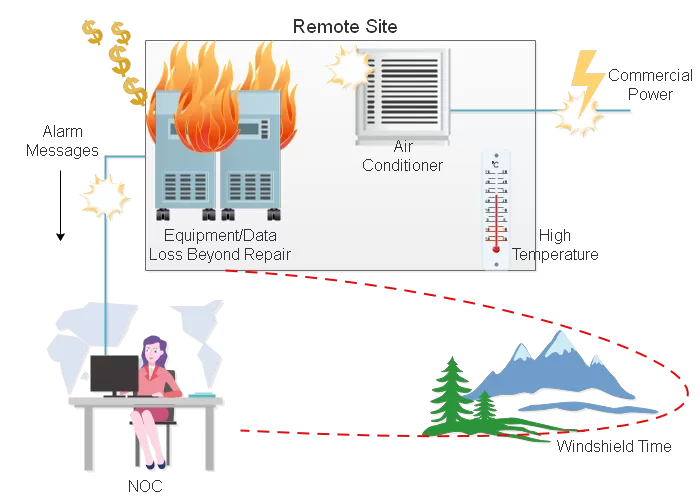
So, you'll likely set up SNMP Traps, unsolicited messages sent from your Ethernet sensor to your SNMP manager. You can have traps sent from the sensor on a regular interval for trending reasons. Or, you can reduce the network traffic required by the Ethernet temperature sensor by setting threshold values at which the temperature sensor should alert you.
The better temperature sensors out there will allow you to set at least four different alarm thresholds. These are "major under", "minor under", "minor over", and "major over". The sensor is "all clear" as long as it's below the "over" thresholds and above the "under thresholds. When one is crossed, the temperature sensor will alert you.
For example, you could set the "minor over" value for a temperature sensor at just above the set point for your air conditioning system. If you receive the "minor over" alarm, you'll know that the air conditioning systems at the site have malfunctioned.
All of this is convenient for tracking temperature at home or at a very small site. In a larger location, you may wish to monitor other things. A great first step to increase your monitoring capacity is to install an RTU.
Good RTUs on the market can monitor more than just environment monitoring sensors data at your site. They'll have a number of discrete points, extra analog sensors, and provide controls relays to operate gear remotely, all over LAN.
Consolidating monitoring at your site into a single RTU brings all of your monitoring under a single interface. A good RTU will offer the same SNMP trap capabilities as an Ethernet sensor - but has the added benefit of reporting from a single source. Perhaps dozens of individual sensors can be collected by a single RTU.
You won't be wondering about the meaning and location of sensors. Each one will be clearly labeled by the RTU. Even better, a good RTU can send an alternative email alert for alarms, so you can know what the temperature is at your site from wherever you are. This is in addition to any SNMP you may have set up.
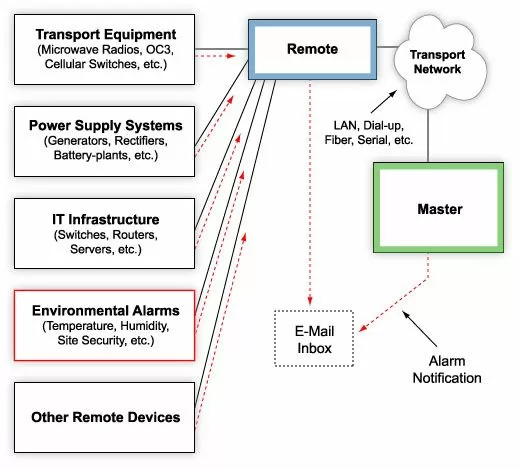
An RTU like the TempDefender from DPS Telecom provides Ethernet access to up to 16 analog sensors. These include sensors for temperature, humidity, or any other values you could hope to measure.
Sensors from the TempDefender are also daisy-chainable and can run up to 600 feet from the unit. This means there's no worry about placement or the distribution of Ethernet ports at your site. This RTU offers an inexpensive alternative to the standard Ethernet temp sensor with greater functionality.
The TempDefender IT is a complete environmental monitoring solution. It monitors temperature, humidity, air flow, and other values at your remote sites.
As your TCP/IP network grows, you'll find yourself tracking temperature across multiple sites. You'll need a way to log the temperature and other data. While an RTU does consolidate monitoring at the site level, a lot of RTUs make monitoring temperature confusing.
When a temperature alarm comes in, you can't spend time associating IP addresses and point references with the right site. Ignoring an alarm that needs a response is even worse.
A manager to capture temperature and other alarms will help you effectively manage your network. T/Mon can consolidate temperature and other alarms from any protocol, legacy, proprietary, or otherwise. This brings all of your alarm and monitoring data, including Ethernet temperature sensor readings, onto a single interface.
Like your RTU, it can also provide notification for your temperature threshold alarms. However, more sophisticated master stations allow for organized and progressive notification schemes.
When a temperature threshold alarm is crossed, your better master stations (ex. T/Mon) starts sending data. This includes email, text, pager, or voice alert to the technician.
If the primary technician does not acknowledge the alert, T/Mon can roll the alert over to other technicians. That way, no Ethernet temperature threshold alarm goes unnoticed.
Your better SNMP masters can color-code all of your Ethernet temperature sensors on a visual map. When a threshold is crossed, you'll know at a glance where you have a problem.
T/GFX, the geographical interface for T/Mon provides just this sort of interface. You can use it to view your temperature sensor data in one unified view. You can also "drill down" to lower levels of the map, all the way down to the floor plan view.
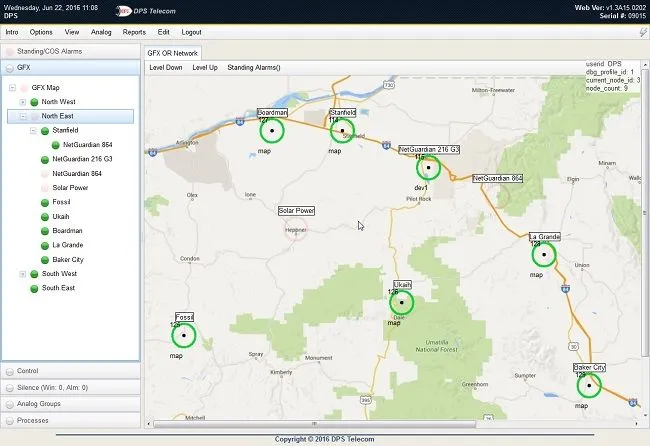
The Graphical interface for T/Mon provides a map-based interface for all of your sites. You can drill from your network at large down to the floor plan at your sites.
Ethernet temperature sensors are just a small but integral part of a robust monitoring network. As you search for Ethernet temperature sensors for your network, you may want to consider RTUs or a master station to better maintain your network.
The goal of deploying ethernet temperature sensors is not to simply receive an alert when the temperature at your remote sites crosses your set thresholds, you need to be able to know what's causing the temperature to get higher (or lower) and take corrective measures.
For that, deploying a competent remote monitoring system with efficient RTUs and a user-friendly master station is a must. Designing and implementing remote monitoring solutions is what we've been doing for more than 30 years, so we can help you get the exact system to meet your needs.
Protecting your remote devices doesn't have to be complicated or expensive. Our application engineers can give you detailed, unbiased information to simply help you make informed decisions. Our goal is to help you have the best visibility over your network as possible and not to simply sell you something.
Give us a call at 1-800-693-0351 or send a quick online message.
Related Topics


