
Download our free Monitoring Fundamentals Tutorial.
An introduction to Monitoring Fundamentals strictly from the perspective of telecom network alarm management.
1-800-693-0351
Have a specific question? Ask our team of expert engineers and get a specific answer!
Sign up for the next DPS Factory Training!

Whether you're new to our equipment or you've used it for years, DPS factory training is the best way to get more from your monitoring.
Reserve Your Seat TodayWhen you have a network that's spread out across a large geographic area, you obviously also have a lot of remote equipment that must be monitored and managed. All sorts of threats come in to play when you don't have someone permanently staffed at a remote site, including extreme temperature, humidity, flooding, intrusion, theft (especially copper theft), and vandalism.
Do you realize that a large chunk of your company's potential profit is eaten away by the inefficient execution of maintenance tasks and your inability to provide reliable service to your customers? If you don't have a good remote equipment monitoring system in place, your technicians can't help but do "the best they can" to keep your network operating in good order. If you don't have a good remote equipment monitoring system in place, your customers are far more likely to abandon you after experiencing several frustrating service outages.
Obviously, you can't pay someone just to sit at your remote sites all day, but you can gain many of the advantages of a human presence by deploying a remote equipment monitoring system. In fact, an automated system is frequently superior to a human because it doesn't get tired, miss details, or have ill intent.
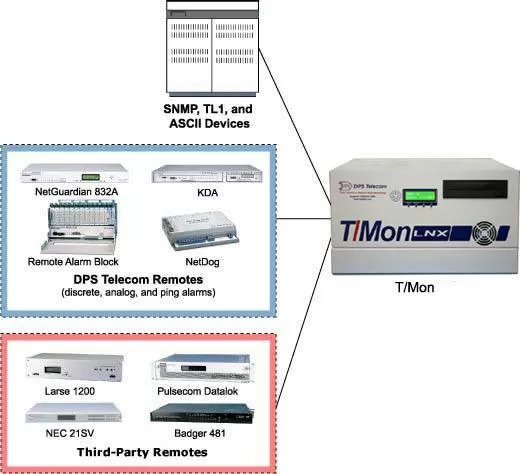
Let's now take a look at the basics of remote equipment monitoring. No matter what the scale of your network or how many sites you have, remote equipment monitoring starts with a Remote Telemetry Unit ("RTU" or "alarm remote") stationed at each of your sites. An RTU doesn't need to be a large device. In fact, some of the best RTU's on the market are just one rack unit high. The effect of an alarm remote, however, is huge.
A good alarm remote is a tireless guardian in your network. It will monitor the temperature (both inside and outside of your site), doors, motion sensors, humidity, and critical equipment alarms. Good monitoring of these and similar factors gives you an edge in trying to keep your network online as much as possible.
Your RTU will, however, respond to the size of your network in a way that it sends you alerts. If you're a large company with a large network, you probably already have a network operations center (NOC) in place with 24 hour a day staffing. With this resource available, your best solution will be to route alarms from your alarm remote to a central master station console located at your NOC. This provides a central aggregation point for all alarms that is necessary to keep a large network and its multiple technicians coordinated to handle maintenance and emergency repairs.
If you don't have a NOC at your company (or even one that's just not staffed 24 hours a day), your RTU should also be capable of sending alarms to you directly via e-mail, cell phone text message, or phone voice message. You should also be able to set alert schedules for alarms. During normal business hours, you may want to know every alarm related to your remote equipment. In the middle of the night, however, it's very likely that you'll only want to be disturbed for major or critical alarms. Good RTU's allow you to make this distinction based on the time of day and the day of week.
Any RTU that you select should support both central console modifications and e-mail/phone notifications. Having both of these capabilities in a single remote adds important flexibility to your remote equipment monitoring system. You'll be able to transition between notification methods as your company grows, or add e-mail and phone notifications to complement what your 24X7 NOC is capable of dispatching.
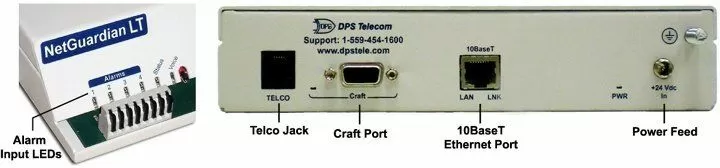
You do, however, need to select RTU's that have an appropriate capacity for the amount of alarms you have present at each site. You want to allow for some growth, but there's no sense in buying more capacity than you're ever going to use.
Fortunately, a good remote equipment monitoring manufacturer will have a variety alarm remotes available to support a variety of capacities at your remote sites.
When it comes time for your real-world deployment, you reduce the cost and confusion of installation (and a lot of headaches for you later) by standardizing on just a few different alarm remote models for a few different site sizes. If you divide your sites into large, medium, and small sites based on the amount of remote equipment contained in each, you can select three different alarm remotes that cover this range well. Selecting just one or two remotes can often result in too little capacity at some sites and way too much at other sites. Selecting more than three can make it difficult for your technicians to learn and install so many different units.
You also need to be careful that you choose a monitoring equipment manufacturer that can support the transport available at your remote sites. Depending on your industry and the construction of your network, you may or may not have a LAN available at all sites. Some sites might be fed with a T1 while others might only have a fiber connection. If this is the case, you should choose alarm remote that has a built-in T1 or fiber connection.
As an example, the NetGuardian 216F has a pair of 1000BaseFX SFP fiber connections that allow it to connect to a fiber ring. It will also break out 10/100 LAN for the other devices at your site. This NetGuardian, which acts as both a monitoring device and provides LAN to your external equipment, is often much less expensive than purchasing a LAN card from your fiber transport manufacturer - while still providing more functionality.
Related Topics:
Additional Info: Equipment Monitoring
Related Remote Equipment Monitoring Devices:
Central Master: T/Mon

