
Download our free Monitoring Fundamentals Tutorial.
An introduction to Monitoring Fundamentals strictly from the perspective of telecom network alarm management.
1-800-693-0351
Have a specific question? Ask our team of expert engineers and get a specific answer!
Sign up for the next DPS Factory Training!

Whether you're new to our equipment or you've used it for years, DPS factory training is the best way to get more from your monitoring.
Reserve Your Seat TodayData centers must stay within certain temperature and humidity ranges to function and prevent hardware failure. Equipment in the data center expends power, generating heat, requiring air conditioning and ventilation gear to keep them cool and running well. If the temp rises too high, gear will begin to malfunction or become damaged. Internal components begin to swell and pull away from each other (or simply burn-up). A data center will want to keep a controlled temperature range of 68-74 F. This is well within ASHRAE's (American Society of Heating, Refrigeration, and Air-Conditioning Engineers) guidelines for data processing environments. It's also within temperature ranges named by manufacturers of gear used in the data center.
Data center humidity control is needed to ensure that all equipment functions properly. If the air in the data center is too humid, water may condense on the internal components. This results in shorts. If the air is too dry, a data center risks static build up, which can also result in electrical shorts. Typically, a data center will also want to maintain a humidity range between 40-55%. It is good practice to install data center humidity sensors and monitoring devices to ensure this threshold is not breached.
The Need for Better Data Center Cooling Systems.As gear becomes more high tech and compact, data centers see their power draw rising above 500 watts per square foot. This increase in power consumption, density, and heat generation requires better AC and humidity control systems to control the data center environment.
Even then, full systems can't ensure perfect humidity and temp in the room, as there's no guarantee of the same gear on each rack. Each gear rack houses different components at different densities. Power consumption and heat generation will be different all over the data center. There will be cold spots and, more significantly, hot spots.
New Systems and Strategies to Keep Data Centers Cool.Liquid cooled systems are now becoming more popular. This allows data center managers to get more cooling for less energy by pumping cold water or liquid refrigerant in closed systems in or near the racks. They come in a number of variants, device mounted, rack-integrated, or rack attachments, but they're quite pricey and require a closer eye to humidity. To prevent condensation, the data center has to strictly control humidity levels taking into account its hottest and coldest spots. Liquid cooling solutions, while efficient, are also expensive to implement.
A cheaper low-tech solution, involves placing racks in hot and cold aisles on the raised floor. In this system, racks are placed two tiles apart, with their air intakes facing each other. Cool air is pumped through perforated floor tiles between the racks, and exhausted away from both racks. Air conditioning systems then pull in the hot air released from the rear of the racks, and release it underneath the floor tiles, completing the cycle. In this way, a chiller or air conditioning system can keep cool air running through the system while helping homogenize the cooling environment.
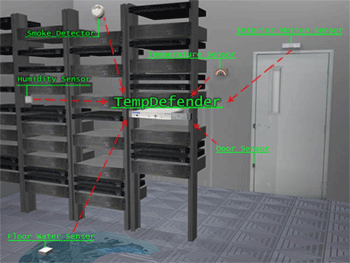
TempDefender monitors your data center's cooling and environmental controls to ensure the safety of your gear and optimal operating conditions. Preventing hardware failures and shutdowns due to poor data center conditions keeps costs down
At any rate, with data center temperatures rising, cooling and environmental control become much more important. If any one piece of your data center's environmental systems were to fail, it could result in a lot of damage to the gear within the data center and expensive repairs or replacements. In order to ensure that your data center's environment is optimal for server function, you'll need to monitor your data center's temperature, humidity, and airflow.
Of course, monitoring your data center can be hard. You'll have to check airflow both below the floor and above. Temp will shift between hot and cold spots, and humidity can change from your return airspace to the data center floor. As hard as it may be, you can't simply leave your data center's environment unmonitored, or trust them to the single systems that control that environment. If the environmental control device and reporting device are one in the same they will fail together. Then you may not be alerted to problems before a serious problem occurs. Fortunately, there are a number of small devices that can fit in line with your data center gear and monitor your data center's environment.
TempDefender Keeps Your Server Room's Environment in Check.DPS Telecom's TempDefender is designed to monitor conditions in your data center. The small, rack mountable RTU connects to up to 16 analog sensors. They measure the temperature, humidity, air flow, smoke, or any other conditions you may be worried about in your server room. Sensors for the TempDefender are connectable with simple RJ11 connectors and are daisy-chainable in any configuration. You can run a set of data center temperature and humidity sensors through your server room without running 16 cables all the way back to your temp defender. You can run sensors from a temp defender to monitor air flow in your hot aisles, temp in your hot and cold spots, and humidity at the return air space, all from one RTU.
NetGuardian 216 G3 Provides an Elegant, On Rack Solution to Data Center Monitoring.Of course, you don't have to monitor your whole data center with one device, or even run sensors throughout the data center. Hot, cold, and humid spots will appear throughout the room naturally (because of heat production). You could install data center temperature monitoring devices with your cabinets. Then you can monitor your gear with discrete contacts and environment with analog sensors in your data center by single cabinets. A NetGuardian 216 device has the dry contacts you need to monitor the data center gear in your cabinets. It also has four analogs to measure the environment inside or just outside your cabinet.
TempDefender and the NetGuardian 216 can both alert you of environmental events in your data center as they occur. You can keep track of the environment inside your data center without staring at your monitor. In TempDefender and NetGuardian configurations, you can have SNMP traps reported to your master station, and progressive email alerts sent to up to 8 technicians. Email alerts come with an acknowledgeable link. That way you can let the NOC and your fellow techs know that you're taking care of an alarm, right from your smart phone or wherever you can get your email.
When you receive alarms, by email or trap, you can connect directly to the web interfaces for both the TempDefender and NetGuardian 216 to see reported values and operate relays. You can take control of your data center's cooling and environmental control systems from wherever you are.
Related Topics:
Ethernet Temperature Sensor


