
Check out our White Paper Series!
A complete library of helpful advice and survival guides for every aspect of system monitoring and control.
1-800-693-0351
Have a specific question? Ask our team of expert engineers and get a specific answer!
Sign up for the next DPS Factory Training!

Whether you're new to our equipment or you've used it for years, DPS factory training is the best way to get more from your monitoring.
Reserve Your Seat TodayMonitoring with your data center monitoring systems is absolutely vital if you intend to keep your servers online and provide reliable service for your customers. Incorporating advanced data center monitoring systems ensures these risks are proactively managed. There are a host of challenges that, if not properly managed, can bring down your data center. Temp can rise above acceptable levels. Well-meaning but novice employees can off-line your servers while executing a seemingly harmless procedure, and outside intruders can enter your data center.
A single data center management device can monitor for all of these threats at the same time. The management solution you choose will mostly depend on the size of your data center. Smaller setups can benefit from compact data center monitoring systems. For a small server room or closet, it's most likely o.k. to install a single monitoring and management device. This has built-in or external temperature sensors for tracking temperature. It will also electronically control physical access into the data center, which helps to prevent damage caused by both employees and non-employees.
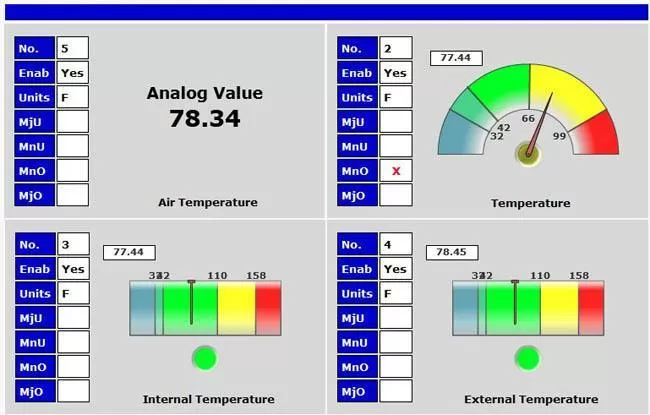
When monitoring temperature, you need to evaluate where the potential "hot spots" and high risk areas are in your data center. The use of targeted data center monitoring systems can optimize this evaluation. Any device that is prone to overheating, or is so valuable that heat must be strictly monitored, should have its own dedicated temperature probe. This is much more effective than a simple temp sensor. It measures the temperature right at the target device rather than within the data center management unit.
For the "physical access" side of your data center management, your best option is an door control system. An electronic access system provides much more granular access rights than metal keys and locks. Data center monitoring systems that include access control provide even greater visibility and security.
Once you've given a key to an employee, that key can be lost, stolen, and used 24 hours a day, 7 days a week. An electronic system makes it easy to give each employee or contractor a unique key or code with single times of day and days of week when access is allowed. It's also easy to deactivate a missing key or revoke access privileges when an employee leaves your company.
Electronic door control also improves your data center management by providing complete logging of entrances to and exits from your data center. This is a critical feature of comprehensive data center monitoring systems. After an incident, good logs will prove to be an great resource as you try to find the cause of the trouble. If you know who was in your data center when something went wrong, you know who to talk to first.
For controlling access to your data center doors, you need to choose an access control system that's suited to the needs of your data center. The best data center monitoring systems integrate access control with ease. If you have a single or just a few doors, a small alarm remote with built-in door control is your best option. You will be able to monitor server alarms, temperature, humidity, and other vital factors with the same device you use to electronically manage door entries.
If you have a larger data center, you might choose to deploy a central master station like T/Mon. It provides a central aggregation, presentation, and management console for both data center monitoring and electronic access control.
At sites where you don't need electronic door control, the TempDefender IT is a good data center monitoring option. This device exemplifies compact, efficient data center monitoring systems. This is a small (4" x 11.5" x 1.7") alarm remote designed just for data centers and server rooms. The small form factor minimizes the rack space required, allowing you to add more revenue-generating servers into the room. With SNMP, the TempDefender makes a lot of sense if you're already using an SNMP manager for data center management.
The TempDefender is capable of monitoring a variety of sensors, including smoke, humidity, floor water, temperature, door, and interior motion. Each of these sensors is powered directly from the TempDefender itself, so no extra power supply from the wall is required.
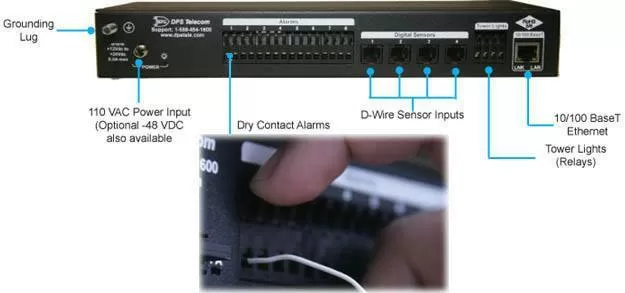
When the TempDefender detects a problem in your data center, it can alert you in a few different ways. As I mentioned before, the TempDefender is SNMP compatible. You can send SNMP traps to your SNMP manager if that's the system you're currently using for data center management.
But if you don't currently have an SNMP manager, there's no need to deploy one just to receive traps from a single TempDefender. You can also have the TempDefender send e-mail alerts to you automatically when single alarms occur. Check the status of data center alarms at any time, you can use the built-in web interface by simply typing the TempDefender's IP address in your web browser's address bar.
Another important feature for any data center management device is a telco-grade casing for improved durability. Your servers are important, so they deserve a high-quality monitoring system. It's important that you know that management devices fall into two basic groups. On one side, you have gear that's built from plastic as cheaply as possible. It is therefore more likely to fail than your servers themselves. This makes the device fairly useless for protecting uptime. Sooner or later, the gear is going to fail you. Software also tends to follow the same quality level as the hardware.
What you're really looking for is a device that's been tested in demanding industrial telecom and utility environments. These might be way more extreme than your data center environment, but that's really the point. A device that's made it in the telco space has what it takes to handle just about anything your data center can throw at it. It should always be the last thing to fail.
Now, you won't end up using exactly the same model that's used by telcos. You might have a lot lower capacity requirement than a large telco. Still, the design principles that a manufacturer establishes for its larger products will carry through to its smaller products as well.
That, actually, is the story of the TempDefender. It might be described as the "little brother" of the NetGuardian family of RTU's. Built on the same basic platform (and with the same powder-coated aluminum chassis) as NetGuardians, the TempDefender's only major difference is in its smaller capacity. This means that, regardless of your capacity need, you can find a telco-proven solution in either a TempDefender or NetGuardian data center management device.
How other companies like yours are doing data center management:
One DPS client named Howard visited DPS looking for a data center monitoring solution. He needed to monitor:
Alerts needed to be sent via email, but the main reporting method needed to be direct SMS via an onboard GSM modem. Howard wanted to "insert a SIM card and have it start reporting". Email could not be the main reporting method, because Internet access was not available in many parts of Howard's service territory.
To date, Howard's company has supplied gear for thousands of BTS tower sites. Lots of data centers were coming up in their deployment queue, which led him to search for a monitoring solution.
At that time, he was reselling a different management product, which "was similar to the NetGuardian". The virtues of that model included fast setup and ability to send 4-5 emails per alarm. The only problem was that it was not sold exclusively by his company. He was looking to develop a competitive advantage with a specialized data center management device. Howard also had a second project in mind for data centers: a 50hz 240vAC 2x4 (or 1x8, but still needs dual power supplies) power switch. This wouldn't require an external power transformer in order to reduce installation complexity and cost. It would also have dual power inputs, and it would monitor the current draw through each of the 8 output ports.
Another DPS client originally called in because he wanted to manage and monitor a GE UPS (80kva). This was a data center management project because this UPS was responsible for providing reliable backup power for his data center, dispatch, radios, and computers for a full 15 minutes. Which is plenty of time for his backup generator to kick on (typically takes 1-3 minutes to start).
One evening, they found they had 3 dead batteries and several bad batteries. This meant they would not have stayed up till the generator started. They needed to be more proactive on battery monitoring.Since this was not a -48v system, a customization was required for the NetGuardian remotes. Fortunately, this sort of customization is routine work for the DPS engineers.
This project required two Battery Voltage Monitors (BVMs). They would also have a company that manages and maintains their battery do the install of this battery monitoring system for their data center.


