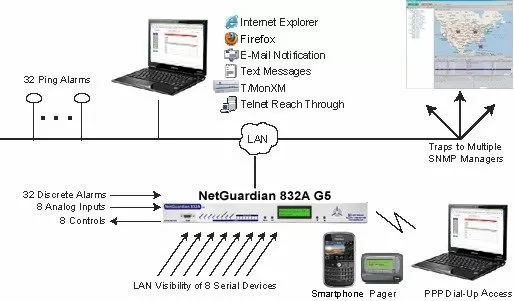
Check out our White Paper Series!
A complete library of helpful advice and survival guides for every aspect of system monitoring and control.
1-800-693-0351
Have a specific question? Ask our team of expert engineers and get a specific answer!
Sign up for the next DPS Factory Training!

Whether you're new to our equipment or you've used it for years, DPS factory training is the best way to get more from your monitoring.
Reserve Your Seat TodayNetwork Alarm Monitoring Systems are devices that are mostly centrally located. They monitor equipment at your sites for notable events - otherwise referred to as "alarms". An alarm may vary from something as simple as an unlocked door or to let you know your equipment is failing and you're close to a massive network outage. By using a reliable network alarm system, you make sure that no critical alarm is missed.
If you're wondering about integrating existing alarm systems with new monitoring services, rest assured, T/Mon excels here too. In many cases, your current alarm equipment can be seamlessly reprogrammed to work with T/Mon's advanced monitoring capabilities. This not only enhances your security infrastructure but also aligns with any proprietary systems you may already have in place.
Moreover, upgrading to a robust monitoring service can offer additional benefits. You might find opportunities for savings on related expenses, such as insurance premiums, by presenting a certificate of enhanced alarm monitoring. This dual advantage of adaptability and potential cost-efficiency makes transitioning to T/Mon a practical choice for maintaining and improving your home security setup.
Your Alarm Monitoring System, if it's any good, should organize and interpret the severity of incoming alarms in real-time. This will help you coordinate maintenance and repair efforts throughout your network. It is an essential part of any network management system.
Equipment at your sites should operate without you watching it 24/7. As events occur that might require your attention, your equipment will let you know by reporting an alarm. You can connect a remote telemetry unit (RTU) to the equipment at your site to report alarms.
Regardless of the device chosen or monitoring plans, the effect is the same: the network equipment sends an alarm whenever something goes wrong.
Alarms start with equipment alarms, self-reported by each piece of your equipment. If your generator runs, it latches a relay to tell you that it's running. If it's running low on fuel, your generator might also have a relay to tell you that. If your microwave link can't transmit effectively because noise levels get too high, it can report that with a contact closure latch.
The alarm types you can monitor are virtually infinite. And because they're reported in a standard way (a simple dry contact closure is the most common), you can capture all of them using a typical alarm remote with discrete inputs.
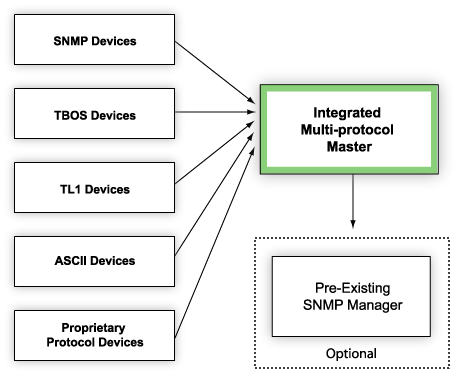
As your network alarm monitoring system grows, both geographically and in the number of elements, you may struggle to track all the data coming in; potentially wasting time and energy trying to determine the severity and location of every individual source.
T/Mon can receive SNMP Traps and poll legacy/proprietary devices. This will bring all of your network alarm monitoring on to one platform. It can even forward SNMP traps to a higher level master, consolidating network alarm services.
Ideally, your alarm monitoring system should:
Your alarm monitoring system won't be very helpful if it leaves blind spots in your network. It must be able to collect all of your network alarms. Therefore, it must be able to communicate using all of the protocols used in your network and be flexible enough to support new protocols.
An alarm monitoring system like T/Mon supports a wide variety of network protocols. It even includes legacy and proprietary protocols. This makes it quite adaptable to your network needs.
If you want to consolidate monitoring to a single platform, you can employ a device like T/Mon. It will act as a regional or mid-level manager to mediate multiple protocols to SNMP or TL1. This single stream will be sent to a higher-level master station.
Discrete contacts and analog threshold alarms can provide an indication of their severity on site. Still, they don't necessarily indicate severity within the network. In some cases, the network monitoring and alarm monitoring system is simply a device that listens for alarms. It collects them via a terminal session or a text log.
While this does collect all of your alarms in a central monitoring station, it is minimally helpful. You will have way too many "routine" alarms that don't require a response. This makes it very difficult to see the alarms that actually matter.
Your alarm monitoring system should provide some means to sort alarms by perceived severity. You need ways to determine the most important alarms within your network. Often times, this is still done by a human operator. No device can make more informed decisions about your network than you can.
T/Mon allows you to sort alarms by severity, location, and other factors, as you see fit. In monitor mode, alarms are color-coded indicating severity, so you can see quickly what your highest priority (alarms labeled "critical") alarms are.
The new "root alarm" feature for T/Mon takes this a step further, helping you weed out irrelevant alarms when a large number of alarms set. For example, if your DS3 fails, a large number of irrelevant T1 points will set alarms. The root alarm feature allows you to designate the DS3 as a "root,". When the DS3 failure alarm sets, any T1 points are automatically silenced.
This saves you the trouble of weeding through nuisance alarms to figure out the real problem. Of course, when any T1 alarm goes off by itself, T/Mon will allow the alarm to occur normally. Your alarm monitoring system should not simply provide visibility, but intelligent visibility for your network.
As your network alarm monitoring system collects alarms, it should be able to notify technicians. They need to know when things happen. This saves your network operations center (NOC) from having to dispatch each individual alarm. It reduces the likelihood that an alarm will somehow be forgotten between the NOC and remote technicians. A solid network monitoring and alarming system allows for swift action.
T/Mon, for example, can send email, text, pager, and, with an accessory, voice notification to technicians for any of the unit's databased alarms. You can even set progressive notifications. That way, if the primary technician for a site/alarm is notified and fails to acknowledge the alarm, the notification rolls-over to the next technician down the line. This ensures that no alarm falls through.
Properly organized notifications essentially automate dispatching duties. They ensure that your network maintenance and repair issues are resolved quickly. First, the alarm notification will be received quickly.
The alert message can go directly to a technician in the field. There's no delay while waiting for a dispatch operator to notice the alarm and assign it to a field tech. Second, the alarm will have enough detail that your technician can decide how to respond: How fast do I need to get out there? What parts do I need to bring? Do I need to grab a key from headquarters to get inside the site?
Finally, your alarm monitoring system should provide an interface that is as easy to use as possible. Most alarm managers provide a simple terminal interface - which is good. The terminal interface provides powerful access to your alarm manager. It is quickly navigated. The user must, however, understand all of the terminal commands and have intricate knowledge of your network.
However, expecting all of your technicians to achieve the extremely high level of proficiency required by a terminal program for your alarm monitoring system is unrealistic. Your alarm monitoring systems should provide some sort of interface that your technicians can make quick use of, without an overbearing amount of training or a weighty manual.
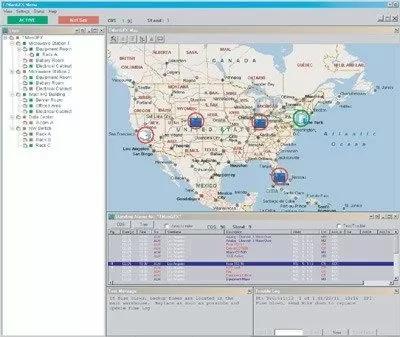
T/GFX, the geographical interface for T/Mon, does this by placing all of your network resources on a map. It also lets you perform databasing and monitoring operations with a simple point-and-click interface. Placing all of your alarms on a map helps technicians determine where problems are at a glance. It prevents users from having to remember complicated point references for sites. T/GFX allows users to "drill-down" through map layers as well, to get a closer view of sections of your network, all the way down to the floor plan at your sites. Using the interface, you can even operate controls or access the interfaces for your alarmed devices directly through the map. This greatly simplifies infrastructure management.
Your alarm monitoring system exists to help you consolidate network alarms and make managing your network easier. Don't settle for something that doesn't provide the visibility you need, or something that over complicates your administrative efforts. Get an alarm master that provides the features and interface you need to manage your network.
Related Topics:
Remote Monitoring Software