
Check out our White Paper Series!
A complete library of helpful advice and survival guides for every aspect of system monitoring and control.
1-800-693-0351
Have a specific question? Ask our team of expert engineers and get a specific answer!
Sign up for the next DPS Factory Training!

Whether you're new to our equipment or you've used it for years, DPS factory training is the best way to get more from your monitoring.
Reserve Your Seat Today"Alarm monitoring" is a phrase with a lot of definitions. Most consumers think of a company with a 24X7 monitoring center for detecting and responding to home or business burglar alarms. In telecom and IT context, however, alarm monitoring refers to much more.
In an industrial telecom environment (a phone company, utility, railway, etc.), an "alarm" can be generated for a wide variety of reasons. For many companies, the routine act of opening a door will generate a low-severity "status" alarm. This is tracked largely so that a log of door entries will be available after theft or vandalism.
Alarm systems can also show minor gear errors or hardware failures. These alarms trigger medium-severity "minor" alerts at the alarm monitoring center.
Minor alarms frequently require a purposeful or emergency response. They are commonly scheduled into a regular maintenance trip to a site. This is so they do not interfere with daily actions (requiring extra labor time, fuel expense, and truck wear and tear).
The most serious alarms in the alarm monitoring sphere are the "major" and "critical" alarms. These alarms almost always require an immediate response, because the integrity of the network is severely at risk. Major and vital alarms are what keep network managers up at night.
Some companies are not prepared to deal with vital alarms at the moment they happen. They will have little chance of maintaining network uptime and continuing to deliver reliable services to its customers.
The severe consequences associated with missing the vital network condition point to the very high value of a good, professional, monitoring system.
What types of gear are most commonly covered by alarm monitoring? They include:
The monitoring device model commonly used in alarm monitoring varies by company size. A very small organization may use just a single device to collect system and environmental alarms at a site. It would also send out alerts via email and/or cell phone (voice or text message).
This monitoring method is an excellent choice for small companies because no centralized server is required to collect alarms. Only a small box with a few monitoring inputs is required.
This one-box approach to alarm monitoring can be repeated at an unlimited number of sites. It can become more difficult to manage once a company has 10-12 sites. At this point, the concept of a centralized alarm monitoring console becomes far more valuable.
Now, all collection and aggregation of alarms will be handled by computers. Only a combined, filtered, and organized list of important alarms will be displayed for human staff (although even hidden alarms can still be logged for review later).
Although there are many possible RTU boxes to use for stand-alone alarm monitoring applications, here are a few good examples of varying capacities.
The NetGuardian LT is a very small and compact alarm monitoring device when just 1-4 alarms need to be collected. Because LT users likely have many other duties, the LT makes simple automated voice calls to one or more designated phone numbers. Upon receiving a call, a user has the option to acknowledge the alarm. This indicates to the device that the alarm is known and will be dealt with.
For medium-sized sites, the NetGuardian 216 provides 16 alarm inputs. It can send email or text messages for monitoring similar to the NetGuardian LT. It is more commonly used to send SNMP traps back to a central master console.
For larger sites, the NetGuardian 832A includes 32 alarm inputs (with an option for 64). Plus, a serial terminal server and an optional network switch. At this capacity level, it is anticipated that almost all deployments will be used with a central alarm master.
Still, stand-alone operation remains available on the 832A. It simply made little sense not to include a feature that already existed on other platforms.
The move to a central alarm monitoring master station ("alarm master") also puts a lot more processing power into the monitoring system at a time when it's needed. Some alarm monitoring systems are small enough to be monitored with alarm remotes only. They can be effectively monitored with simple web interfaces that are built into those devices.
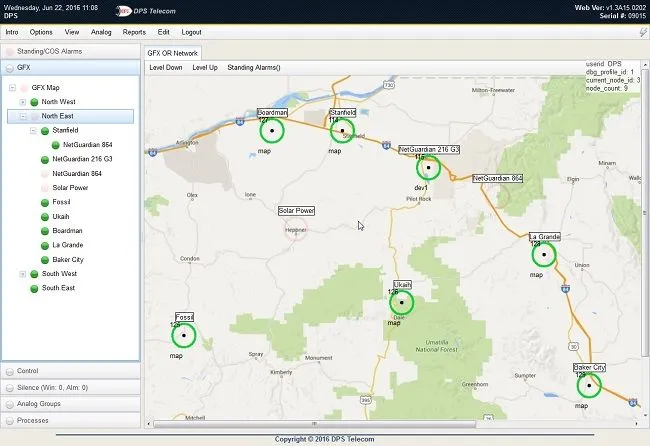
Once a company's alarm monitoring needs outgrow this level, however, a more intuitive view is required. A central master console is usually a high-speed computer running highly specialized software. One use for all this power is to display alarms on a geographic map. This makes monitoring alarms much more intuitive, as even new techs can see where a problem is occurring in a network.
Alarms come flooding in during an emergency, such as a natural disaster. The ability to see which areas of a widespread network are affected is absolutely vital. A map view display supports highly intuitive alarm monitoring, while a text-only view does not.
One example of a geographic map alarm display is T/GFX software. This is a Windows(R)-based software program that connects to a dedicated T/Mon server. Alarms collected by the T/Mon server are associated with graphical icons arranged by latitude & longitude. Icons blink and change color to indicate new alarms of various levels.
In a few clicks, a user can "drill down" to the single piece of gear that has issued the alarm. Imagine how much easier it is to monitor a big network with users moving through zoomable maps.
There is great value for growth-oriented companies to choose RTUs that can transition from a stand-alone role to centralized-master reporting. Any RTU that can send out its own alerts (voice messages, text messages, emails, etc.) and also supports an industry-standard open protocol (the most common for alarm monitoring is SNMP) is a good choice.
The #1 Rule of Alarm Monitoring: Do not use "embedded alarm monitoring" options on your gear. That means that the gear manufacturer has included alarm monitoring as a "value-added" feature. Your gear manufacturer may be great at designing alarm monitoring functions.
The fatal flaw though lies in having core functions and monitoring functions residing on a single device. Imagine a case when your device failed.
Now is absolutely the right time to send out a vital "device failure" alarm. But, now is the time that it absolutely cannot send an alarm, because it has failed. Don't fall into the trap of using embedded alarm monitoring.
About six months ago, a client called DPS with a need for alarm monitoring to keep better tabs on several remote HVAC units. These HVAC units were integrated with three cooling towers and two water pumps. This person needed to monitor alarms for several key risks.
If the water level of the site dropped too low, the HVAC units would fail, causing gear to get hot and shut down. Instead, if the water level rose too high because of a stuck valve, the company could waste a great deal of money sending tons and tons of water right down the drain. Finally, if the pumps failed, HVAC could also be severely impacted.
His two pumps rotated in a 1 week on and 1 week off cycle. During the transition, both were running. The alarm monitoring plan was to place a single current sensor and put it on one phase of the power, then do the same for the other pump.
The sensors would be configured such that the sensors are closed when current is not flowing. These sensors would then be joined in series, such that if they both are closed they would get an alarm on their RTU. Each phase was 480VAC.
He also wanted to monitor alarms for low water in the towers. To start, this was using 1 sensor for low flow, so it would be a total of 3 towers. Because "too much water" also need an associated alarm point, 2 sensors were deployed per tower (total of 6 sensors to cover the 3 towers).
Another company needed an alarm monitoring system for a bank with 25 branches nationwide. The main gear to be monitored was contained within a single server room at each branch. The single door granting access to each room was vital to monitor, considering the amount of money in the vault that the computers controlled.
There was value seen in monitoring single temps within each server room using probes. But, the initial phase of the project was to monitor simple ambient temperature from an on-board RTU's temperature sensor.
=Remote Monitoring System Design: A 3-Step Process
Do you want to monitor your remote sites, but you're not too sure what equipment to use to cover your bases? Planning your remote monitoring system can be very hard, especially if you've never done it before. Finding th...
by Andrew Erickson on March 19, 2019
How to Get an RTU for Evaluation & Testing
If you want to test out an RTU in your lab or at one of your remote sites, you'll need to get a free evaluation unit from a manufacturer. There are 3 primary ways to do this...
by Andrew Erickson on March 5, 2019
How Do I Justify My Remote Monitoring Purchase To Management?
You're interested in purchasing a remote monitoring system, but you can't get your boss on board with the idea. That's very common, since remote monitoring is not directly responsible for your company's revenue. However, think about alarm monitoring as a...
by Andrew Erickson on March 18, 2019
Top 5 Causes of Network Failures
Whether you're a phone service provider, internet service provider or some other type of telecommunications company, it's your responsibility to ensure that your communication services are always operating correctly...
by Andrew Erickson on December 10, 2019
How to Choose an RTU - Top 3 Considerations You Need to Think About
You've decided it's time to buy an RTU to monitor your remote sites, but how do you decide which model is the best fit? Today, we're going to look at the top 3 things you need to think about when you're choosing an RTU...
by Andrew Erickson on February 11, 2019



