
Download our free SNMP White Paper. Featuring SNMP Expert Marshall DenHartog.
This guidebook has been created to give you the information you need to successfully implement SNMP-based alarm monitoring in your network.
1-800-693-0351
Have a specific question? Ask our team of expert engineers and get a specific answer!
Sign up for the next DPS Factory Training!

Whether you're new to our equipment or you've used it for years, DPS factory training is the best way to get more from your monitoring.
Reserve Your Seat Today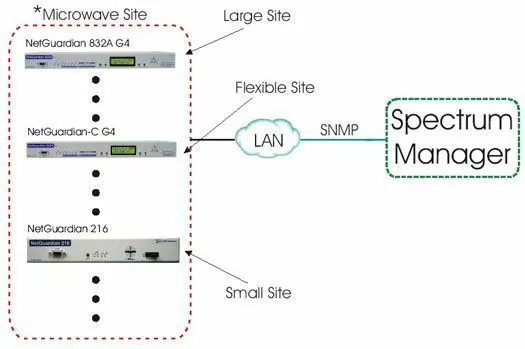
Deploy the NetGuardians with the capability of reporting alarms to your Spectrum Manager. All of the NetGuardians will be able to report SNMP over IP to your Spectrum SNMP Manager. For your Larger Sites, we recommened the NetGuardian 832 G4. The NetGuardian G4 features the ability to monitor 32 alarm point, 8 Analog Ports, has 8 controls, 7 RS232 serial reach through ports, and a single RS485 port for GLD support or Building Access, should you need to expand basic monitoring. Also, we have an Expansion Chassis available for the NetGuardian G4 in case your monitoring site grows beyond the 32 at these sites. The NetGuardian 832 and C version feature a easy-to-use GUI interface and full PPP functionality.
At the Flexible Sites, we suggest the NetGuardian-C G4. The NetGuardian-C was designed to be easily expandable at a moment's notice. It can be used at either the small sites or the large sites (once expanded). The NetGuardian-C is a limited version NetGuardian 832, the only differences are the alarm, serial and control capacities. This version features 16 Discrete Points, 2 Controls, 2 Analog Ports and 4 RS232 Ports. Also, the NetGuardian-C keeps an eye on the future and can migrate to a full-blown version at a later date (i.e. for a larger site).
Our suggestion for the Small Sites, is that they should be outfitted with the NetGuardian 216. The NetGuardian 216 offers an easy, cost-effective way to monitor those smaller sites without having to populate it with a unit that is too big for it. The NetGuardian 216 will provide complete coverage and control of your smaller remote sites with easy installation and configuration.


