
Check out our White Paper Series!
A complete library of helpful advice and survival guides for every aspect of system monitoring and control.
1-800-693-0351
Have a specific question? Ask our team of expert engineers and get a specific answer!
Sign up for the next DPS Factory Training!

Whether you're new to our equipment or you've used it for years, DPS factory training is the best way to get more from your monitoring.
Reserve Your Seat Today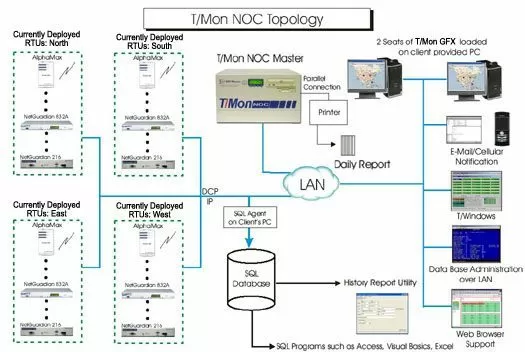
This application of the T/Mon NOC features its ability to act as an automatic reporting tool using SQL. The T/Mon NOC is a rack mounted, -48V dual feed, Pentium computer that will be responsible for: Collecting, filtering, categorizing & presenting alarms, maintaining history, alphanumeric paging and e-mail notification. The T/Mon NOC used the slide rack, which can be placed into your 19" or 23" racks. This solution provides the highest level of local alarm visibility. Alarm viewing will take several forms including our embedded web browser support facility. This interface is incredibly easy to use and will provide network visibility to your staff provided they are given the access rights by your system administrator.
This is a most efficient way of preparing your daily log books to keep them available on hand. With the T/Mon NOC and a local parallel printer, you can have a single daily report printed out at a specific time every 24 hours. As you can imagine, this avoids wasted time in 'running reports' or forgetting to run them altogether. This report can be set for a single group, or the regions that make up your network (North, South, East and West for example) would simply be placed in a 'Report' group for convenience.
The T/Mon History Agent and the Alarm Data Streaming Software Module(SQL) which will be necessary to get the history off of the T/Mon NOC to the SQL server. You can then create queries to run reports from the SQL server. The T/Mon History Report Utility has also been included to allow you to run existing reports from the SQL server.
The T/Mon GFX Software Module is a graphic-based application that is great for T/Mon applications where intuitive graphical feedback is required. T/Mon GFX provides a graphic display of alarm network status using maps, floor plans and other graphic representations to give operators a system visibility. T/Mon GFX can work using a centralized database across the LAN where multiple users can access the same information. Multiple T/Mon GFX displays can be supported by T/Mon software. T/Mon GFX will run on a windows based PC connected to the T/Mon SLIM via LAN and consists of a series of maps that allow users to have a birds eye view of their network. Users can then drill down on specific icons representing layers of your network. Layers could include a national, regional, local view and even a rack presentation of your equipment. It's very intuitive for the users and makes for a very impressive war room type display. Mapping software is included that reflect your local area but you may also use any graphic that can be saved as a .bmp extension.


