
Check out our White Paper Series!
A complete library of helpful advice and survival guides for every aspect of system monitoring and control.
1-800-693-0351
Have a specific question? Ask our team of expert engineers and get a specific answer!
Sign up for the next DPS Factory Training!

Whether you're new to our equipment or you've used it for years, DPS factory training is the best way to get more from your monitoring.
Reserve Your Seat Today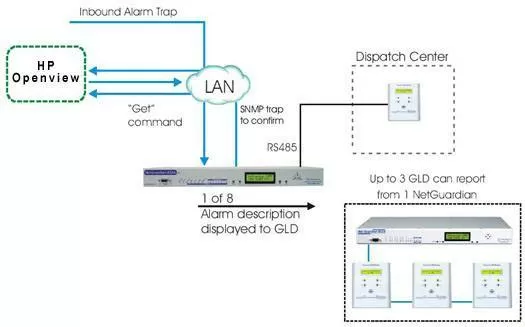
To demonstrate how to use HP OpenView for activating alarms, we will need a NetGuardian G4 a General LCD Display (GLD) and of course the HP OpenView software. The setup of the system should be configured similarly to this. The GLD should be connected to the NetGuardian G4 through a RS485 connector, and the NetGuardian G4 and HP OpenView must have LAN access to one another. This setup will allow HP OpenView and the NetGuardian to send and receive information from each other through a LAN connection. The GLD will be used for sounding an audio alarm and displaying any custom messages that has been set for it to display.
Once the setup is completed, it should be a breeze for activating alarms with HP OpenView. Here's how it's going to work. An inbound alarm trap is sent to HP OpenView and from there HP OpenView will issue a "get" command to the NetGuardian's eight relays. Once the NetGuardian has received the command, it will then send a SNMP alarm trap to HP OpenView confirming the received command. From there, the NetGuardian can then use the GLD to sound a singular audible alarm as well as display a custom message.
The NetGuardian 832A G4 is a versatile piece of equipment that was designed to be a reliable and complete remote site monitoring solution. It is easily configured and monitored from a standard Web Browser and also comes with a free Windows-based utillity for off-site editing and remote provisioning through LAN. Alarms can be reported through a number of protocols such as SNMPv1, SNMPv2c, SNMPv3, or DCPX aswell as the option of reporting via DNP3. In the case of a primary communication path failure an alternate dial-up reporting path is available.
Security is a big topic in current events, and security is what the NetGuardian 832A G4 has. The NetGuardian 832A G4 has dual ethernet support for secure network access and while both Network Interface Controller (NIC) can have access to the NetGuardian; the NICs does not have access to each other. That means that a connection on one ethernet can not detect a connection on the other ethernet and vice versa.
Customization and expandability is something that DPS Telecom prides itself in. So you can expect the NetGuardian 832 G4 to have many options available for it. The base model starts off as the NetGuardian-C5 which has 16 discrete alarms, 16 ping alarms, 8 analog alarms, 2 controls, and 4 serial ports. From there, expanding on the feature-set is extremely flexible in that you can decide the capacity that will work best for you.
The GLD can be driven via the RS485 connectors on the NetGuardian G4. The GLD allows you to monitor an existing network from different locations by providing remote visibility of the system's statuses. This convenient method of monitoring gives the user the ability to monitor the network without being physically present at the system site. With detailed alarm indication messages, the GLD gives peace of mind to network managers who aren't able to constantly observe the system from the network's location.
The GLD can easily "daisy-chain" from unit to unit. This means that up to 3 GLDs can be connected to a single host, with a maximum range of 1,500 feet between the host and the last GLD unit (the 1,500 foot maximum applies to a single GLD as well). The GLD is also easy to install, with connectors for all ports and mounting screws for easy attachment to any flat vertical surface.
Along with the convenience of remote visual monitoring, the unit is equipped with a speaker for one audible notification. The unit will sound when certain conditions occur, keeping the network manager informed of the system system's status even when the unit is not being watched. Additionally, the Link LED on the face of the GLD indicates communication with the host. A red flash indicates receive activity while a green flash shows transmit activity.


