
Download our free SNMP White Paper. Featuring SNMP Expert Marshall DenHartog.
This guidebook has been created to give you the information you need to successfully implement SNMP-based alarm monitoring in your network.
1-800-693-0351
Have a specific question? Ask our team of expert engineers and get a specific answer!
Sign up for the next DPS Factory Training!

Whether you're new to our equipment or you've used it for years, DPS factory training is the best way to get more from your monitoring.
Reserve Your Seat Today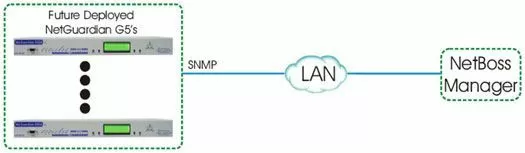
Equipment Used:
How This Application Works:
This example demonstrates the NetGuardian G5 RTU monitoring alarms at your sites. It will be able to report alarms as SNMP traps via LAN to your NetBoss Manager.
Alarms may be terminated using 66 blocks and cables if desired.
The NetGuardian G5 includes all of the necessary components for most monitoring projects. It is rack-mountable (19" or 23"), has dual -48VDC power inputs, comes with internal temperature and battery monitoring, and can send alarm messages as SNMP traps over IP to your SNMP Manager (Harris NetBoss in this example).
The NetGuardian 832A is an IP-based workhorse RTU that can serve as the foundation of your remote site's monitoring.
More on the NetGuardian 832A G5
The NetGuardian 832A G5 alarm remote provides 32 discrete alarm inputs, 8 analog inputs, 8 control relays, 8 RS232 terminal server ports, 1 RS485 BAS port, an audible alert speaker, and an informative local LCD display, all in a 1 rack unit of space.
The G5 model has a faster processor than any previous generation. This will provide you with more horsepower for future software releases that will enhance security and add new serial port functionality. It also provides faster web browser interaction, increased terminal server throughput, and secure SNMPv3 encryption. The G5 also has extra RAM and flash memory available for future software applications.
The discrete inputs of the NetGuardian 832A G5 monitor items such as door alarms, equipment alarms and other ON/OFF events. The discrete alarms are "software reversible" to support both N/O and N/C alarm wiring.
The analog alarms are used for measuring such critical events as temperature and voltage (+/- 92VDC). Each of the alarms can be assigned qualification times so that transient and nuisance alarms can be filtered out.
The control relays are a convenient and time efficient way of remotely switching equipment in the field. With the G5, you can adjust these NO/NC Form-C relays, as well as the voltage/current settings for your analog inputs without having to unscrew and remove the top panel of the chassis. All of these settings can be adjusted through access panels on the top of the unit.
All of this I/O can be controlled via your SNMP manager.


