
Download our free Monitoring Fundamentals Tutorial.
An introduction to Monitoring Fundamentals strictly from the perspective of telecom network alarm management.
1-800-693-0351
Have a specific question? Ask our team of expert engineers and get a specific answer!
Sign up for the next DPS Factory Training!

Whether you're new to our equipment or you've used it for years, DPS factory training is the best way to get more from your monitoring.
Reserve Your Seat Today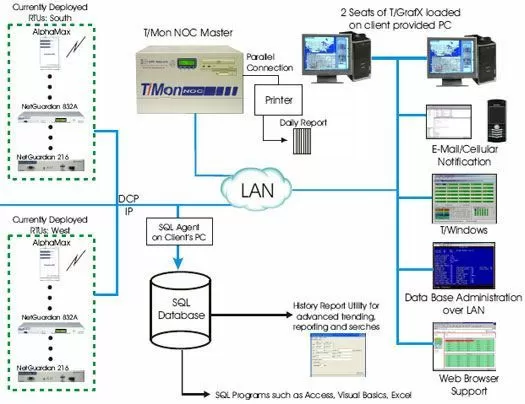
This application features T/Mon NOC. With the power of the T/Mon NOC, you will excel with DPS Telecom's most advanced features found in a central master station. It comes standard with the ability to receive alarms from the existing DPS alarm remotes such as the NetGuardian and AlphaMaxes without purchasing additional software.
It gets better - with the power of the DPS master station your entire network of LAN-based DPS RTUs will now benefit from IP-based reporting, and those that support alternative path reporting will have that additional coverage. Ultimately, on a per alarm point basis, SNMP based alarms will be forwarded to an SNMP manager.
You will immediately begin to receive the benefits of having a central aggregation point for all your local alarm notification needs. However, understanding the requirements that the FAA has placed on companies such as yours, we have created several features.
As you and your team are aware, daily log books must be kept on-site in case of an FAA inspection. With the T/Mon NOC and a local parallel printer (included in this proposal), you can have a single daily report printed out at a specific time every 24 hours. As you can imagine, this avoids wasted time in 'running reports' or even forgetting to make such reports.
We've added the T/Mon History Agent and the Alarm Data Streaming Software Module, which will be necessary to get the history off of the T/Mon NOC to the SQL server. You will then be able to create queries to run reports from the SQL server. The T/Mon History Report Utility has also been included to allow you to run existing reports from the SQL server.


