
Check out our White Paper Series!
A complete library of helpful advice and survival guides for every aspect of system monitoring and control.
1-800-693-0351
Have a specific question? Ask our team of expert engineers and get a specific answer!
Sign up for the next DPS Factory Training!

Whether you're new to our equipment or you've used it for years, DPS factory training is the best way to get more from your monitoring.
Reserve Your Seat Today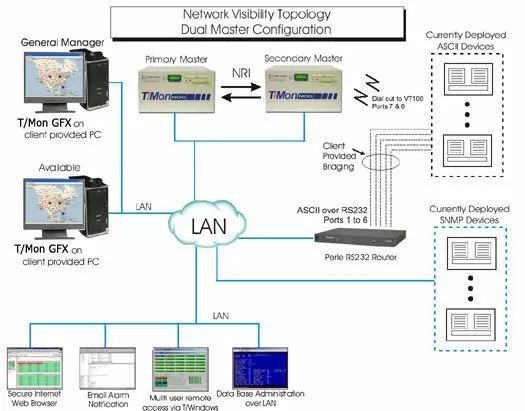
This application features a centralized T/Mon NOC master station. T/Mon is configured with both an ASCII Parsing Module and SNMP Software Module that allow for both protocols' alarm messages to be received by it - and notifying your technicians immediately. You won't pay any additional fees for adding new SNMP or ASCII devices (switches). This software allows you to add both kinds of devices on your own.
Redundant backup monitoring with the T/Mon NOC provides the disaster-recovery capability. When two T/Mon NOC units are deployed in your network, one can be assigned to be a secondary backup. The T/MON NRI software module keeps both masters in sync, so the backup is always up-to-date. If the primary T/Mon on site goes down, the backup master almost instantly takes over. The backup master handles monitoring until primary comes back online, then sends the primary an update. Virtually no time, visibility, or databasing capabilities have to be sacrificed!
Your technicians can log from virtually anywhere, provided that they have an Internet connection and proper authorization. There is unlimited number of how many installations you may have of the T/Windows remote viewing software. (17 users may access the system simultaneously.) The T/Mon NOC has several alarm features that provides advantages against home-brewed SNMP Managers; like alarm escalation and the use of nuisance alarms. Authorized technicians may also set up alarm filtering to reduce the amount of nuisance alarms. This is a handy option for technicians who may be working on equipment that is being is monitoring and avoid repeat false alarms that may block out real alarms. Overall alarm viewing is done with T/Mon GFX. It is a virtual graphical interface of your entire network and is strongly recommend for use by your senior management team. It provides a "war-room" type map interface that can be drilled down to view current alarms in real time.


