
Download our free SNMP White Paper. Featuring SNMP Expert Marshall DenHartog.
This guidebook has been created to give you the information you need to successfully implement SNMP-based alarm monitoring in your network.
1-800-693-0351
Have a specific question? Ask our team of expert engineers and get a specific answer!
Sign up for the next DPS Factory Training!

Whether you're new to our equipment or you've used it for years, DPS factory training is the best way to get more from your monitoring.
Reserve Your Seat Today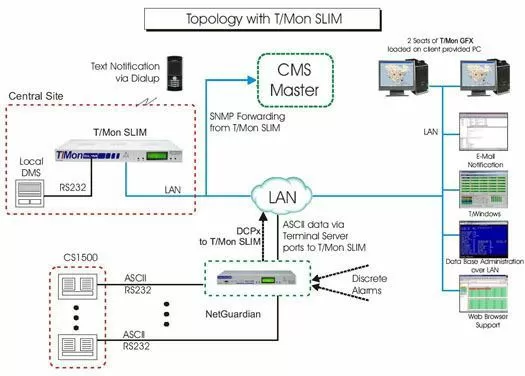
To acheive reliable CMS management, you need ASCII to SNMP mediation between your alarm master and your CMS SNMP Manager. This application features the T/Mon SLIM, which, with the necessary software modules, will receive the ASCII alarms via your NetGuardian remotes and forward them to the CMS. The T/Mon SLIM platform was created for this type of application. In addition to being a network element manager, the T/Mon SLIM can be used as a master station to manage all elements underneath it, should the connectivity to the CMS be compromised or have catastrophic failure.
To send out SNMP traps to your CMS Master Station, we strongly suggest that you use the DCPx protocol for the SLIM and NetGuardian as this is their native protocol. There is no extra cost associated with this, it is just a matter of changing the NetGuardian's provisioning.
The key to successful CMS management here is protocol mediation. The SNMP Agent Software module will give the T/Mon Master Station the ability to convert incoming TL1 alarms to SNMP and ultimately send the alarms via SNMP to your CMS SNMP Manager. This software module supports traps as well as query and control commands.
The T/Mon Master Station can be preloaded with the ASCII software module that will parse the ASCII from your DMS equipment. The Auto-databasing ASCII software will allow you to create rules to parse the ASCII output and capture the key data, then present the alarm to perform paging and email notification. This software greatly enhances the overall functionality of the T/Mon Master Station by providing a single consolidated alarm management system.
The T/Mon GFX Software Module is a graphic-based application that is great for T/Mon applications where intuitive graphical feedback is required. T/Mon GFX provides a graphic display of alarm network status using maps, floor plans and other graphic representations to give operators a system visibility. T/Mon GFX can work using a centralized database across the LAN where multiple users can access the same information. Multiple T/Mon GFX displays can be supported by T/Mon software. T/Mon GFX will run on a windows based PC connected to the T/Mon SLIM via LAN and consists of a series of maps that allow users to have a birds eye view of their network. Users can then drill down on specific icons representing layers of your network. Layers could include a national, regional, local view and even a rack presentation of your equipment. It's very intuitive for the users and makes for a very impressive war room type display. Mapping software is included that reflect your local area but you may also use any graphic that can be saved as a .bmp extension.


