
Check out our White Paper Series!
A complete library of helpful advice and survival guides for every aspect of system monitoring and control.
1-800-693-0351
Have a specific question? Ask our team of expert engineers and get a specific answer!
Sign up for the next DPS Factory Training!

Whether you're new to our equipment or you've used it for years, DPS factory training is the best way to get more from your monitoring.
Reserve Your Seat Today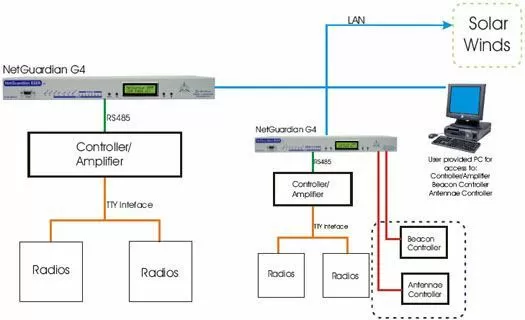
This solution features eight (8) NetGuardian 832A G4's. We've included an additional for sparing purposes. We've also included several sensor options as well as alarm termination options to the NetGuardian 832A.
You can request a full technical overview that will list and explain the capabilities and features of each piece of equipment in this proposal.
The NetGuardian 832A will be the perfect solution to monitoring your remote locations and reporting those alarms via SNMP over ethernet to your SolarWinds SNMP Manager.
The NetGuardian G4 also comes equipped with a built in 33.6 modem. The built in 33.6 modem is a great way to get dial up access to this equipment should your primary transport fail and supports full PPP functionality. If your LAN connection is ever disrupted, the NetGuardian G4 will be able to dial into your ISP and re-establish the LAN connection. This function will prove usefulness time after time to your unmanned remote sites.
The NetGuardian offers a Web Browser interface for easy and convenient centralized alarm management and unit configuration via Web Browser that can run on any platform or operation system. This means if you get notified of an alarm away form your normal workstation you can go to the nearest computer (with internet access) and log onto the NetGuardian.
The user friendly interface allows complete access to all the functions of the unit and enables the user to quickly set up alarm point descriptions, view alarm status, issue controls, and configure paging information, as well as additional options.


