
Download our free Monitoring Fundamentals Tutorial.
An introduction to Monitoring Fundamentals strictly from the perspective of telecom network alarm management.
1-800-693-0351
Have a specific question? Ask our team of expert engineers and get a specific answer!
Sign up for the next DPS Factory Training!

Whether you're new to our equipment or you've used it for years, DPS factory training is the best way to get more from your monitoring.
Reserve Your Seat Today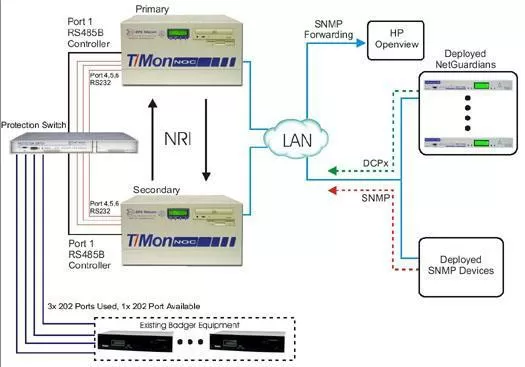
Adding a hot stand stand-by T/Mon Master Station will provide fault tolerance should your primary system failure. As with any mission critical component of your network, you have become to depend on T/Mon more and more for daily operations, the more impact its loss would be in the case of a failure. Rather than being down for a day or longer waiting for an emergency repair, this redundant NOC will automatically activate within a few minutes of a failure. As you will see in the technical overview, you will also additional uptime as your databasing can now be done on the secondary system.
When deployed in a HOT Standby Configuration, both the Primary and Secondary T/Mon NOC will require the NRI Software Module. This will allow alarm synchronization (COS, standing, Trouble logs, acknowledgment, history) via LAN between the masters. Since you are currently receiving alarm information over 202 Serial Connection from your Badger Devices we have included a Protection Switch. In the future if you wish to add PBX monitoring you will need to add an additional software module. Please reference the Port allocation for the new port assignments that will need to take place in both your Primary and Secondary Master. Also, any new deployed NetGuardians will need to configure it it's alternative Path Reporting for both the Primary and Secondary T/Mon NOC.
In order for the Dual Master Configuration to work with your existing Badger 202 Polling Legs you will need to add a Protection Switch to your Network. This will cause a Port Configuration change (please see Port Allocation Sheet for changes). The existing three (Port 4, 5, 6) 202 Serial Connections will now go into the DPS Protection Switch. From the Protection Switch, 3 RS232 Cables will connect to the Primary T/Mon NOC and 3 RS232 Cables will connect to the Secondary T/Mon NOC. A RS485B Protection Switch Controller will be added to Port 1 of both T/Mon NOC Masters.
The SNMP Agent Software module will give the T/Mon Master Station the ability to convert incoming alarms to SNMP and ultimately send the alarms via SNMP to your HP Openview. This software module supports traps as well as query and control commands.


