Download our free SNMP White Paper. Featuring SNMP Expert Marshall DenHartog.
This guidebook has been created to give you the information you need to successfully implement SNMP-based alarm monitoring in your network.
1-800-693-0351
Have a specific question? Ask our team of expert engineers and get a specific answer!
Sign up for the next DPS Factory Training!

Whether you're new to our equipment or you've used it for years, DPS factory training is the best way to get more from your monitoring.
Reserve Your Seat TodayDid you think carefully when you picked your SNMP manager, or did you just pick the first one you found? Maybe you "inherited" a manager when you changed jobs. Whatever the reason, you're probably not positioned as well as you should be when it comes to SNMP.
with your SNMP manager working constantly to help you.
This list of 13 Key SNMP Manager Functions teaches you how to :
, then
Call the DPS SNMP Manager Experts today at 1-800-693-0351.
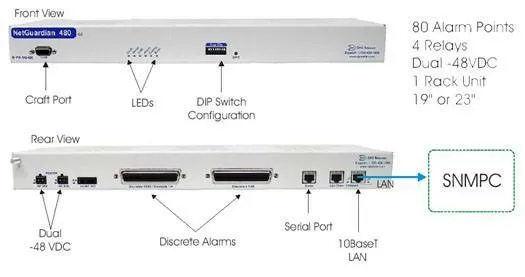
This application provides a convenient way of alarm notification to your current SNMPc Manager. The NetGuardian 480 (NG480) is a specialized member of the NetGuardian family, optimized for use as a high-capacity discrete-only responder. The result is a highly costeffective solution for gathering the diverse equipment at your remote site and integrating it into a single modern network management system. With 80 discrete alarm inputs - two and a half times as many as the NetGuardian 832A - you can easily forward all the alarms of a small to medium-sized site to your SNMPc Manager. This dense alarm coverage gives you the convenience of a single-box solution, saves you the cost of buying multiple low-capacity RTUs, and offers you the lowest possible cost per point. Take advantage of the NetGuardian 480's ease of use.
Configuring SNMP traps to report to your SNMPC Manager's IP addresses is simple and quick using the included Windows-based T/NG480 utility. T/NG480 also provides a single, uniform interface for all of the NG 480's functions. Field technicians can provision alarms, view the status of alarm points, turn control relays on and off, analyze communication traffic between the NG 480 and its alarm collection master, and load firmware upgrades by merely plugging a PC into the craft port on the NG 480's front panel. Once the site has been turned up, the network administrator can use T/NG480 over LAN to monitor alarms or change the configuration of the unit.
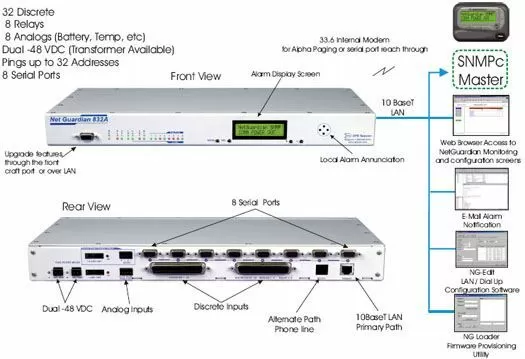
This solution features NetGuardian 832A's along with 19" Wire Wrap Back Panels. The NetGuardian will be the perfect solution to monitoring your discrete and analog alarms and sending those alarms via SNMP over IP to your SNMPc Manager.
The Hinged Wire Wrap Back Plane will attach behind the NetGuardian832A to facilitate alarm termination. The back panel hinges open for easy access to the data (serial) ports, LAN, phone and power connections of the NetGuardian. The back plane consists of two wire-wrap fields that allow convenient termination access to the discrete alarms and controls. The analog inputs have a special header that plugs directly into the NetGuardian 832A's analog inputs. This is ideal for uses where rack space is a premium. The Hinged Wire Wrap Back Plane will mount to the rear side of a relay rack.
The 1 RU NetGuardian 832A alarm remote supports 32 discrete alarms, 8 analog inputs, 8 control relays, 7 serial ports, 1 RS485 port and an informative local LCD display all in a 1 rack unit of space.
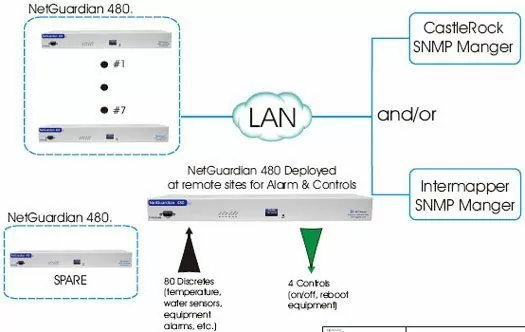
This solution contains eight (8) NetGuardian 480s, eight (8) 110V (wall) to -48V Converters, and seven (7) Discrete TempAlert Sensors.
The NetGuardians can be monitored with your deployed SNMP Manager, including Intermapper or Castle Rock.
With 80 discrete alarm inputs - two and a half times as many as the NetGuardian 832A - you can easily forward all the alarms of a small to medium-sized site to your CastleRock and/or InterMapper SNMP manager(s). This dense alarm coverage gives you the convenience of a single-box solution, saves you the cost of buying multiple low-capacity RTUs, and offers you the lowest possible cost per point. You can take advantage of the NetGuardian 480 ease of use. Configuring SNMP traps to report to both SNMP manager IP addresses is simple and quick using the included Windows-based T/NG480 utility. T/NG480 also provides a single, uniform interface for all of the NG 480's functions.
The TempAlert Sensor is a discrete temperature sensor with high and low alarms thresholds. This unit has separate alarms for high and low temperatures. Temperature range from 30 to 100 degrees Fahrenheit (-1.1 to 37.8 degree Celsius). It requires no power to operate. Wall mount rectangular box designed. The unit includes screw kit for mounting hardware.
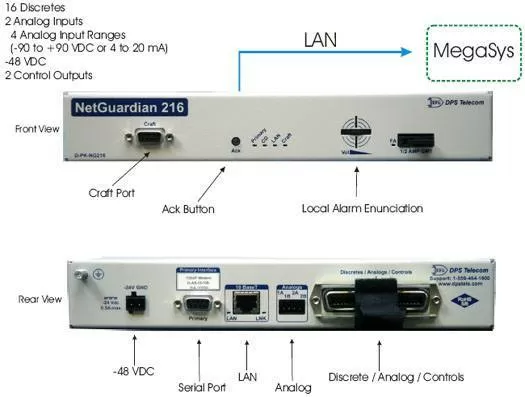
Recognizing your need to monitor your smaller sites and have those critical alarms report to your MegaSys SNMP Manager, we have provided a solution for a single NetGuardian 216.
The advantage of the NetGuardian 216 is that it features 2 Analog type of alarms that can be used for Battery Plant Monitoring and/or Temperature. In addition, it features a RS232 Serial Reach Through Port and will be able to act as a mini-terminal server.
We believe that the NetGuardian 216 will be the perfect match for your monitoring needs.
The -48 VDC NetGuardian 216 offers an easy, cost-effective way to monitor your small sites. The NetGuardian 216 comes equipped with 16 discrete alarm inputs, 2 analog alarm inputs, and 2 control relay outputs. The discrete alarms are items such as door alarms, equipment alarms and other ON/OFF events. The discrete alarms are "software reversible" to support both N/O and N/C alarm wiring. The NetGuardian 216's 2 analog inputs can be used for measuring such critical events as temperature, voltage and battery. We also have a line of sensors, which can be used with the NetGuardian 216 and can be included upon your request.
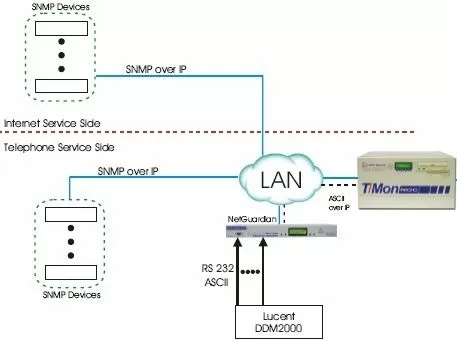
The T/Mon Master Station will provide the central aggregation point for both your telecom and IT Networks. It can provide specific alarm viewing and reporting to technicians on either side of the network.
T/Mon will monitor SNMP devices over LAN. It will also monitor your Lucent DDM2000. Monitoring for the DDM2000 begins across RS232 serial to a NetGuardian remote at the site. Data is then forwarded as ASCII text across your LAN to T/Mon for alarm processing.
The Auto data-basing ASCII software will allow you to create rules to parse the ASCII output and capture the key data, then present the alarm then perform paging and email notification. This software greatly enhances the overall functionality of the T/MON NOC system and provides you with a single, consolidated alarm management system.
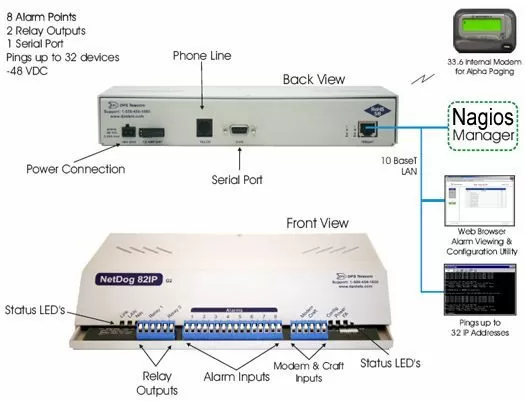
This application features three (3) NetDog 82IP's to monitor your alarm points, one for each site. The NetDog 82IP comes equipped with a built-in web browser, which will allow you to database the unit without a Windows-based software utility. It can also report alarms via SNMP over LAN to your Nagios SNMP master station The new NetDog 82IP (G2) has a capacity of 8 discrete inputs, and 2 control relays. The NetDog 82IP's 8 discrete alarm inputs can accept any contact closure type of event, such as door switches, fuse alarms, major and minor equipment alarms, high temperature alarms and tower light monitors.
The 2 control relay outputs can be used for a number of functions including operating standby equipment, door locks or emergency lighting. The NetDog 82IP's built in 33.6 modem will not only dial to a pager directly to report a fault or alarm, but once alerted, the staff can dial into the NetDog 82IP using the telnet session and control up to 2 different pieces of equipment i.e. back up generator, turning lights on etc.
The NetDog 82IP is easy to install, with connectors for all ports and captive screw-lug terminals for alarm and control wiring. The unit mounts on any vertical flat surface, or it can be desktop mounted. If needed, we also carry mounting panels for equipment rack mounting.
Alarms are reported to your Nagios SNMP manager for collection and presentation to your operators.
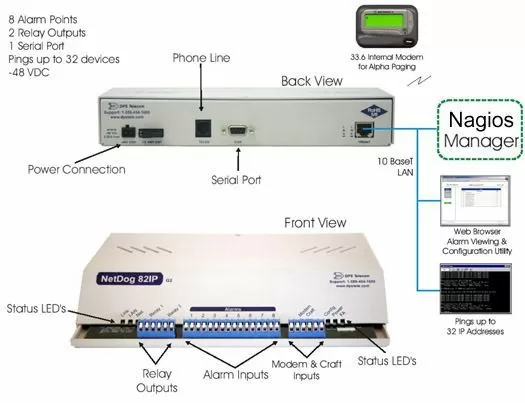
The NetDog 82IP G2 can report alarms via SNMP over LAN to your Nagios master station. The NetDog 82IP can also ping up to 32 network elements which will notify you if critical network elements are not reachable. If an element fails to respond to successive pings, or if something is amiss with the environmental controls, the NetDog 82IP notifies personnel using a variety of methods with a complete status message, including sending an SNMP trap over IP to your Nagios Manager and/or a text message to your pager.
The new NetDog 82IP (G2) has a capacity of 8 discrete inputs, and 2 control relays. The NetDog 82IP's 8 discrete alarm inputs can accept any contact closure type of event, such as door switches, fuse alarms, major and minor equipment alarms, high temperature alarms and tower light monitors.
The 2 control relay outputs can be used for a number of functions including operating standby equipment, door locks or emergency lighting. The NetDog 82IP's built in 33.6 modem will not only dial to a pager directly to report a fault or alarm, but once alerted, the staff can dial into the NetDog 82IP using the telnet session and control up to 2 different pieces of equipment i.e. back up generator, turning lights on etc.
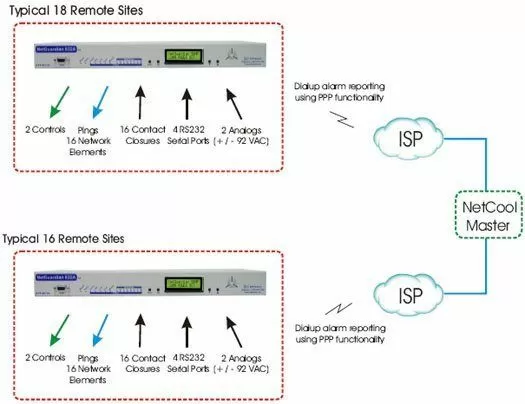
You need a monitoring solution that will be able to dial out to your NetCool master station. That's why the NetGuardian G4-C, a scaled-down version of the NetGuardian 832A G4, is the economical choice for your remote sites.
These NetGuardian G4-C's will differ from full NetGuardian G2's. Please note that the full-featured versions of the NetGuardian G2 comes with a onboard 12V sensor power supply, the NetGuardian G4-C's will not.
The NetGuardian G4-C will come equipped with 16 discretes, 2 analogs with 2 controls. This configuration will give you enough alarm points to monitor HVAC (high & low), rectifier, AC, generator, BAS systems, etc.
Its built-in modem will be able to dial out to NetCool using PPP functionality. The PPP functionality will be an on-demand method. When an alarm occurs, PPP will establish internet connection and the SNMP trap is sent. The NetGuardian G4-C will then terminate the connection after completely sending the SNMP trap.
For more information on this application, call us at 1-800-693-0351 to schedule an online Web Presentation. By simply visiting our website and calling our bridge number we can provide a PowerPoint presentation on the NetGuardian G4-C for you and your entire team. This is a quick and efficient use of your time and provides the quickest way of getting everyone 'up-to-speed'.
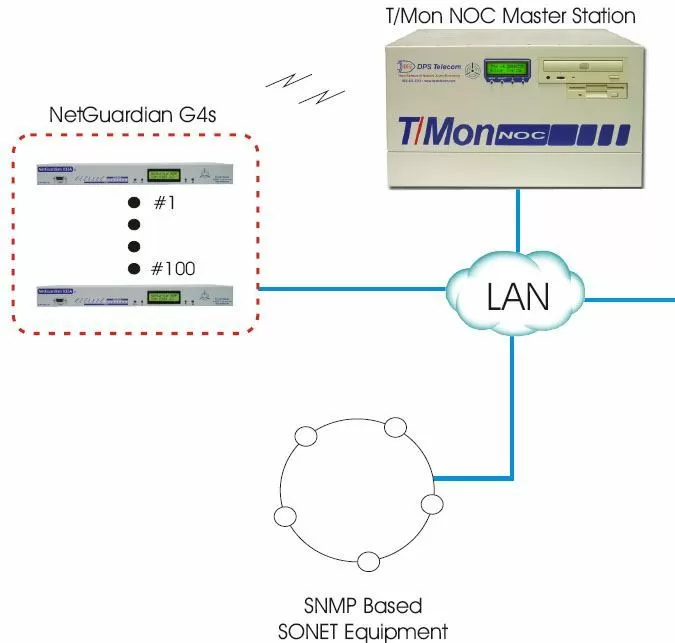
We are pleased to present a monitoring solution that will provide you with a means of monitoring NetGuardians and other SNMP-based SONET equipment. As you will see in this application drawing, this solution addresses your vital concerns, including providing redundancy, eliminating multiple obsolete platforms, and increasing your monitoring reliability.
The SNMP Trap Processor Software Module will give your T/Mon Master Station the ability to receive SNMP traps from network elements and convert them to standardized T/Mon alarms so you will be able to view them. This will result in a very powerful SNMP manager because not only will your T/Mon be able to accept DCPx from DPS remotes, you will be able to monitor your other SNMP devices as well. This software module will support V1 as well as V2 devices and is very simple to use. Simply compile the MIB onto the T/Mon Master Station, select the rules for how you want to see those alarms and you've integrated those into the system.
We would also like to invite you to visit DPS Telecom for factory training. The factory-training course is tightly focused on your specific, real-world monitoring tasks. We've added more material on the applications you most want to know about - like ASCII alarm processing [SNMP protocol], creating a curriculum built around the product features, monitoring technologies and network management techniques that you use the most.
All DPS Telecom products include comprehensive technical support. If you've purchased one of our products and are encountering any kind of issue, contact DPS Tech Support today at 559-454-1600.
At DPS Telecom, the representative who answers your call isn't an intern reading from a script. DPS Tech Support representatives are engineers who contribute to product development. And, if your problem requires additional expertise, the DPS Engineering Department that designed your product is right down the hall.
Help us connect you to the right engineer by filling out this quick questionnaire. Simply leave your contact information to get started, and we'll call you back. Most preliminary discussions are about 15 minutes, and afterward, we'll send you a custom application diagram of a recommended solution that'll make it easier to justify your project to management.