
Download our free Monitoring Fundamentals Tutorial.
An introduction to Monitoring Fundamentals strictly from the perspective of telecom network alarm management.
1-800-693-0351
Have a specific question? Ask our team of expert engineers and get a specific answer!
Sign up for the next DPS Factory Training!

Whether you're new to our equipment or you've used it for years, DPS factory training is the best way to get more from your monitoring.
Reserve Your Seat TodayCould you estimate how much money your company has invested in your IT server room or data center? How much is your network uptime worth to you? These questions might be difficult to answer, but monitoring your valuable IT equipment certainly doesn't have to be.
Your equipment is essential to the well-being of your business, but it is not indestructible. One hike in temperature or humidity could cause catastrophic network down time, or worse, permanent damage to your mission-critical gear. It is essential that you have a temperature monitoring system to monitor server room environmentals.
Some of the components in your most vital equipment are not rated to operate outside of a specific temperature range. If the temperature gets too high, or in extreme cases too low, the components of your equipment can seize up and fry. Not only does your network go down, but your equipment is permanently damaged.
You need to monitor the temperature, but you need to monitor humidity too. Humidity can cause significant damage to your equipment as well. It is well known that moisture and electronics don't mix well. When the humidity in your server room gets above a certain point, it can cause a short in your equipment. In the best case scenario, you have to wait for your equipment to dry out.
Unfortunately, most of the time you aren't so lucky and the damage is irreversible. You can't afford to lose angry customers or replace large amounts of equipment every time there is a temperature or humidity spike. To guard your equipment against damage, you need a reliable monitoring system, designed specifically for your server room needs.
Imagine a system that doesn't require a large amount of space. One that is easy to use and easy to operate. You need a system that is compatible with your other equipment, especially SNMP.
You'll want to be able to receive detailed alarm notifications in real-time when something goes wrong. You need a compact, simple, and reliable device to monitor basic environmental conditions (like room temp, humidity, smoke...) around your valuable equipment.
Without this basic visibility, it's just a matter of time before your investment in your server room is seriously damaged. As an additional layer of protection, the ideal system should have a certain level of automation capability. When the temperature reaches a certain point, it should be intelligent enough to turn on the cooling system. It's one thing to alert you of a problem, but isn't it better if it can start solving the problem for you?
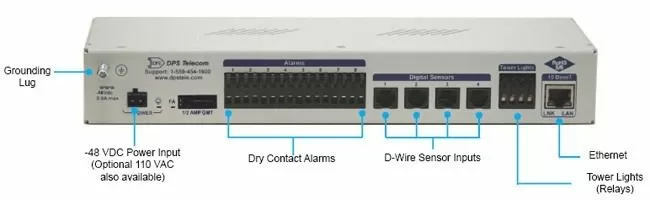
This small device keeps tabs on all the environmental levels that affect your servers, phone closets, data centers, and other equipment locations. The 8 discrete alarms on the back panel are used to monitor dry contacts, such as motion sensors, UPS, smoke detectors, flood sensors, AC and room entry. With 4 digital sensor inputs on the back panel, you'll stay protected from environmental threats by keeping tabs on temperature, humidity, power and more.
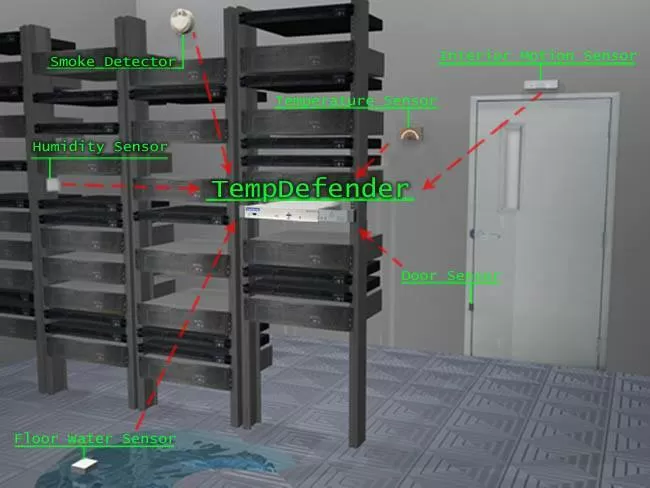
With the built-in web interface, you'll log on to the TempDefender IT from anywhere on the network to edit your threshold settings and view the current status of the room. What's the current room temperature? When was the last time someone entered the room? Get all of this information - right from your network PC.
Don't wait until the day your AC unit fails and your server closet overheats to start protecting your gear. This small, 1RU device alerts you of changing conditions 24 hours a day, 7 days a week, either to your cell or SNMP manager. The TempDefender IT is the cost-effective way to stay proactive in your monitoring.

Because you have servers, you probably have websites you're responsible for maintaining. You need to know immediately when those sites go down.
Pinging your servers regularly will not detect every website failure. How many times has your site been down, yet your server is still responding to low-level pings?
What you need is a tool that makes actual HTTP page requests and scans the page it receives. If it doesn't see the correct content that you've specified, or it sees an error message, you should get an alert - regardless of whether your web server is technically still "online." That's the tool you need, so that's exactly the tool that we've built into the TempDefender.
TempDefender's 4 digital sensor inputs (these are a build option, commonly known as "1-wire" ports) support simple 4-conductor cables terminated with easy RJ12 connectors. Multiple sensors can be daisy-chained into a single input port, so you can easily place sensors at locations that may be some distance away from the TempDefender itself.
1-wire sensors are also automatically detected and databased by the TempDefender. You can use the built-in web interface to enhance and customize the databasing that was done automatically, but the basic things are handled for you.
The TempDefender allows you to protect your most vital server room gear and gives you peace of mind. It's a complete server room monitoring solution. With both the TempDefender and sensors, you can have complete, 24/7 visibility of your remote sites.
You can not afford to leave your mission-critical equipment unmonitored and vulnerable. Keep your boss, your customers and your techs happy and your equipment functioning properly by purchasing a reliable monitoring solution for your server room.
Strategies for Monitoring Your Data Center


