Download our free PDU Tutorial.
An introduction to Remote Power Switches that will help increase productivity while minimizing costs.
1-800-693-0351
Have a specific question? Ask our team of expert engineers and get a specific answer!
Sign up for the next DPS Factory Training!

Whether you're new to our equipment or you've used it for years, DPS factory training is the best way to get more from your monitoring.
Reserve Your Seat TodayIf you've ever had to jump in your truck and drive hours to a site to reboot jammed equipment, you know how expensive and frustrating it is. You can't afford to waste time or money on truck rolls, but you can't just ignore the problem, either.
What you need is a remotely accessible device that can toggle power to your site equipment without requiring a truck roll. Truck rolls eat up technician staff time but also mean that it takes much longer for problems to be fixed. With a device that allows remote power control, you'll power on/off and reboot all your critical devices - right from your desk.
That's exactly why the new Remote Power Switch AB6 was designed. It combines the functionality of a traditional fuse alarm distribution panel with a PDU (Power Distribution Unit) that can toggle power outputs to cycle your equipment. At just 1RU in size, it's also a physical-size match for most common fuse panels.


The AB6 is divided into two halves for convenient use with redundantly powered gear. 6 power relays on each half make a total of 12 power outputs. Each of the 12 relays supports up to 10 amps of current draw (40-amp max. per 6-output side). The power relays are physical, rather than solid-state. This avoids certain "power-on surge" issues that can blow solid-state relays, and it also minimizes the risk of a relay becoming "stuck on."
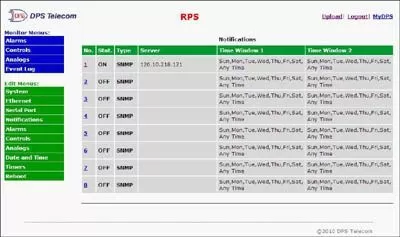
To remotely access the AB6, you can use either the built-in web interface or your SNMP manager. Each of the 12 power relays may be turned on, turned off, or reset via SNMP SET commands. You may choose to receive SNMP trap notifications (v1, v2c, or v3) when one of the power relays is toggled on or off, a fuse is blown, or one of the inputs loses power.
The web interface is convenient when you're away from your NOC center or when you need to manage just a handful of sites. To maintain your security, the web interface supports HTTPS (via SSL encryption), allowing you to browse securely. Up to ten usernames & passwords may be created, with the ability to define varying access levels.
To learn how the Remote Power Switch AB6 will work in your network, call DPS today at 1-800-693-0351 or send email to sales@dpstele.com